# About TagSpaces
> Organize your digital life—privately. Files, tags, notes, tasks, maps and kanban boards, all in one place.
This file contains all documentation content in a single document following the llmstxt.org standard.
## TagSpaces as Evernote alternative
TagSpaces is an application for managing and organizing of files. In this article I will explain how TagSpaces can be used for achieving some typical Evernote use cases such as:
- Saving web pages and other digital artifacts
- Creating and editing notes
- Organizing documents with tags in collections
- Distributing the collected artifacts across different devices such as smart phones and tablets
Evernote is a cloud based service for collecting and organizing of digital artifacts such as web clips, pictures and documents. I was using this service for years, because it is very handy and has a sleek user interface (except the previous Windows client, which was built on .NET/WPF). Despite all the cool features, I was still concerned about the fact the Evernote stores all the data I have collected over the years on servers somewhere in the cloud. This fact motivated me to search for an Evernote alternative in which I will have the complete control for my data. So I came to the development of TagSpaces, that can be used - together with Firefox and some other browser extensions - for accomplishing most of the tasks for which I have previously used Evernote. Saving of web pages sounds as a trivial task, but it has some tricks. For example, if you try to save a web page with all the images in it in Firefox, it will create a HTML file and a separate folder containing all the included images, CSS and other files. This functionality has one major drawback - the main HTML file can be easily separated from the folder with images. So now I was searching for a file format saving all the web page content in one single file, and I came to MHT aka. MHTML. This format is based on this RFC specification. The good news was that many internet browsers are supporting this format either OOTB (out of the box) or with the help of third-party extensions. Some popular rich mail clients such as Mozilla Thunderbird and Microsoft Outlook are also supporting MHT without external help. This makes managing of important emails outside of the client’s email address very easy. An overview of the applications supporting MHT file format follows in the table below:
Application
opening MHT files
MHTML saving
Firefox
Mozilla Archive Format add-on
Mozilla Archive Format add-on
Internet Explorer
OOTB
OOTB
Chrome
OOTB
Enable save as MHTML
Opera
OOTB
OOTB
Thunderbird
not relevant
OOTB (Files have the EML extensions)
Outlook
not relevant
OOTB
As you can see, the variety of applications supporting MHT export makes the collecting of data from many input channels very easy.Currently for saving things from the web I am using the following directory structure on my local drive. As you see the files are organized in a flat folder hierarchy, I create for every month a new folder with this naming pattern YYYYMM e.g. 201211 for November 2012. The "month" folders are then placed in the "year" folders (pattern YYYY).
But every other folder structure is possible, of course. The only limitation is the length of the filename, which on some file systems includes the path to the folder where the file is located. So keep in mind that a very deep folder structure could lead to some technical limitations. The following screenshot shows how the same folder structure looks in TagSpaces. In the middle section you see a table, where every row represents a file. The green rectangles represent tags. The tags are persisted in the name of every file in brackets. This simple solution make the tags tool independent, portable and long living, since no database and/or tool is involved in the process. In the right area you can see a preview of the currently selected MHT file. Of course, TagSpaces can open not only MHT files, but also PDFs, JPGs, PNGs, etc. In fact almost every file type, which can be viewed in the browser, is possible. A growing list of the supported files for viewing and editing in TagSpaces can be found [here](https://docs.tagspaces.org/supported-file-formats/).
This folder structure can easily be distributed with the help of e.g. ownCloud, across multiple devices such as tablets, TVs or smart phones. For this kind of devices a version of TagSpaces is in development, so stay tuned!
---
## Saving webpages as mhtml(mht) in Chrome
TagSpaces is a great tool for MHTML file organization on many platforms, because it features an integrated MHTML viewer, but the question here is how you can save web pages as handy MHTML files directly out of the Chrome browser. Here you will find the answer of this question for the both browsers - Chrome and Chromium respectively. Please note that after this activation you will not be able to save website in HTML anymore.
1. Start the Chrome/Chromium browser
2. Navigate to "chrome://flags"
3. Find the entry "Save Page as MHTML"
4. Click "enable"
5. Restart your browser
6. That's it, now the web pages will be saved by default as MHTML
The following screenshots shows the MHTML preview function in TagSpaces.
---
## Syncing tagged files between devices
A tutorial describing how you can sync tagged files between devices is available here. Meanwhile you could refer to this concept or just try to use ownCloud for this purpose.
---
## Syncing tagged files between devices with Dropbox
One of the most common questions I receive about TagSpaces, is about the missing files synchronization feature. The concerns of the users are that they spend an hour tagging their files on the laptop, but now they want to get the same results also on their tablet or desktop computer and vice versa. Ok, my opinion here is that TagSpaces does not need sync functionality, because all the tags are saved in the names of the files, which does this meta-information extremely portable between devices. This is one of the main differences between TagSpaces and other applications offering tagging on files. Most of those applications are using some kind of database to store the tags, which does the transfer of this information challenging. Besides that, your tagging information in this case is locked by the vendor and you cannot migrate to another application or service without significant effort. Saving the tags in the file names make the information stick to your files, and you can find files based on the tags even with simple search functionality supplied with your operating system.
For the synchronization of the tagged files with TagSpaces, you can use any "cloud" service like Dropbox or projects like ownCloud, which provides sync clients. At present, I personally use Dropbox with its native clients on my Ubuntu laptop and the Dropsync app on my Nexus 10 and Nexus 5 devices. This tool combination works perfectly with TagSpaces and the way it preserves tagged information. And since there are TagSpaces clients for many platforms (currently Windows, OS X, Linux, Firefox, Chrome and Android), your tagged files can be synced and used almost everywhere.
The following diagram shows my current utilization of Dropbox in connection to TagSpaces.
If you are using TagSpaces with any other sync service, please post a comment bellow. I am always keen to know details on the way you are using TagSpaces.
---
## File formats handled by TagSpaces
I added a new page on [tagspaces.org](https://www.tagspaces.org) yesterday, describing the currently [supported file types](https://docs.tagspaces.org/supported-file-types/), which can be opened and edited in the application. As of today TagSpaces supports more than 50 file types. In the near future I am planning to support opening of EPUB (e-books) and formats from the Open Document Format (ODF) such as ODS (spreadsheet), ODT (text documents), ODP (presentations) and ODG (graphics). What do you think - which formats should be also supported in TagSpaces?
---
## A monologue about the culture of tagging
These days there is a real temptation and it’s funny in some strange way to categorize things not only in real life but also in the digital space. To define and categorize music, movies, books, games and another things is catchy. The problem is, that it’s very subjective. For instance, for somebody one book can be "science fiction" but for another "alternate history". It’s based on someone else’s subjectivity.
Tagging and tags is fresh and better alternative of categorizing and grouping things.
Tagging allows people to call thing with their own words. They don’t need to conform with keywords or categories in internet created by somebody else. Allow them to describe what they’re seeing in their own words, to imbue the experience with their own meaning. Tagging spares of your time, it creates a variety of tags in different sites and can make the searching for a specific song or a movie or a book or whatever you’re looking for much more easy and faster.
Tags are personal thing. Tagging something is your emotional response and not simply a taxonomic decision. With using tags, people have the control to define things in the web - not only for music, literature, games and movies, but also public websites, data repositories and consultations. Tagging is a new indirect way of control to express your mind and to call things your way - you can call it a "form of freedom of speech" if you want to go that far. Tagging is a power to create your own genres in movies and music for example.
There is also some negative side of tagging and tags - the photos. Not everybody is pleased when is tagged in a photo without his permission- mostly on Facebook. But at the same time tagging is the best way to group and categorize all of your large amount of photos scattered in different folders in the hard drives.
---
## Free your health data from the tracking apps and devices!
Recently I gave a talk on the quantified self meetup in Munich. In this talk I presented how TagSpaces can be used to manage your health data. Please find here the slides from this talk:
And here is the complete presentation transcript:
TagSpaces
Free your health data from the tracking apps and devices!
(or how to use your file system as a database)
by Ilian Sapundshiev @ilianste
Munich QS Meetup at [20140320]
Table of Content
Motivation
Envisioned Solution
What is TagSpaces?
My "Health Data" Workflow
Supported platforms
Motivation
Issues with health / quantified self data:
many apps on many devices (smartphones, tablets, laptops)
many intelligent devices (smart watches, bluetooth scales, wristbands)
many health web portals
all this leads to a segmentation of your data
your data is mostly vendor locked
and you don't really know how your data is used
Envisioned Solution
What I really needed:
Universal hub for health data management
Cross device sync and portable data
Abilities for visualization and analysis
No Backend ->No Login -> No Cloud
What is TagSpaces?
What is TagSpaces ?
Use cases - File Management
Use cases - File Preview
Ok, we were here already ...
Use cases - File Tagging
File System as a Database
Sync Tagged Files Between Devices
Use cases - File Editing / Note-Taking / Evernote
TagSpaces as of v1.7
What is TagSpaces ?
it is open source and extensible platform for personal data management
it let you organize, tag and browse your local files, photos and documents on many platforms.
project initiated in 2013 by me
official website: tagspaces.org
source hosted on github.com/uggrock/tagspaces
build with HTML5, JS, Cordova, Node-Webkit
Use cases - File Management
create files (plain text, html, markdown)
create directories
rename files
move files (drag&drop)
delete files
Use cases - File Preview
TagSpaces can open over 50 different file types such as:
Images (PNG, BMP, JPG, GIF), Videos and Audio (MP3, OGG)
Documents (PDF, ODF, ODT, ODS, ODP, MARKDOWN)
Sourcecode (C, Java, C++, Javascript, PHP, Ruby, XML)
Ok, we were here already ...
Use cases - File Tagging
TagSpaces uses the file name for saving the tags
tags are saved after the following schema:
file title [tag1 tag2 tag3].extension
example: img_2343 [USA beach miami].jpg
example: meeting [bmw 20140214 john].html
File System as a Database
No database locking
Findabilty - with the search capabilities of your operating system
Easy to synchronize between devices (just work in a dropbox folder)
Sync Tagged Files Between Devices
Dropbox offers a great way to sync tagged files across multiple devices
Use cases - File Editing / Note-Taking / Evernote
TagSpaces can also edit some text file types
HTML
Markdown
Text Files
Sourcecode (C, Java, C++, Javascript, PHP, Ruby, XML)
TagSpaces as of v1.7
My "Health Data" Workflow
Collecting the data
Organizing the data
Live Demo
Visualizing my weight
Adding new weight data entry
Conclusions
Collecting the data
taking screenshots from your after every measurement
using the export functionality of your device (if available)
e.g. my scale has usb port so I can export all the data in CSV
taking photos of the device (if it shows the result of the measurement)
Organizing the data
Once a week collect all the screenshots / photos
Organize and tag those screenshots in 10 minutes
Convert your CSV to tagged files (easy with scripts)
Live Demo
Visualizing my weight
Feature currently in development
Adding new weight data entry
Feature currently in development
Conclusions
You can experiment with many kind of devices and apps
While letting you stay not vendor locket
Not suitable for measurements happening to often
It is still heavy manual approach
It needs optimizations, eventually OCR for automatic tagging
Supported platforms
Download it from tagspaces.org/downloads for:
Windows
Mac OS
Linux/Ubuntu
Android
Firefox
Chrome
iOS
Windows
Native 32bit Application
Mac OS X
Native 32bit Application
Linux/Ubuntu
Native 32bit and 64bit Applications
Android
App available in the Google's Play Store
Firefox
Available as Add On
Chrome
Available as Extension
iOS
iOS release is coming soon
The End
Thank You! Questions?
Ilian Sapundshiev @ilianste
Powered by Mindslide for Freeplane, using Reveal.js
---
## Hosted Edition utilizing WebDAV
## Motivation
Almost since the very first releases of TagSpaces back in the 2013, many users did requested a server based version of TagSpaces. They wanted to use the convenient tagging workflow of TagSpaces on their self hosted ownCloud or in general WebDAV instances. So starting from today this is possible, TagSpaces can now run on servers and once installed you can access your files from anywhere.
## Installation
In order to test the hosted version you need a working WebDAV server. The current release was tested with success on [ownCloud](https://owncloud.org) which is based itself on the [sabre/dav](https://sabre.io) WebDAV server. On Ubuntu my installation steps are the following:
- Install Apache
- [Install ownCloud](https://owncloud.org/install) or any other WebDAV server
- Unzip the hosted version of TagSpaces somewhere in the www root folder of Apache. Currently the TagSpaces should be on the same host/ip and using the same port as the WebDAV server. This is so because of the XSS prevention integrated in the modern internet browsers.
- Assuming ownCloud is installed in `/var/www/owncloud` and TagSpaces in `/var/www/tagspaces` you have to type something like this in your terminal:
```
cd /var/www
sudo chmod -R 755 tagspaces
sudo chown -R your_www_group:your_www_user tagspaces
```
- Open your browser and enter: `127.0.0.1/tagspaces`. The TagSpaces UI should be loaded.
- Create a new location with the following path: `/owncloud/remote.php/webdav`
- Give a name to your location and save.
- A dialog for credentials entering will appear. Enter here your ownCloud username and password.
- That's all, you can now browse your ownCloud files in TagSpaces.
- It is interesting to mention that you can open also your ownCloud contacts by creating a location with a path like `/owncloud/remote.php/carddav/addressbooks/ilian/contacts`. This does not make currently much sense, because you only see a list with VCF files, but who knows perhaps somebody will write a contacts perspective and VCF viewer for TagSpaces someday.
## Download
The current version can of the WebDAV version can be downloaded from [here](https://www.tagspaces.org/downloads/). Please note, that current status of the implementation is a technology preview, which is **NOT suitable for production use yet !!!**.
---
## What's new in TagSpaces 1.8.5
Version 1.8.5 was released some weeks ago, and now is a high time to present the major new features provided by it.
### Files drag and drop
One major new functionality is the ability to import files in TagSpaces by dragging them from your native file manager or desktop to TagSpaces.
After dropping of the file(s) in the currently opened folder, a dialog appears, where the user can choose between copying and moving of the dropped files.
The same dialog can be triggered manually by a toolbar button emphasized in the next screenshot with a red line.
This way the user can move or copy the currently selected file to a some other location.
### File duplication
Starting with this version it is possible to duplicate files. The operation can be triggered in the menu of the currently opened file.
To the name of the newly create file will be added the current date and time.
Example:
`some title [important].txt` will be duplicated as `some title_20140825-074432 [important].txt`
### Bookmark management
One other small addition to this version is the implementation of a viewer for `.url`, `.website` and `.desktop` files.
This is basically enabling you to use TagSpaces as a bookmark manager.
`.url` files can be created for example in Windows by dragging and dropping over the desktop a website from your browser.
`.desktop` files are the alternative to the `.url` files in Ubuntu.
Once you open such a file, a button with an URL will be shown in the viewer, allowing you to open this URL in your default browser.
### Transfer tag groups between devices
Another long awaited feature was delivered with this release, allowing you to transfer easily tag groups and tags between different
installations of TagSpaces (on different devices).
It is currently not started by default and have to be activated in the experimental tab of the settings.
Once activated, by opening of a location, TagSpaces will try to find and load the `tsm.json` from the `.ts` folder which should be placed in the root of your location.
The `tsm.json` files, should be in the following format:
```json
{
"app": "TagSpaces",
"release": "1.8.5",
"version": "1",
"tagGroups": [
{
"title": "TagGroup 1",
"key": "TGT1",
"expanded": true,
"children": [
{
"type": "plain",
"title": "Tag1",
"color": "#7bd148",
"textcolor": "#ffffff"
},
{
"type": "plain",
"title": "Tag2",
"color": "#7bd148",
"textcolor": "#ffffff"
}
]
}
]
}
```
After successfully loading of the file a new tag group called "TagGroup 1" containing the tags "Tag1" und "Tag2" will be added to your tag library.
In the next release of TagSpaces we are planning a TagGroup export functionality, with which the user can easily create `tsm.json` files.
Note: In order to distribute the tsm.json file to other devices and since `.ts` is a hidden folder, allow your sync software to include hidded files while syncing.
Note: _Please consider this feature as experimental and not production ready._
### Miscellaneous changes
In the dropdown menu of a tag group the users will find now a "Sort Tag Group" functionality.
This command will sort the tags in the current tag group alphabetically. This could be useful if you have tag groups with many tags.
In addition spanish (thanks to gjasso) and initial ukrainian (thanks to 235) translations were added to the project.
And now if you create a new file in TagSpaces it will be opened automatically in edit mode.
---
## Export your Evernote notes as local files
In this post I will explain how you can export your notes from Evernote as plain text files in the popular [Markdown](https://en.wikipedia.org/wiki/Markdown) format. The purpose is of course to make the migration from Evernote to TagSpaces or any other file based note-taking application as painless as possible.
In the original version of this post, we were proposing the use of the [Geeknote](https://www.geeknote.me/) project, but since it is not actively developed anymore, we are suggesting the use of this [Geeknote's fork](https://github.com/jeffkowalski/geeknote). Just for clarification Geeknote is a command line client for Evernote.
## Preparating your notes
The basic idea here is to create a new notebook and call it for example `4export`. Then go throught your notes and copy them in the newly created notebook, as shown in the following screenshot. This copying is needed because in some circumstances explained later, this notebook could be synced with local files, which could damage your original notes in Evernote.
The preparation of the notes is performed in the Windows desktop client of Evernote, because here you can easily copy notes to another notebook and change their names.
### Tag Migration (relevant only for TagSpaces)
The Geeknote application does not currently support export of tags attached to your notes. So in order to migrate your tags to TagSpaces, I am suggesting to add manually the tags you want to export in brackets (`[`,`]`) to the note title. As seen in the next screenshot.
This suggestion is of course not perfect and requires a lot of manual work if you want to transfer many tags, the positive site is that it gives you the opportunity to rethink the tagging decisions you already have made.
## Installing Geeknote
You have to execute the following command in order to install Geeknote.
```
git clone git://github.com/VitaliyRodnenko/geeknote.git
sudo python setup.py install
geeknote login
```
If you are not using the two way authentication, skip this step by confirming with `enter`.
## Exporting your notes
And now the most important command, which is indeed exporting your notes:
```
gnsync --path ./data --notebook "4Export" --logpath ./log.txt --two-way TWO_WAY --format markdown
```
So here you are exporting your notes from the `4export` notebook in markdown format in a local folder called `data`. You can also export your notes in plain text with all the formatting information stripped down by exchanging `--format markdown` with `--format plain`. The `--logpath` switch is optional, giving you additional information about the progress of the sync.
Warning! Please make sure that before every execution of the previous sync command, the target local directory is empty. Otherwise Geeknote will try to sync the content of this directory back to Evernote, resulting in overwritting the notes with same names in Evernote with the local files. And since the local files are already stripped to markdown files without any embedded images or attachments, you will loose this information also on Evernote. That is the reason why I am suggesting to copy and not moves the notes you want to export in the newly created `4Export` notebook.
##Results in TagSpaces
On the following screenshot you can see the export result in TagSpaces, with one opened markdown file:
And here the results as plain files listed on the command line:
## Current limitations
The proposed approach is not perfect and had some important limitations:
- Any files attached to a note will not be exported
- Any embedded image or any other embedded content will be also lost
- Tags and reminders are also ignored, except you manually add the tag to the title of the note
I hope that some of these limitations will be implemented in future versions of Geeknote.
## Some final tips
Here some other helpful commands for Geeknote:
- renaming a note:
```
geeknote edit -n Title -t Title[tag1]
```
- list all notes
```
geeknote find
```
The research for this post was performed on Linux and the proposed solution should work without modifications on Mac OS. On Windows the commands should be similar, but I did not have had the chance to test them.
Furthermore I am curious to learn how you are exporting or backing up content from Evernote. Any improvement suggestions or new ideas are also welcome.
---
## Adding keyboard shortcut to the webclipper of the TagSpaces chrome extension
Recently I discovered a nice feature in the extension management page of the Chrome browser. Here at the end of the page there is a link called "Keyboard shortcuts". See the red area of the screenshot below.
This link opens a dialog where you can set a direct keyboard shortcut, which will open the popup area of an extension. Since currently the main functionality of the this area in TagSpaces is to scrap the current webpage, I choose for myself the shortcut `ctrl+s`, which overwrites the default save as functionality of Chrome browser. You can choose of course any other key combination, like for example `ctrl+shift+s`.
So now I can conviniently save and tags any page by just clicking this shortcut combination.
And my last tip. In order to be asked everytime, where you want to save the scapped web content, make sure to activate the checkbox "Ask where to save each file before downloading" in the advanced Chrome settings.
Enjoy it.
---
## Introducing TagSpaces Pro
As you already may know we at TagSpaces love files. Files are the artifacts of our digital life and such we working hard to provide a consistent and convenient interface to them across operating systems like Windows, OS X or Android. Our goal is to enable you to organize and order these artifacts in a way, which is meanwhile common in many cloud-based platforms, but entirely or partially missing in the default file manager build in the modern operating systems. We are convinced that not all your files have to be uploaded or shared with these cloud services and this is driving us to further develop the application. Meanwhile the effort for keeping the project running with the desired quality on all platforms has grown tremendously and we started to look for some sources of income in order to further develop it. So some months ago we decided to offer a premium version of TagSpaces, containing some advanced features. And today we think that TagSpaces Pro is ready to be released to the public.
### What is TagSpaces Pro?
TagSpaces Pro is an application based of TagSpaces which includes all of it's cool [features](/products/lite/). And on top of that we implemented some new features, which we think that some of the existing TagSpaces users may need. Here is a list of them:
- Ability to save tags in sidecar files
- Generating persistent thumbnails
- Deleting files to trashcan
- Description for folders
- Folder tagging
- Advanced search
- Full-text search
- Signed Installers for Windows and Mac
Here is a short video showing the thumbnail generation in action.
### Is TagSpaces staying open source?
TagSpaces is a project started by developers, and we remain committed to open source. TagSpaces will always stay open source, in our previous release we have even extracted all the TagSpaces extensions in separate repositories and [published](/blog/tagspaces-2-1-released/#extensionlicensing) them under the more permissive MIT license, expecting to enable our advanced users to more easily fork them and build new exciting plugins for the application.
As we already mentioned TagSpaces Pro is based on the community project and we will continue to further develop it, by adding new features and fixing issues. And of course we are excited to continue supporting our developer community.
### What's new in the community release 2.3 of TagSpaces
In version 2.3 we have added some new features to product, while the main challenge was the refactoring of the existing search functionality. So the applications features now a new advanced search user interface, with the long term goal to became a kind of desktop search engine.
We have added an options in the settings to limit the maximal search results or files to be shown in the current perspective. With this version of TagSpaces we changed the default behavior of the search and now the applications searches automatically in the subfolder of the current folder recursively. This of course may lead on big directory tree to performances issues. That's why we have integrated a switch in the options where you can disable this functionality.
Other convenient feature we implemented is the so called "go to previous folder" button in the folder navigation area. Which for example can be used to leave your current location and browse files in parent folder of a given location.
### Looking forward
The future for TagSpaces is bright, with an exciting [roadmap](/products/#possibleFeatures) of big features coming in the next months. I’d like to thank you again for your great support and energy the past several months.
---
## Using TagSpaces with Cryptomator
Evernote's recent [change in its pricing plans](https://blog.evernote.com/blog/2016/06/28/changes-to-evernotes-pricing-plans/), restricting non-paying users to only two machines, have been an eye-opener to many. Even though the cloud-crazed hype is trying to convince us otherwise, with all the marketing tools at its disposal, keeping your private data in the cloud, and especially via vendor-locked solutions such as Evernote, had never been a good idea. With such vendor-locked, proprietary services, you do not own your own data, and have no control over its storage, meaning access to your own notes might be severely limited at any time, as it happened just recently.
[TagSpaces](https://www.tagspaces.org/) had long been offering an alternative, self-hosted note-taking solution. Its capable RichText (HTML) and MarkDown editors and previewers can easily replace proprietary software, the plain, flat-file storage paradigm allows total control, and unrestricted access. With the help of third party cloud storage providers, such as Dropbox or Google Drive, you can also easily keep your notes in sync.
Keeping your own files in your own cloud account is undoubtedly a better solution, but it still does not alleviate the problem of storing plain files on other people's computers (which is what servers, and the whole "cloud" really are.) To be reasonably safe, the best bet is to encrypt your data, before sending it off over the Internet.
## [Encryption made easy](#cryptomator)
Encryption might sound daunting to the everyday user, and rightly so. It is a broad topic, there are many solutions, and implementations, often targeting the advanced user, or even the expert. If you just want to secure your notes, it might seem like a little too much work of work. And of course we all prefer an instant solution. This is where [Cryptomator](https://cryptomator.org/) comes into the picture.

Cryptomator is a free and open source, transparent, client-side encryption solution, which makes encrypting your cloud hosted files effortless. The cross-platform software is available for Windows, Mac, Linux, and as an executable Java `.jar`. The platform is absolutely service agnostic: Your encrypted files can be used with any cloud storage provider, as the encryption/decryption happens on your local machine, with as password provided by yourself. Cryptomator integrates into your OS's file system, making encryption as easy as a drag and drop operation in your file manager. How much easier could it be?
## Your encrypted Evernote alternative
From a note-taking perspective, the solution to replacing Evernote with its access-limit, vendor lock, proprietary file format, and "cloud only" approach (meaning "no Internet, no work", unless you buy premium, of course), is really simple with TagSpaces, and any cloud service you prefer. Add Cryptomator to the mix, and your notes are also secured.
### Setting up your encryption solution
First you will need to install **Cryptomator**, which is as easy as downloading the latest version for your platform from the Cryptomator [download site](https://cryptomator.org/downloads/), and running the installer. Next, you will need to connect a new _vault_, which in Cryptomator's terminology, means a folder that you connect to the software to create a virtual drive.
To connect a new vault:
- Open Cryptomator
- Click on the "+" icon on the lover left corner, and
- Select "Create new vault"
- In the file chooser, navigate to the local folder that is synced with your preferred cloud service
- And type a name for your vault.
Once you're done, your new vault should show up on the side pane of Cryptomator's main screen. The vault is now there but not functional, until you set up a password. this password will be used to generate the encryption keys, ensuring that you can easily encrypt/decrypt any file in the vault on ,multiple computers.
- Enter, and confirm a new password
- And press "Create Vault"
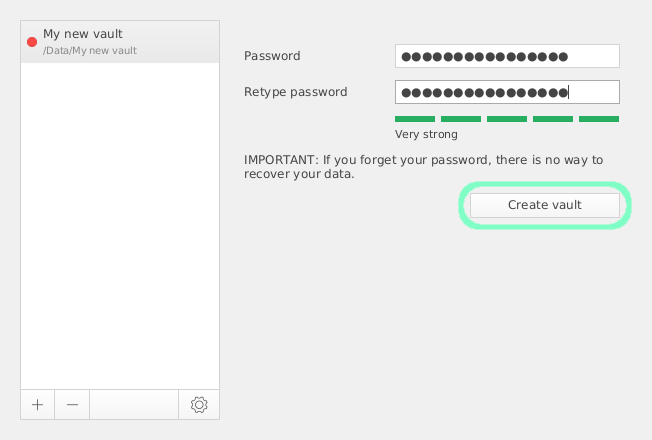
Now your new vault is ready to use. To unlock it, you need to enter your password. In the "More options menu underneath, you can change the drive name to whatever you like, and opt to save your password, so that you will not need to enter it on the local machine, each time you want to unlock it. This might be good for single user computers, but you should remember it's always a security risk to store your passwords.
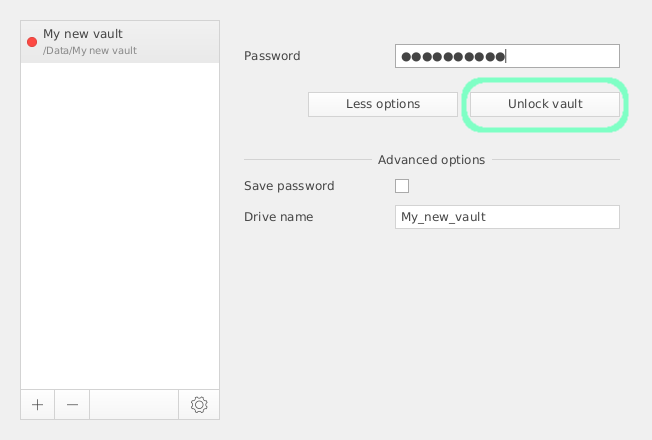
As you enter your password, your vault should be unlocked and automatically mounted on your system. Your File Browser application will most likely fire up, showing your vault mounted as a new `dav` network drive. You can just begin to copy or move files and folders onto this drive, and they will be instantly encrypted by Cryptomator, without you noticing anything. To you all the files and folders will appear as if they were stored in their plain for mat on your file system.
You can also lock the vault any time from within Cryptomator by pressing "Lock vault"
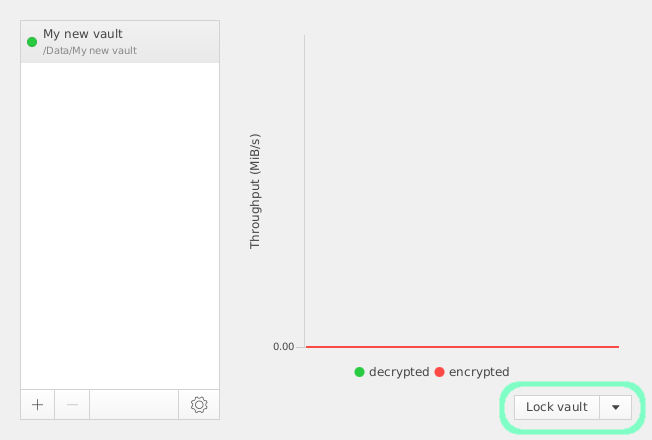
This will unmount the drive and make the vault's contents unacceptable to anyone locally. When you unlock the vault, you will have full access again.
If open the folder where your vault is stored, you will only find encrypted data, inaccessible from outside Cryptomator's virtual device.
### Adding it to TagSpaces
To complete your setup, [download](/downloads/) and install TagSpaces for your platform, if you have not already done so.
You can now easily access your vaulted files from within TagSpaces:
- Make sure Cryptomator is running and the vault containing your files is unlocked.
- Mount the drive, if you have to (although this should happen automatically)
- And connect it as a new location in TagSpaces.
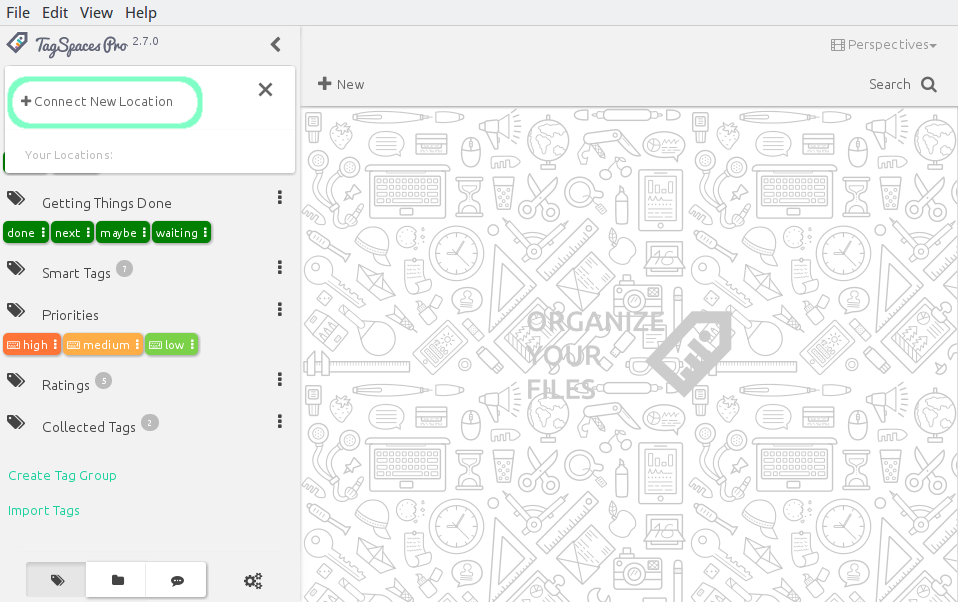
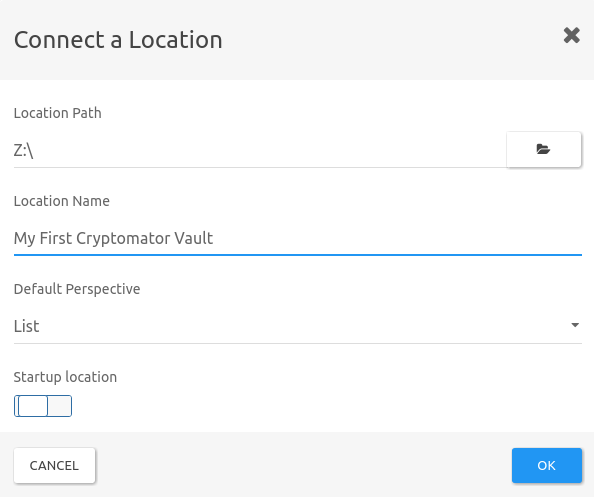
> Important note: You should not be adding the folder in which the Cryptomator vault is located, but rather the virtual dav network drive, which Cryptomator creates. If you need more information about how to mount a drive, you should consult your operating systems's documentation, although Cryptomator should handle this step for you automatically.
Now you can access all your notes inside your Cryptomator vault from within TagSpaces, wile storing them encrypted for both on- and off-line use. If you now synchronize the folder with your cloud service of choice, you can rest assured that your files are safe, private and always accessible, without having to worry about the next policy change from Evernote, or any other proprietary cloud based note-taking service.
---
## Great new TagSpaces desktop app and other goodies
## WE ARE BACK!
### Great new TagSpaces desktop app and other goodies
Hello, TagSpaces community,
We have been silent for the last 6 months but we are still here! We haven’t gone under! Au contraire, we are working our bottoms off on an extensive overhaul of the TagSpaces desktop and Android app and the accompanying software of the TagSpaces ecosystem.
Here is where we are:
Thanks to your input and buckets of coffee we are now in beta phase for the TagSpaces App. We have integrated your numerous ideas in a symbiotic state with our own vision of how the product should look like. And we can certainly state that it is turning out to be amazing.
Here is why we are drooling over it. We have completely re-implemented the app using the latest web technologies like React and Webpack. We have re-imagined the user interface with many usability improvements.
We know that customization is your thing and that’s why TagSpaces App will now be able to support user interface themes. We are starting with light and dark, but hey, that is just the beginning. More will be added later.
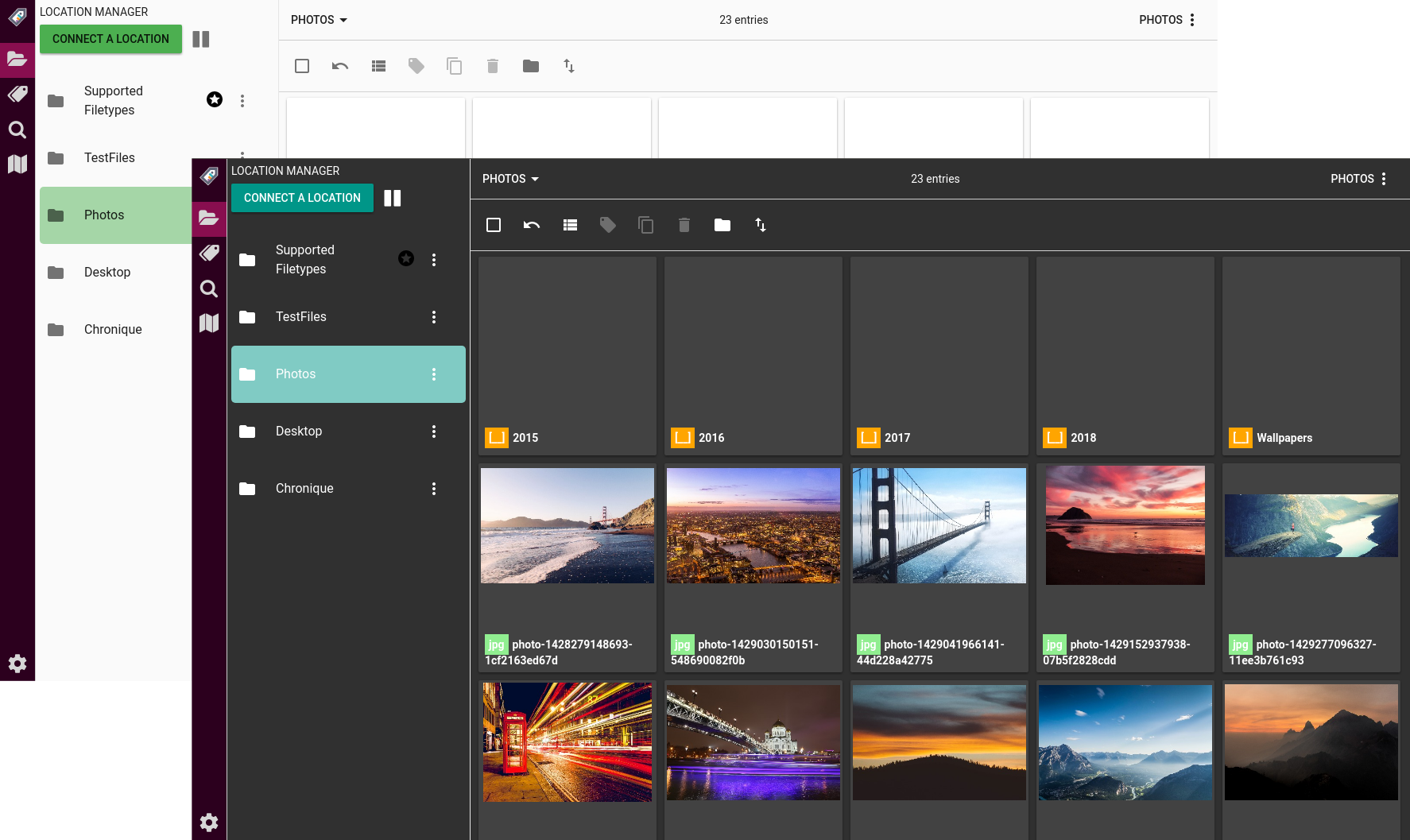
Not only is TagSpaces community an organized bunch of people but also a creative one and that is why we added support for TIFF and PSD files. You can now access that summer vacation collage, preview it and please, finish it already.
Since we have churned out large amounts of code, some of it was discarded, some of it held and/or added to the existing product. The results were carefully reviewed and we are now in a special state of mind. We can honestly say that there is a general improvement in speed and performance.
We couldn’t have done this without you, so we are still relying on your input. Here are a couple of questions that you might find interesting:
For the browser extension, we were thinking of adding of a screenshot of the currently active tab when you save a page as HTML. The screenshot then can be used as a thumbnail while organizing your snippets of different pages. Should we go on and add that to the TagSpaces Desktop App and TagSpaces Web Clipper?
By the way have prepared a new version of the TagSpaces Web Clipper, supporting again the Firefox browser. Here is a screenshot of the slightly redesigned user interface:
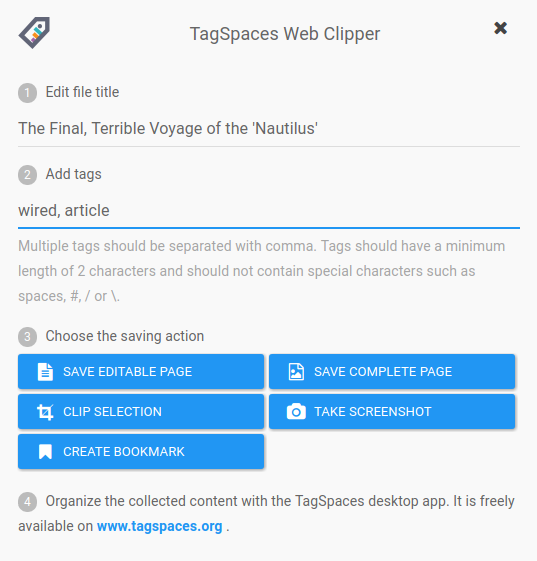
We are thinking of adding geo tagging functionality to the web clipper, allowing you to save for example a screenshot of a map together with it's geo information (latitude and longitude).
What do you think of it and how would you use it? Please share your thoughts or comments here, on our dedicated email address: ideas[at]tagspaces.org and our [Trello board](https://trello.com/b/TGeG5bi9/tagspaces-ideas)
Last but not least, we call it TagSpaces Next for now and we are expecting to relaunch it in about 3 months. We will release a testable beta version in 4-6 weeks. In the meantime, you can [GET](/downloads/) TagSpaces 2.9 to start organizing your files. You will be prompted for an upgrade when the newest version is released.
Subscribe to our [newsletter](/#subscribe) to get the latest info plus tips and tricks on using TagSpaces and organizing your files.
---
## New TagSpaces Web Clipper
We are done with the re-work of our web clipper browser extension. Yay! We are very excited because now it supports both Chrome and the newest version of Firefox! It is already up, so you can download it now.
TagSpaces Web Clipper is a powerful tool that lets you collect digital artifacts from web pages faster than you can say “Hey, Siri”. It can save whole pages or selected parts. Two clicks and you are done. Everything is safely stored on your computer.
### Start TagSpaces Web Clipper and enjoy
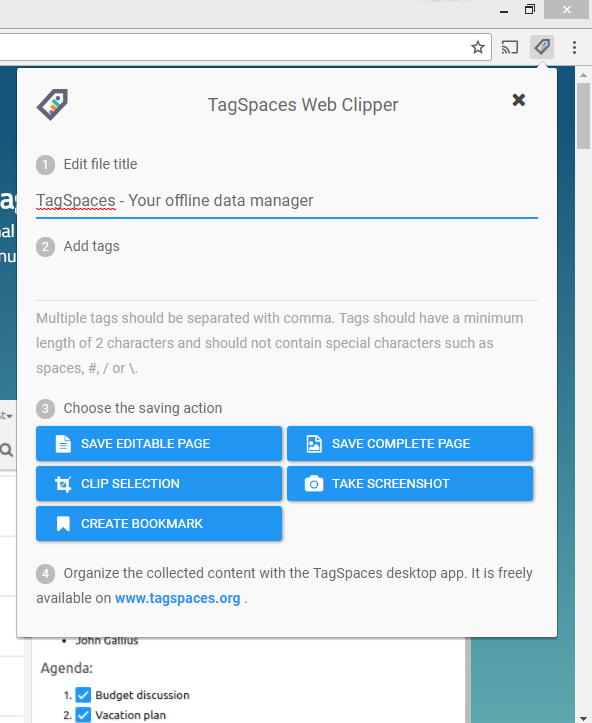
Click the Tag button on your web browser.
Edit file title – Leave the default web page title or create your own
### Get playful with Tags
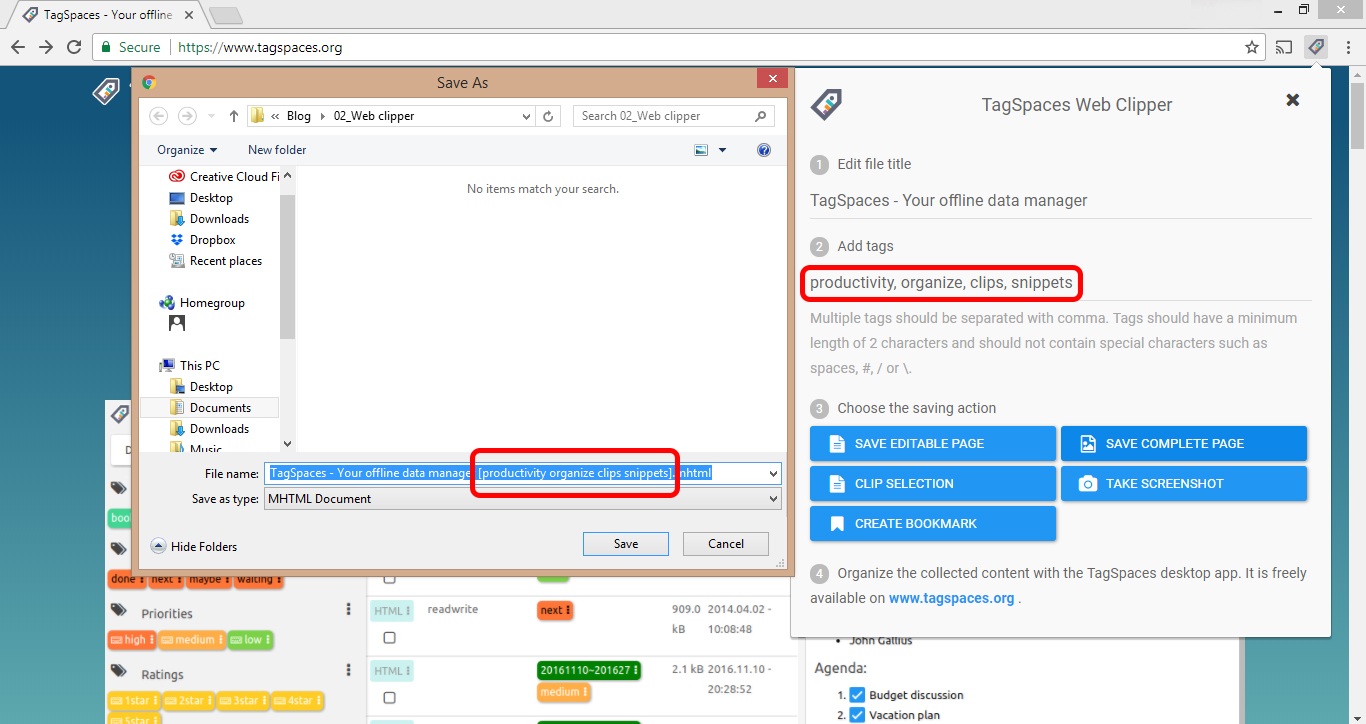
Add tags to your day and organize everything. From ‘read later’ to ‘for my mother-in-law’, the sky's the limit.
### Choose the saving action
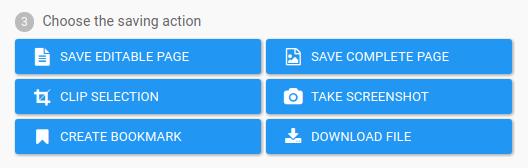
- **Save complete page** – You can save the whole page in one single MHTML file, preserving the original design. Saving in this format is possible only in Chrome browser.
- **Save editable page** – Clicking on this button, will try to extract the main content of the page. If some images are in the extracted content they will be embedded in the HTML file, so you don't have to take care anymore of images saved separately from the main HTML file. In addition to that, the URL of the original website and the date and time when the page was saved is also embedded in the created file. This information can be displayed later in the Desktop version of TagSpaces. Original design of the page will not be preserved by this action, but a screenshot of the visible area of the page can be included in the HTML file. This embedded image will be used the [TagSpaces Next](https://www.tagspaces.org/blog/tagspaces-next/) for creating a thumbnail of such HTML files.
- **Clip selection** – Saves only the selected content as one HTML file. The rest of the functionality is similar to the previous action.
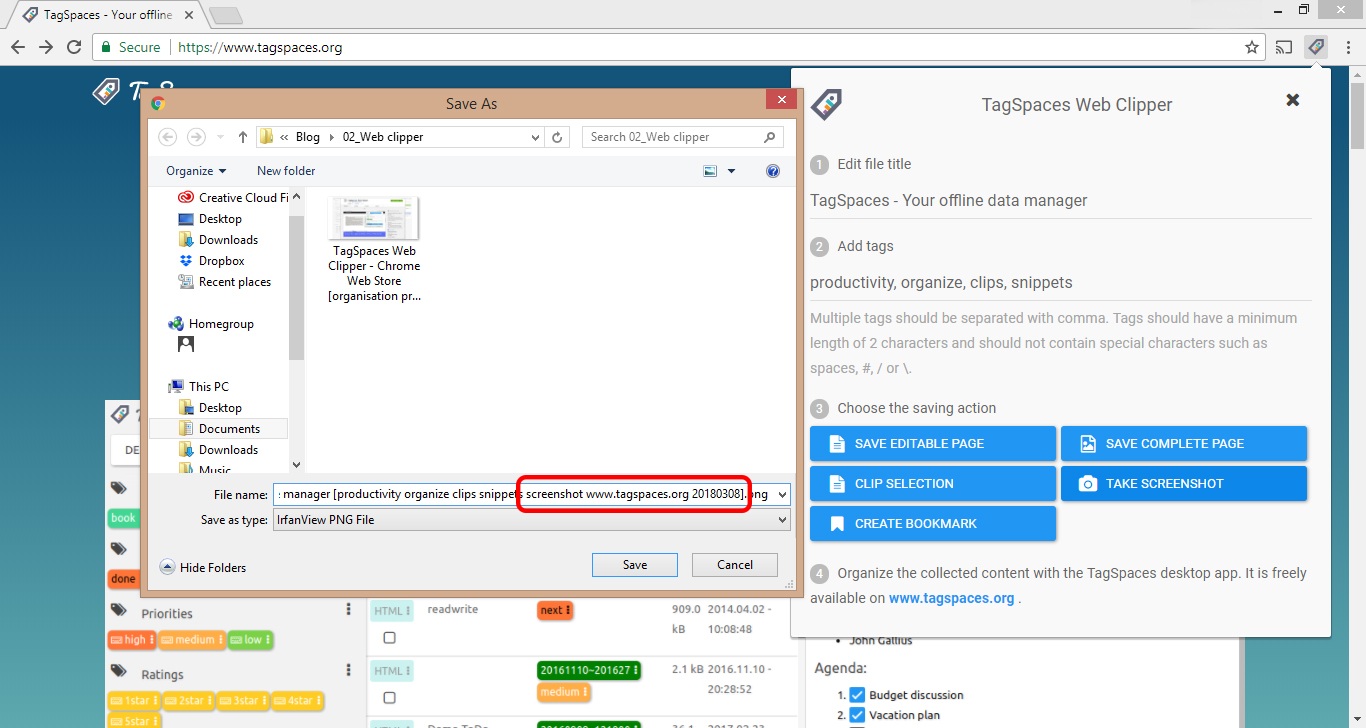
- **Take screenshot** – Saves a screenshot of the visible page area as a PNG file. Tags representing the current date and the source URL of the web site are added automatically to make later organizing and finding even easier for you. See the following screenshot for more details.
- **Create bookmark** – TagSpaces Web Clipper can create a URL file for the current webpage. Bam! TagSpaces is your new bookmark manager. URL files are supported directly in Windows and Mac OS.
- **Download file** - This button appears only if the current browser tab is displaying just an image, a pdf or a video file. As the name suggests clicking on this button will start the download of this file.
### Get TagSpaces Web Clipper:
- [Chrome](https://chrome.google.com/webstore/detail/tagspaces-web-clipper/ldalmgifdlgpiiadeccbcjojljeanhjk)
- [Firefox](https://addons.mozilla.org/en-us/firefox/addon/tagspaces/)
Once you have all your content clipped and tagged neatly organize everything on your own terms, on your own devices, free of cloud, login and registration with TagSpaces Desktop.
---
## TagSpaces 3.0 is out!
## Our best work to date is based on React.js and features lightning speed, location indexing, dark theme and more
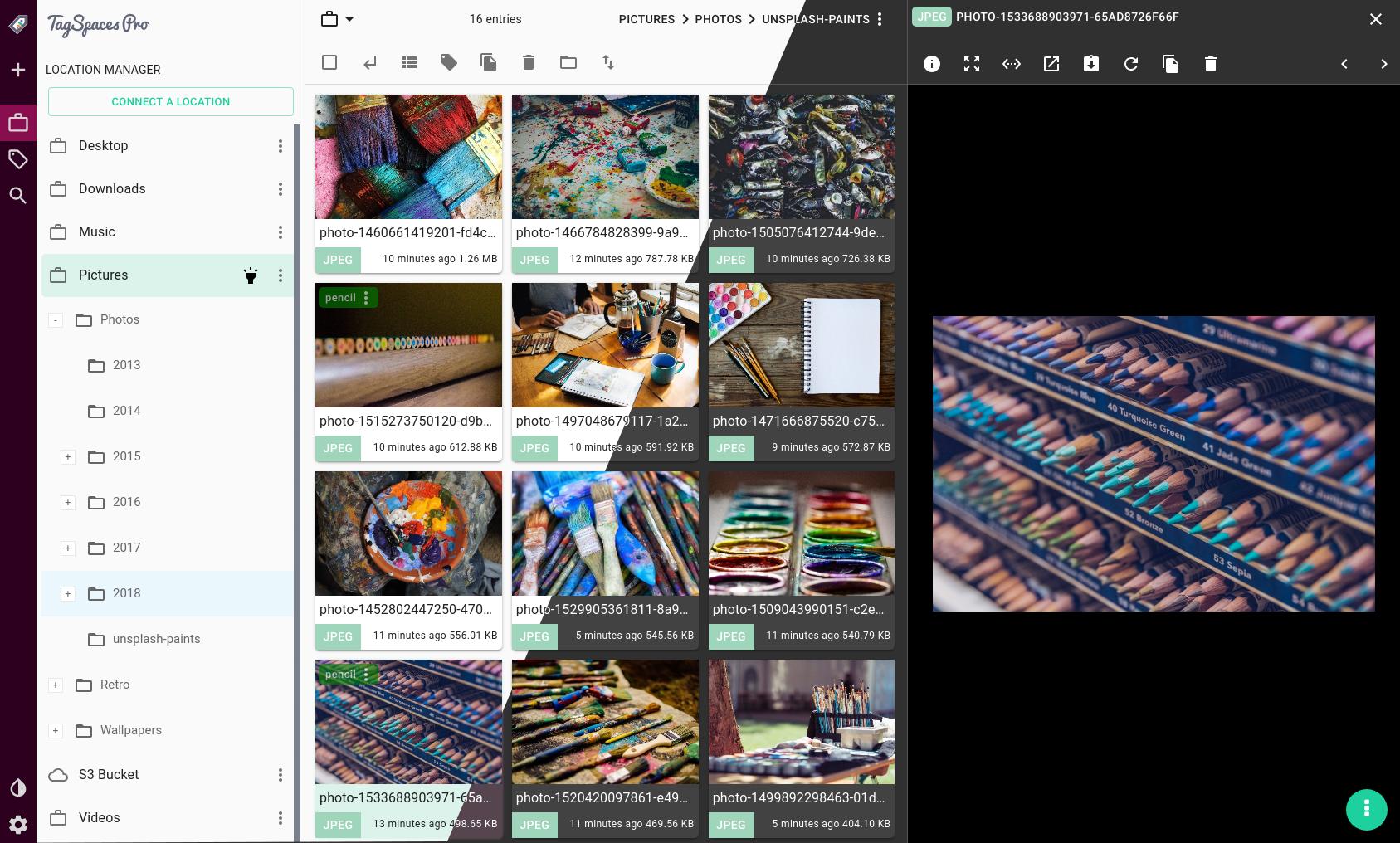
The great new TagSpaces 3.0 is out now after it has been in the works for the last year. We overhauled the entire concept and remade it from the ground up. But fear not, it is still the smartest way to organize your files and one of the best productivity app out there. The user interface was redesigned to increase the overall usability and speed of the application. We used React.js, which is a JavaScript library for building modern and fast user interfaces.
## What’s new:
- Location indexing. File and folder indexing procedure is started in the background on the opening of a location. This ensures a high-speed location search, once the indexing is done.
- Tree like navigation for the folder structure in the location manager
- Added support for colour themes. We are starting with a dark one, but more color themes will follow.
- Preview support for PSD and TIFF files - For our creative users, and all of you out there who want to be able to look at their PSDs and TIFFs without opening them
- Preview support for DOCX files – Basic visual representation of your texts, enough to quickly pinpoint the right file
- Playing mode for audio and video files. You can now choose between loop all, loop one and no loop modes. In addition to that, you can now deactivate the auto-play of media files. This is useful if you tag lots of media files and don't want TagSpaces to play every file automatically.
- The interface of the app is now zoomable, you can adjust the zoom level according to your screen size and resolution from the main toolbar of the desktop app
- The main toolbar is now hidden by default to reduce the visual clutter. You can always invoke it by pressing the ALT key.
### What’s new in the PRO version
- **PRO**: Added support for cloud-based locations. As a pilot cloud service, we have chosen to integrate Amazon Web Services S3 support (AWS). It is now possible to connect Amazon's S3 buckets directly to TagSpaces. The bucket will appear as a regular location, where you can browse, preview, tag and manage files, without syncing the bucket locally.
- **PRO**: New advanced search features like searching by file type, searching only for folders or searching for untagged files. We can now show files tagged with any of the preselected tags or show only files and folder containing all of the tags.
- **PRO**: Watching for changed files and folders is supported now per location. TagSpaces is monitoring file and folder changes in the currently opened location and reflects changes of the files or folders automatically in the user interface.
## What's changed?
- New main navigation and left panel in the application. The main panels of the application are now resizable.
- We have extended the file and folder description functionality.
- The search algorithm was re-implemented to include typos and probabilities in the results. For example, if you search for “Stink” instead of “Sting,” the search algorithm will also show results for “Sting.” The tags search defaults now to any tags, which means that TagSpaces will show now files containing any of the searched tags.
- Currently only one perspective with a list and a grid view is available, this replaces the list and grid perspective from v. 2.
- You can now mix for one file, without issues file name and sidecar based tags.
- The desktop keyboard shortcuts now can be disabled
- Once generated, thumbnails for image files such as JPEG, PNG, etc. will be continuously shown and not generated every time. When TagSpaces 3.0 creates the thumbnails, it will use the EXIF data to display the orientation of the file properly
- Geo tagging will be available later
- As we announced before the Firefox and Chrome web clippers were also completely redesigned this year. One amazing new feature to improve your workflow is the screenshot of the visible page area when you bookmark or clip content. The screenshot is saved along with the bookmark and is shown later as a thumbnail in the preview area of the app.
### New free features
We like to help you organize your files and folders, and we have decided to move the following features from the old PRO version to the new Free version:
- sidecar file tagging is available now also in the free version
- deleting files to trash is not PRO only feature anymore
- collecting of the used tags in a separate tag group is available in the free version
## [Migration from version 2.9](#migrationFrom2x)
Since TagSpaces does not use a central database for the tagging information, there is no need for migration of your files. You just have to open your folders containing tagged files with the new TagSpaces and the tags will be there. There are thought some things such as the Tag Library you may want to migrate in the new version. Unfortunately due to the complete rewrite of the application, there is no automatic way of doing this. But there is an easy way to have your "old" tag library in the new version 3.0. of TagSpaces. Please follow these steps in order to achieve this.
- Before installing the new version, start TagSpaces 2.9.x and go to the tab general in the Settings
- Find there the button "EXPORT TAG GROUPS AS JSON" and press it. This will create a JSON file containing your complete Tag Library
- Install or start the new TagSpaces and go to the Tag Library area. Press the 3-dot menu from there and select "Import Tag Library" menu item. This will start the import wizard.
- After successful import, you will find the "old" tag groups in the tag library of the new TagSpaces.
## In closing
TagSpaces 3.0 is a bold new application that will help you better organize your files and boost your productivity. We are keeping all the good stuff from TagSpaces v2 and adding a modern, intuitive user interface and new indexing features.
As usual you can get the Free and PRO versions [here](/products/).
---
## How to organize your exported photos from Flickr?
According to a recent [announcement](https://blog.flickr.net/en/2018/11/01/changing-flickr-free-accounts-1000-photos/) from Flickr, the users with the free account may lose some of their photos if they don't update to a paid plan. Luckily Flickr is providing a way to export all of your photos and videos together with some meta data including useful things such as tags and albums. So we decided to write a [small script](https://github.com/tagspaces/flickr-export-organizer), with the purpose of sorting the files in folders and extracting that meta data in a format, which can be later recognized by [TagSpaces](https://github.com/tagspaces/tagspaces). The script iterates through all the media files in the export folder and copies the found files in sub folders. If file is part of album, a folder with the album's name is create and the file is copied there. If this is not the case the script create a folder, which name corresponds to the date when the image was taken, and copies it there. In addition to that it parses the provided JSON file and extract the tags, the description and the comments if available. This information is saved in readable for TagSpaces JSON files, in the `.ts` sub folder of the folder where the image was copied previously.
## Exporting your Flickr data
- Your Flickr Data - You have to request and download your Flickr data, as shown in following screenshot.
- Login to Flickr via the web
- Click on the profile avatar and then select Settings
- Go to "Your Flickr Data" area and request your files by clicking the "Request my Flickr data".
- After a while the data is prepared and you have to download all the zip-files locally.

## Installing and running the script
- You will need a running **Node.js** environment, which can be easily achieved on Windows, macOS or Linux by just installing it from [here](https://nodejs.org/en/#download).
- Create a folder where the script will run.
- Download the last version of the script directly from [here](https://raw.githubusercontent.com/tagspaces/flickr-export-organizer/master/export-organizer.js) or from the [release section](https://github.com/tagspaces/flickr-export-organizer/releases) of this project and place the script `export-organizer.js` in the previously create folder.
- Extract all files from all the zip exports in a sub folder called `flickerData`.
- Under Windows you can right click on `export-organizer.js` and choose Open With... (path_to_nodejs\node.exe)
- Alternatively you can run the script in the Windows, Linux or macOS terminal in the working folder like this:
```
node export-organizer.js
```
After a successful run of the script a new folder `flickrExport` will be created containing your photos distributed in sub-folders.
## Resulting structure
The folder structure before running the script should look like this:
```bash
~ your working folder
├── flickrData
│ ├── img_4376_2723423425_o.jpg - image part of Album1
│ ├── photo_2723423425_o.json
│ ├── img_20180823_2723427625_o.jpg - image taken on 2018-08-23
│ ├── photo_2723427625_o.json
│ ├── ... - other media files
│ ├── albums.json
│ └── ... - other profile json files
└── export-organizer.js
```
After running the script, you will have the following folder structure:
```bash
~ your working folder
├── flickrData
│ ├── img_4376_2723423425_o.jpg - image part of Album1
│ ├── photo_2723423425_o.json
│ ├── img_20180823_2723427625_o.jpg - image taken on 2018-08-23
│ ├── photo_2723427625_o.json
│ ├── ... - other media file
│ ├── albums.json - file containing your albums
│ └── ... - other profile json files
├── flickrExport
| │ ├── Album1
| │ | ├── .ts
| │ | | ├── img_4376.jpg.json
| │ | | └── ... other TagSpaces meta data files
| │ | ├── img_4376.jpg
| │ | └── ... other media files
| │ └── 20180823
| │ ├── .ts
| │ | ├── img_20180823.jpg.json
| │ | └── ... other TagSpaces meta data files
| │ ├── img_4376.jpg
| │ └── ... other media files
│ └── ... - other profile json files
└── export-organizer.js
```
## Managing your files with TagSpaces
After the files are organized, you can create a new location in TagSpaces pointing to the `flickrExport` folder and open it. Now you will be able to navigate your photos in TagSpaces by albums and see the tags, description and comment you have added to your media files.

Your don't need of course TagSpaces for just browsing your photos by folders. This can be achieved perfectly with the Windows Explorer or macOS Finder, but if you have spend some time organizing your photos with tags, descriptions and comments and want to use this data somehow [TagSpaces](https://www.tagspaces.org) might be helpful.
P.S.: If you are a [TagSpaces PRO](/products/) user you can even put your photos back to the Internet on a S3 compatible object storage such as Amazon's [AWS S3](https://aws.amazon.com/de/s3/) and connect this storage with your local installation of the product, making your photos available from everywhere.
---
## TagSpaces 3.3 released
Last week TagSpaces version 3.3 was released. Here you will find the major new features and improvements included in this release.
## Reintroducing Perspectives
One year ago, when we were preparing the major 3.0 release, we decided to postpone the implementation of the [perspectives](https://docs.tagspaces.org/browsing-files/) support. Which were a core functionality in version 2.x of TagSpaces. The idea was to migrate one default stable perspective with the two modes for viewing files: [grid](https://docs.tagspaces.org/perspectives/grid/#grid-view) and [list](https://docs.tagspaces.org/perspectives/grid/#list-view). Now, in this release we reintegrated the perspective support and added on top, two completely new perspectives in the Pro and the Enterprise editions.
### Mapique Perspective
This perspective is useful for showing geotagged files and folders on a map. For the visualization of a online map we use the [Openstreemap](https://www.openstreetmap.org/) integrated with the popular [leaflet](https://leafletjs.com/) javascript library. On the following screenshot you can see how it currently looks like.
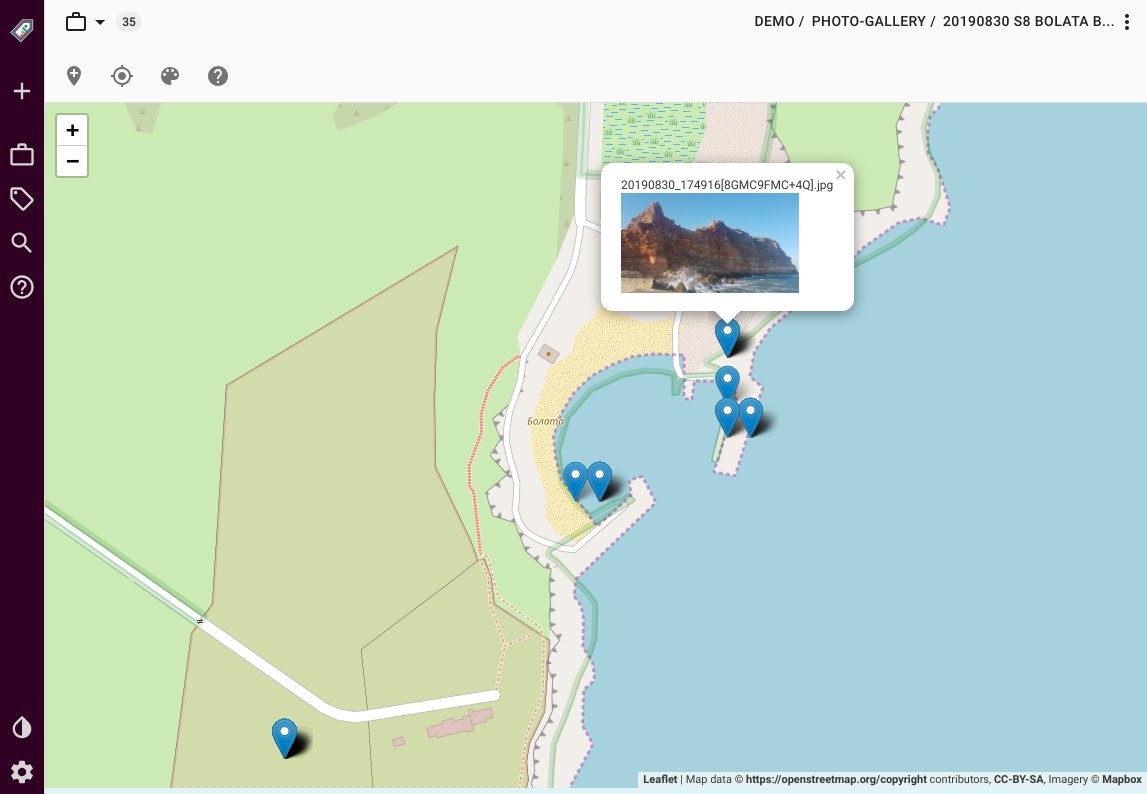
You can learn more from the [dedicated documentation page](https://docs.tagspaces.org/perspectives/mapique/) in the TagSpaces' documentation or try it directly in the live demo page we have created for the [geotagging](/usecases/geotagging/#liveDemo) use case.
### Gallery Perspective
The purpose of the gallery perspective is show images, pictures and photos in a presentation mode. There is also a integrated fullscreen mode and support for swiping gestures on mobile devices. This is a screenshot of the gallery perspective.
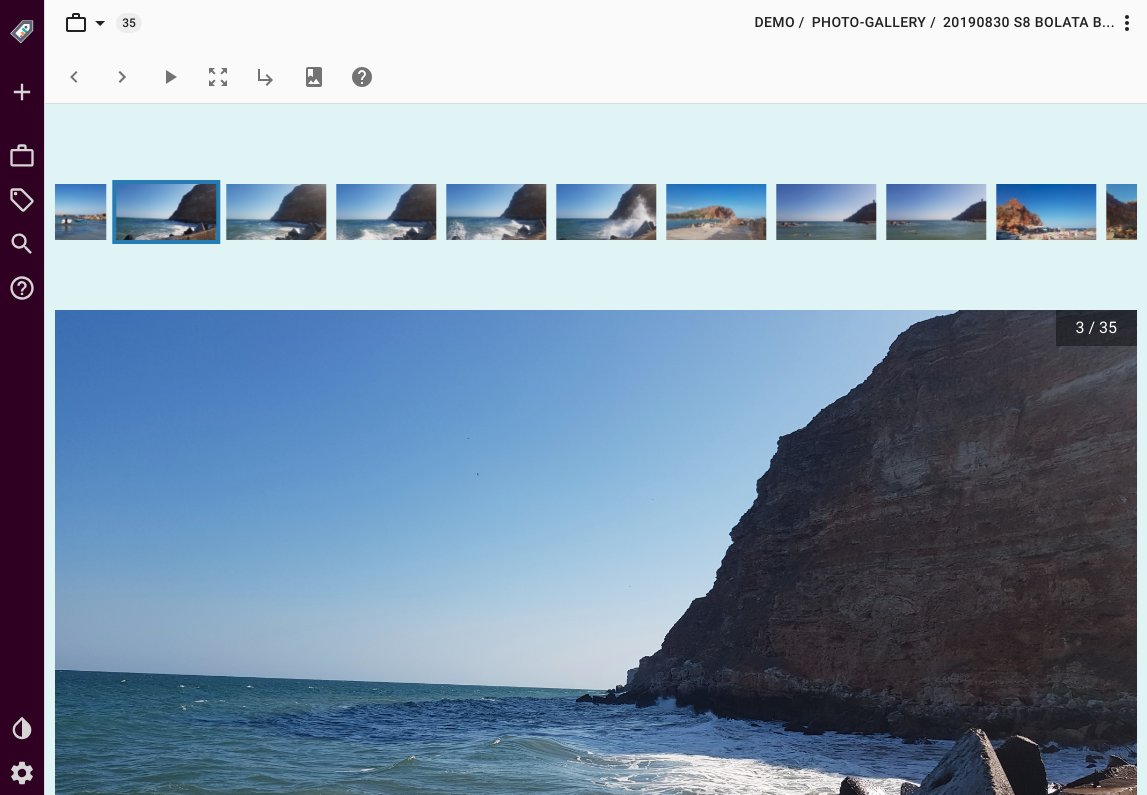
You can learn more from it's [dedicated page](https://docs.tagspaces.org/perspectives/gallery/) in the TagSpaces' documentation.
## Mobile mode and PWA
We optimized the user interface for use on mobile devices. This mode is perfect for using TagSpaces as PWA (progressive web app), which is a major feature of web based [TagSpaces Enterprise](/products/custom).
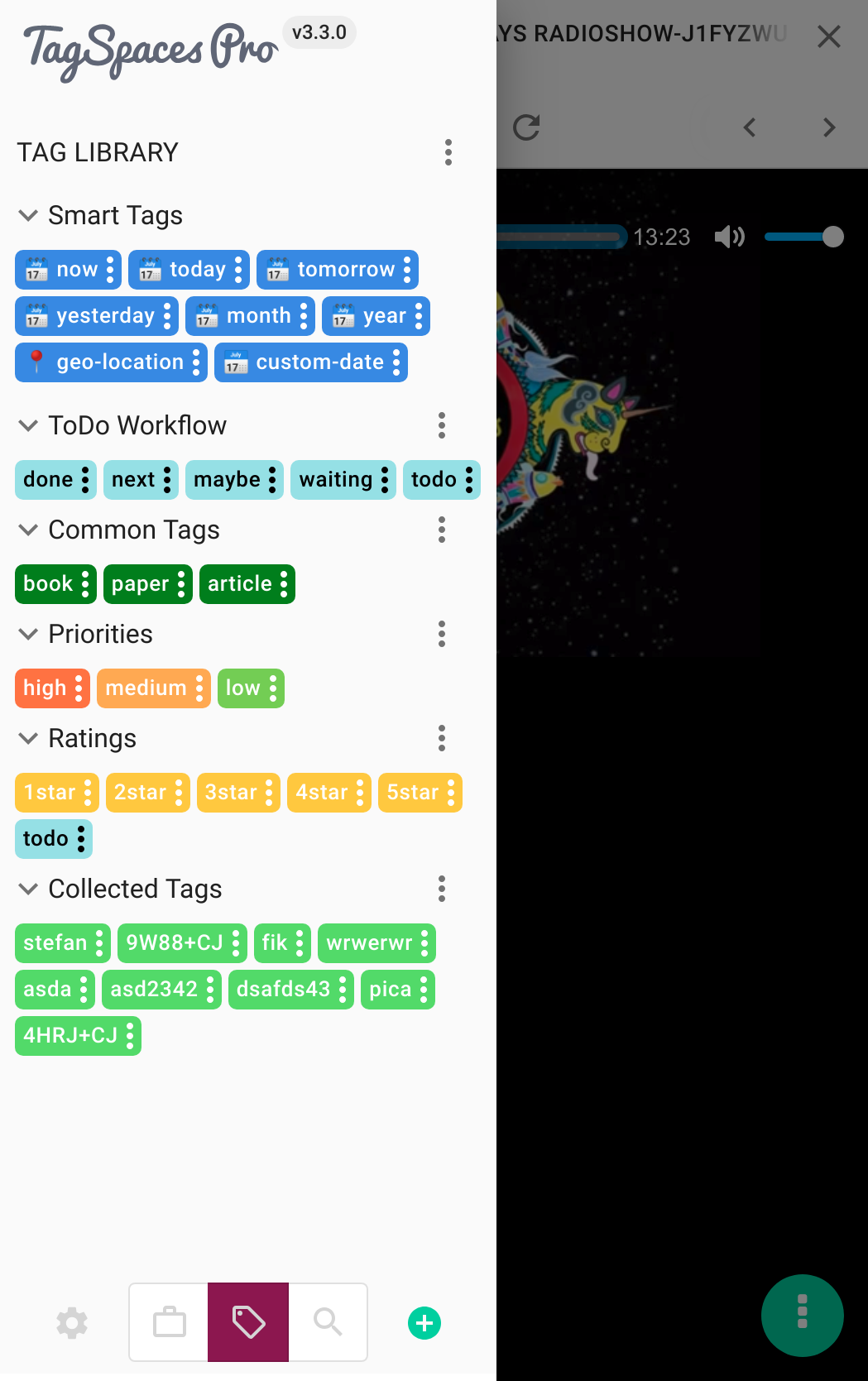
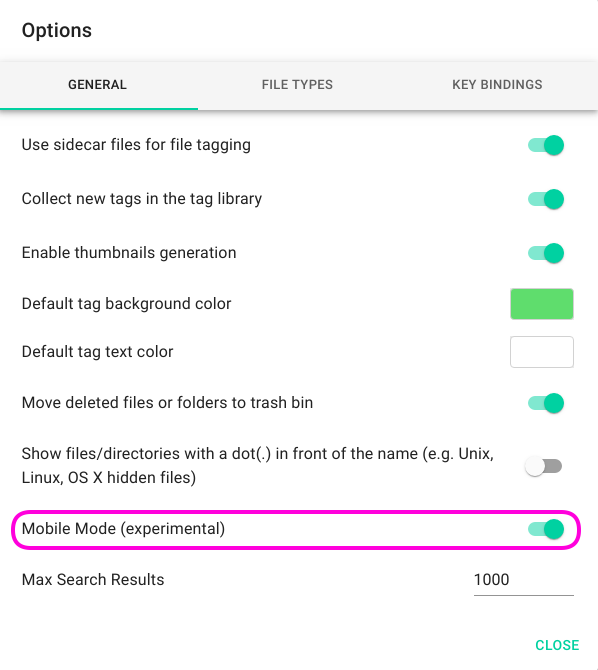
It can be activated for test purposes in tab general of the setting, as shown in the next screenshot.
## Documentation updated
In the recent weeks we have update also the TagSpaces documentation. So now it reflect more precisely the new user interface introduced in version 3. Check it out on [docs.tagspaces.org](https://docs.tagspaces.org).
## Other changes
In this release we made some improvements of the content creation process. These includes a new design of the file creation dialog, which was greatly simplified. Now, the newly create files are opened automatically in edit mode of the corresponding file editors. You can also import existing files from this dialog. In the mobile the _Add file_ button can be used also for taking new pictures.
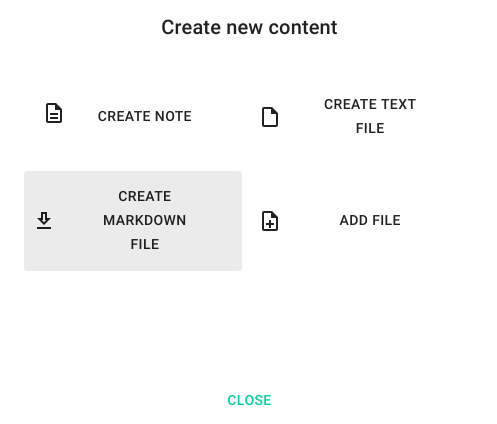
On top of that, we made many other usability improvements and fixed some bug. A complete list of the changes can be found in the [changelog](https://github.com/tagspaces/tagspaces/blob/develop/CHANGELOG.md).
---
## The problem with Cloud based note-taking apps
_The article in this blog entry was initially published on 2018-12-07 in [artplusmarketing.com](https://artplusmarketing.com/my-quest-for-a-suitable-evernote-replacement-after-the-company-decided-to-restrict-access-to-my-4f620a435740). We rediscovered it recently and were under the impression, that the thoughts presented there are more than valid in the current times. So we decided to republish it in our blog (of course with the [author](https://medium.com/@attilaorosz)'s permission). So here the original article:_
## The problem with Cloud based note-taking apps - and the alternative solution that delivered on its promises
My quest for a suitable Evernote replacement, after the company decided to [restrict access to my own data](https://lifehacker.com/evernote-limits-device-sharing-for-free-users-bumps-up-1782744350), proved to be a short one. Soon after publishing [Five Evernote alternatives, and how to preserve them in brine](https://artplusmarketing.com/five-evernote-alternatives-to-suit-any-workflow-714be108e2d9) (this might not have been the exact title), I have settled on one of the contenders from the same list.
TagSpaces, the application of choice does many things right but surely is unbeatable in one particular: **Data access**.
## Cloud (in)security is not always your friend
The root cause of the problem, which restricted data access is a symptom of, is data storage, and how most cloud-based apps handle this. Cloud storage is mostly transparent these days, and even mobile bandwidth provides mostly instantaneous access to whatever you are accessing, but **Cloud storage still inevitably means to store your stuff on remote servers, God(s) know(s) where**.
There are, of course, inherent security risks involved. A large-scale hacking attack will most likely target large cloud-based data-centres, where the attackers are most likely to get access to tons of information, some of which might be useful for them. The late scares of meltdown/spectre have also mostly meant [mostly your cloud storages were/are in danger](https://www.wayoflinux.com/blog/cloudless-security). Of course, a responsible provider will secure your data in more than one way, not only by hardening their servers/services but by storing everything encrypted, which is probably the best possible way, until said hackers get their hands on the encryption keys. (Unlikely with end-to-end encryption, but that usually concerns communications. Storage is a more complicated issue, as with multiple devices accessing the same stored data, credentials usually have to be stored somewhere too.)
Naturally, providers and large data warehouses do introduce many fail-safes. While you probably still should not entrust the internet (even if it’s called “The Cloud”) with any sensitive information, large cloud providers are mostly capable of securing your data from theft. Mostly. [Remember when 3 billion(!!!) Yahoo accounts had been compromised?](https://www.reuters.com/article/us-yahoo-cyber/yahoo-says-all-three-billion-accounts-hacked-in-2013-data-theft-idUSKCN1C82O1) That’s how safe your data is. Even the most popular note-taking app, Evernote is not immune to breaches. [Nearly 50 million user accounts got compromised just a few years ago](https://nakedsecurity.sophos.com/2013/03/02/evernote-hacked-almost-50-million-passwords-reset-after-security-breach/), and there is no guarantee it will not happen again.
This, of course, means some malicious person(s) or organisation(s) actively being after your stuff, be it rogue hackers, or your garden variety government agency protecting your freedoms by violating them. While this happens only occasionally, is **the way you can access your own data** is equally worrying. As soon as you agree to whatever terms the application maintainer puts in front of you, and start storing your files/notes/images/information in a remote location, you have forfeited physical access to, and control of your data. But the issue is broader than this alone.
## The middleman, and restricting access to your data
Cloud storage is only part of the problem and is often no problem at all, or not in itself anyway. There is another, less high-profile, but possibly even more nagging problem is that of the middleman. **When you sign up for a service that keeps your data in the cloud, while offering a way to access and manipulate it, you are giving up your right to free data access**. While storage providers have no business in restricting your access (in fact, they are interested in you being able to access everything as smoothly as possible), middlemen businesses and their middleware applications will do just the opposite. **You will only be able to access your own data through the middleware app, and conforming to the middleman’s conditions**. Your notes, ideas, images, documents, files, etc. are all controlled by a third party, and as mentioned above, access restriction did, in fact, happen and can happen any time again.
**The only real difference between middleware and ransomware is your consent**. Ransomware will infect your computer, and hijack your data until you pay, without you inviting it in, unless you accept the fact that not keeping your computer safe is, in fact, an invitation, and so are unsafe online habits. **Middleware apps**, on the other hand, **lure you in and make you hand over your data willingly, with overblown promises of convenience**.
Ironically, the promise itself is easier access to your data. This might even be true in a sense, as the app will sync (mostly) seamlessly between your devices. Still, access to your data is far from unrestricted. The middleman would have made you sign disclaimers, terms and conditions, privacy policies, etc., with clauses that will allow them to change their own terms any time. Then they make you pay money for better access to the data you have just handed over. In reality, your access is still restricted while you are forced to use the middleware app, and to access your stuff otherwise would require a disproportionate amount of effort, like, e.g. going through the never seamless process of “exporting” it. All this time you will be continually reinforced in your belief that accessing your data and stuff you have created has never been easier through flashy ads and a wonderful tool of word-of-mouth marketing called hype.
As we’ve all seen from Evernote’s example, restricted data access is only a change of terms away. And what can you do when a provider changes their terms? Accept them, or stop using the service. Naturally, any resemblance to blackmail or ransom is based entirely on… reality. Or is preying on people’s gullibility really more ethical, than using brute force and/or stealth to get their data? Not for me to say, but at least one of these is legal. What a relief… Is a false promise of convenience really worth giving up common sense? Really?
## TagSpaces and your data
And here is where TagSpaces really excels. It does, of course, excel in many other regards (like being cross-platform and open-core), but this is my main point of focus, and the main reason I keep using it too: No backend, no proprietary storage, no cloud, no hype, no restriction on what you do with your stuff and how. It just uses the files from your computer. As it should. Everything you “put into” TagSpaces, you are really just saving on your computer.
You can “connect up” locations in TagSpaces, to make access a breeze, and then use it to browse your own files. The emphasis here is on your own. You are not forced to use TagSpaces, or to only use that to access your stuff, but simply offered an alternative way, to view and organize your files. And while it’s more than just a note-taking app, it works perfectly as one. You still have photos, audio and video files, text files in multiple formats, you have them in one place with tags and editors, and tons of functionality, while not having to worry about access restriction or data hijacking, or even a change of terms. You do not have to agree, sign up, or register to anything when using it.
What TagSpaces does not do is synchronization. Everything is offline, and the app only handles whatever location is connected. Of course, it can be argued that a note-taking app is not a data syncing app. It can also be argued that separating this functionality (i.e. synchronizing with another app) eliminates the single point of failure most over-integrated services tend to represent. And whoever would argue these, would be right, of course. You can always just use a dedicated service to sync all your data (and not only whatever you have in TagSpaces), which again means more control over your data and its security. Alternatively, can use any Cloud service you trust, as these usually let you do the synchronization on your terms, with the added protection of encrypting your stuff seamlessly for yourself.
This all might sound a little less convenient than just having one app “do everything for you”, but ask yourself this: Would you leave the front door of your house unlocked, just because that makes it more convenient to open it when you get home? Because the same applies when you use online services. Overly convenient usually equals greater risk, and choosing comfortable over sensible basically means inviting malicious actors to do you harm.
I’ve mentioned this to Ilian Sapundshiev, founder of TagSpaces when I told him I’d write about his software. He kindly pointed out that the new TagSpaces (version 3, released shortly after I started writing this) actually allows you to connect an AWS storage (in the paid version at least), so TagSpaces can become a cloud-based app. While that sort of straightforwardness is great, and so is the added convenience, it is even greater that TagSpaces has now become a proof of concept:
You don’t need any middleman, and the middleware app can be unrestrictive. TagSpaces lets you rent your own storage space if you need online storage (making it optional), and allows you to access your data through the software without tying you in. This does not make it mandatory to either use the software to access your data or to store your data in The Cloud, but makes it easier to do both. If you decide not to, you’re free to do so. Also, data access is not subscription based, so you are not paying for data access, but only for software functionality (and updates), and only if you really need the extra fluff. This is how cloud storage access should be done. And how data access should be done. And how any ethical software should operate. No tricks, no ransom. Possibly less profitable, sure, but on whose side are you really? Your own, or on those who want to make you pay for your own stuff?
So I keep using TagSpaces to this day, and I’m most satisfied with it. (I even got involved in compiling their [user documentation](https://docs.tagspaces.org), that is how much I actually use it.) Sure, it does not make me feel like I belong to some elite club, but I’m not here for the hype. It’s simply the most reasonable, ethical, unrestrictive solution I have found to date. And yes, the next article here will be a long-winded review of the software itself, so you’ll know what I mean. Until then, stay secure. And reasonable.
---
## The forgotten releases
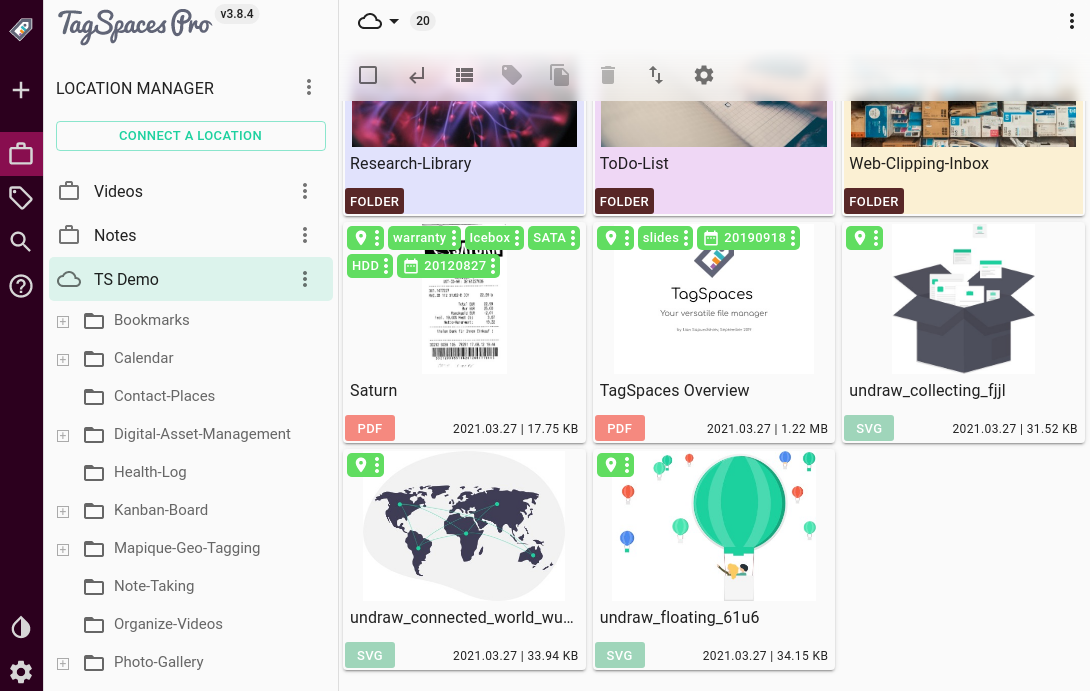
TagSpaces has seen some **new releases in the past months,** bringing enhancements and upgrades, and many new features. With our latest release, **v3.9 becoming available**, it’s time we went through some of what came before in versions **v3.7** and **v3.8**, respectively.
## User Interface and UX features and improvements
**Version 3.7** has seen some improvements in the UI/UX front. **The already extensive and advanced tagging functionality**, a key feature of the software, **was improved** in some small ways. Similarly to other tag groups, **the now read-only SmartTag group can now be collapsed in the sidebar**. Since **TagSpaces can extract macOS tags**, an explanation is now provided for Mac users on how the tag extraction works in TagSpaces.
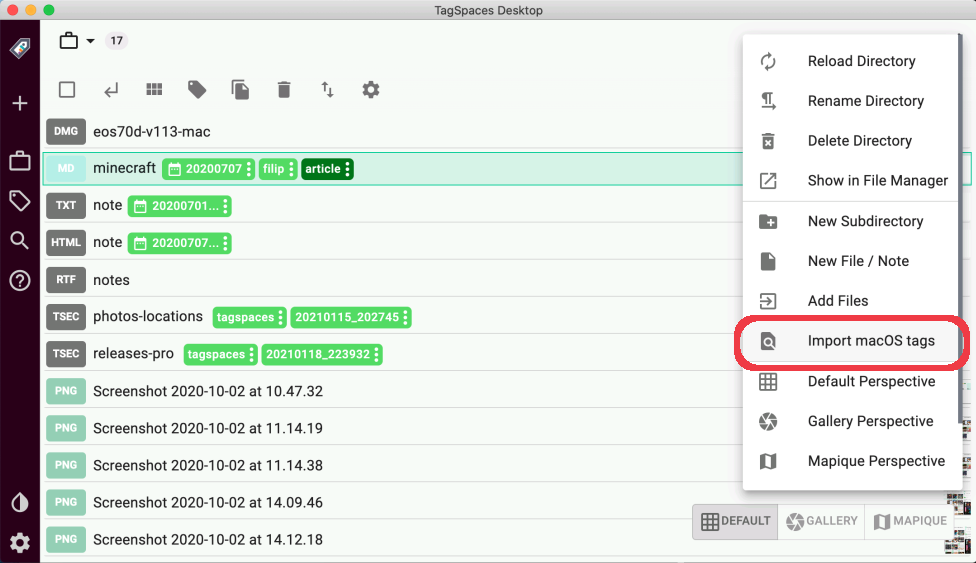
When a file or image **has a geo tag associated with it**, there is now **a map displayed in the file properties**, showing the exact location the geotag points to.
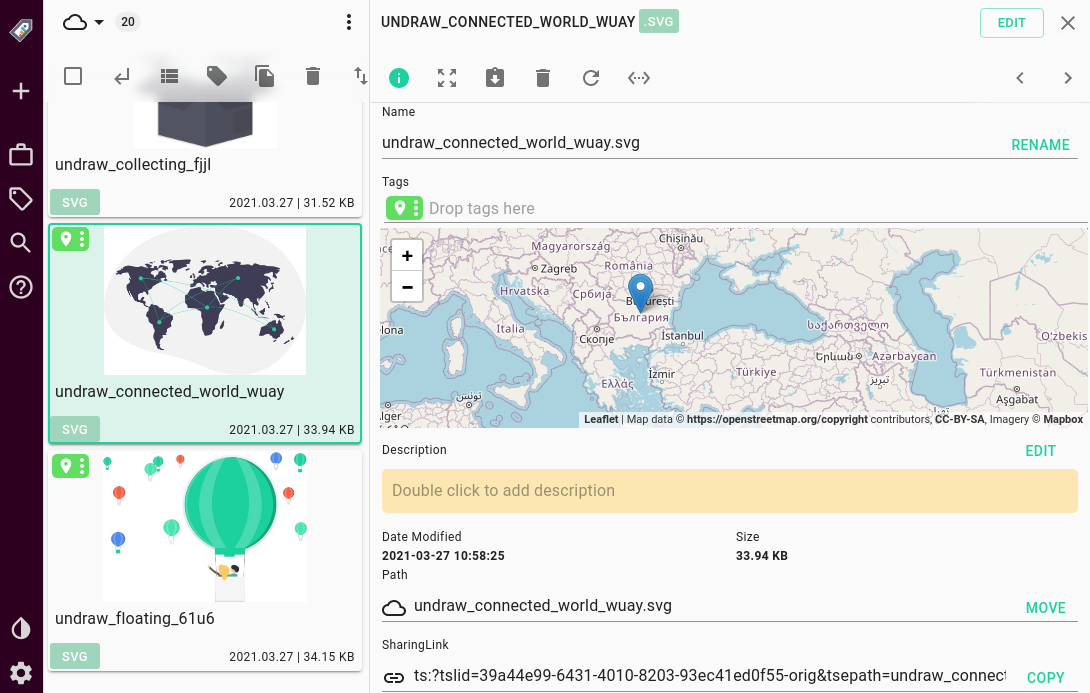
Geo-tags display most prominently in **the Mapique perspective, which now redraws the map displayed after closing a file** or a directory in the **PRO** version, to better reflect possible changes. Also in the PRO version, the Mapique perspective, along with the gallery perspective now has **a button to navigate up to the parent directory** more easily.
Navigation and usability have seen some improvements as well. The **Grid perspective now has pagination enabled,** allowing the user to set the maximum number of files shown on each page, while **macOS** users will notice the re-addition of the **tray menu**.
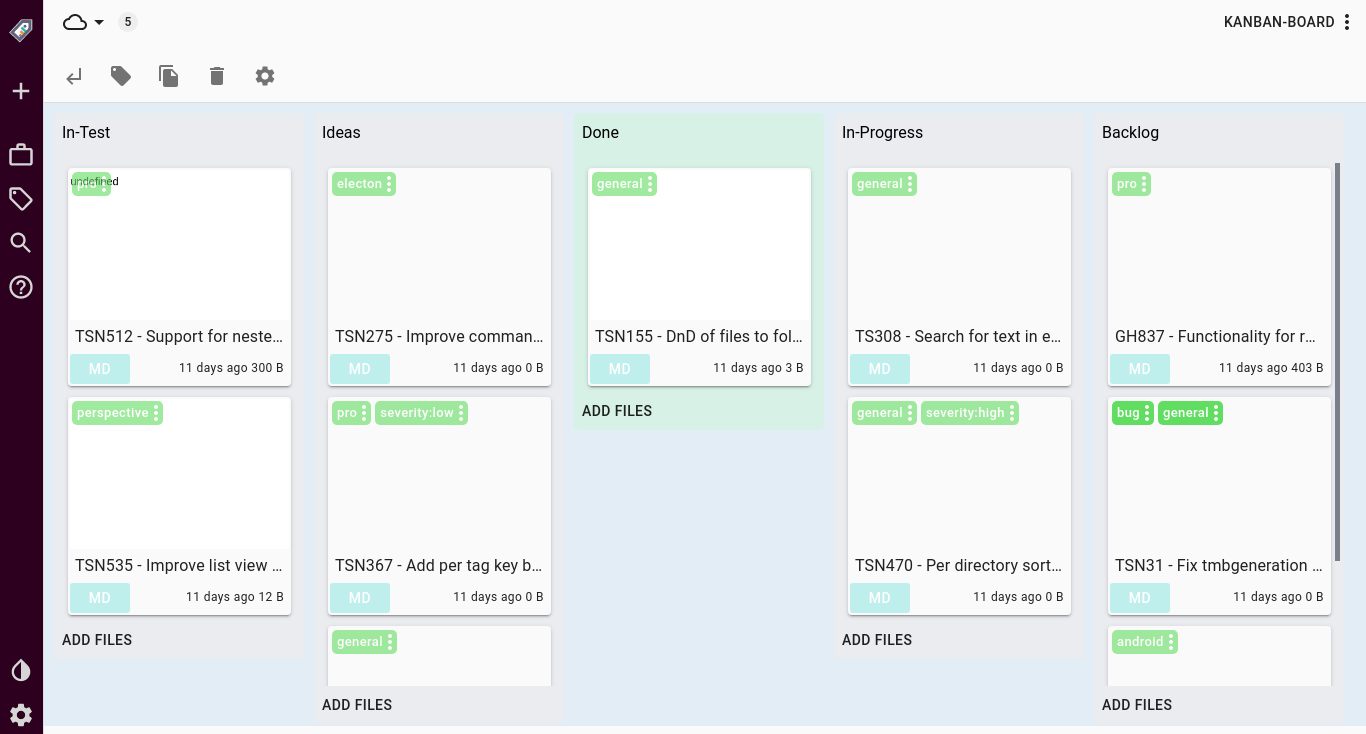
The most exciting new feature, **the KanBan perspective** is still heavily experimental at this point but shows a lot of promise for a new style of file and folder organization.
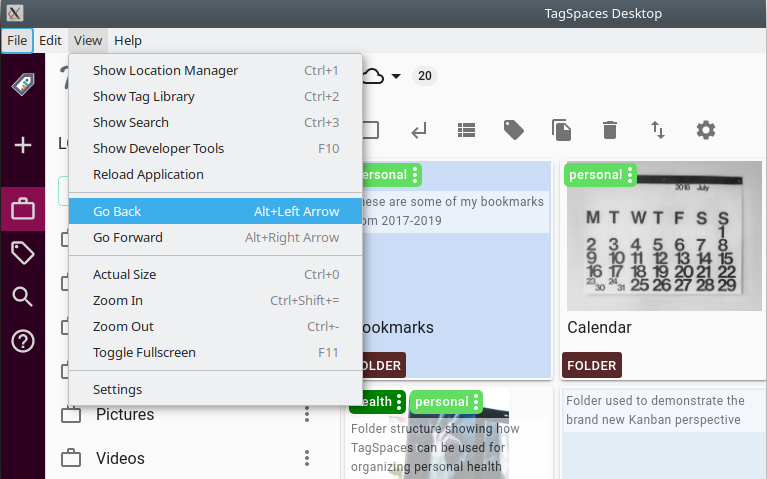
**Version 3.8** had even more usability and user interface improvements to offer. Navigation was further improved with **the introduction of the** still experimental **“history navigation”.** It can be found in the file menu for now (which is now hidden by default on Windows and Linux but can be shown by pressing the Alt key), selecting View->Go Back or Go Forward, or by pressing Alt+Left arrow (for back) and Alt+Right arrow (for forward). The history navigation offers a navigation experience similar to and known from web browsers, where you can navigate between the last accessed folders and files in a non-linear fashion.
**In Mobile Mode** (Settings->General->Enable mobile mode) **the help panel is now integrated into the side panel** for a more unified look and feel. The **Settings menu now also features a “Reload App” button**, that will refresh TagSpaces and load everything, should you experience any problems or inconsistencies, and as a serious usability improvement, **the UUID of connected locations is now both visible and editable from Settings**.
As a small, but important visual improvement, **tags in the default perspective are no longer translucent**, making them more legible, while **the perspective toolbar has gained some translucency** for a better visual effect.
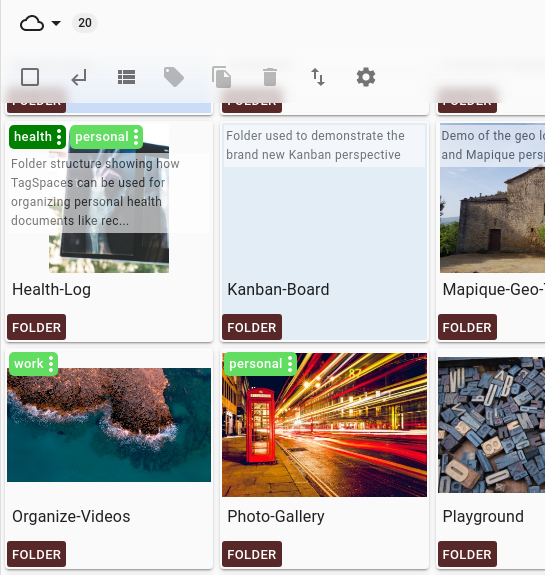
In the **PRO** version, you can now **exit full-screen mode in the Gallery perspective on mobile devices**, which is both an important visual and usability improvement.
Lastly, **the tool-tip in the “About” dialogue now displays a lot more detailed version information**, which can prove handy in troubleshooting and opening support tickets.
## Under the hood
Besides the most obvious visual and UX improvements, there have been plenty of changes under the hood that, while not immediately visible, can improve one’s workflow considerably.
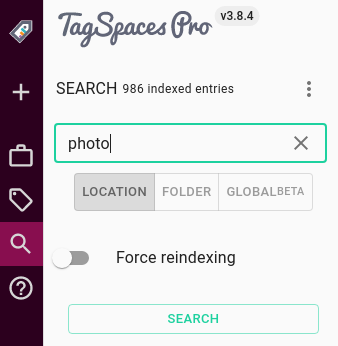
The biggest and most important change **in version 3.7 concerns** file and folder indexes. **Indexing will no longer occur immediately upon opening a location**, instead, **it will start when the first search is performed** on a given location. These **indexes stay valid for 10 minutes**, after which they get recreated when a new search is performed. This **saves a lot of power and resources** and makes everything work so much faster and allow for **smaller index sizes**. Besides being more efficient, indexing also got more transparent, as **the total amount of indexed files is now displayed** after every time the index is (re)built.
As another efficiency improvement, the **PDF thumb generation was moved into the main app process**, so there is no longer a need for a hidden worker window, when a folder contains PDFs, while the generation of thumbnails for zip files was disabled, as this could lead to performance issues.
**More audio filetypes are now supported** with the addition of ACC which, along with FLAC, is now included in the search settings too, which has also become more table, as it would no longer crash when searching on no location.
The **PRO** version had even more improvements. **Editing of file and folder descriptions is now only a double click** away, while also **supporting embedded images and opening external links**. The **PRO** version can now have a **default perspective on a per-folder basis**, which you can set in the directory properties, and the **date dialogue** was changed **to use a YYY-MM-DD format**.
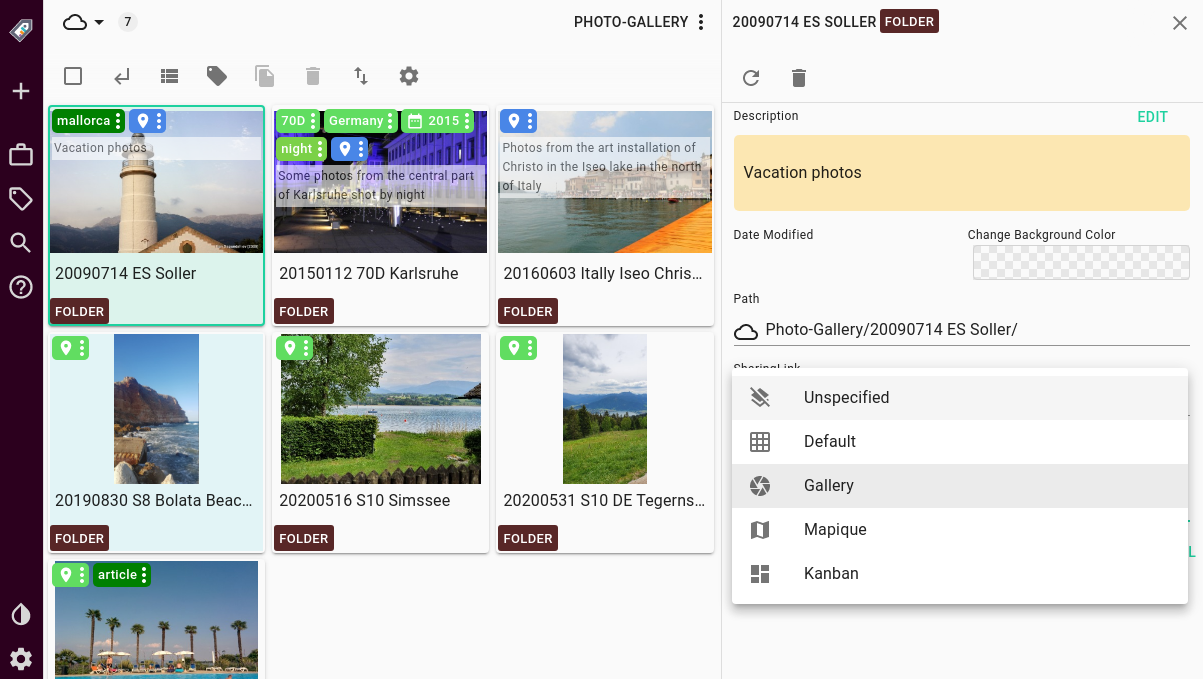
The **Armenian, Japanese, Korean German, Indonesian Italian and Chinese translations were updated**, and now the **default electron spell-checker app is enabled** for the desktop version
**Command-line users can now open locations as a parameter,** **read-only locations no longer display a context menu,** **folder renaming** from the three-dot menu **now works as expected**, and the **deletion dialogue will show the correct filename**.
The **PRO** version had some major improvements regarding **external config:** **Smart tags can now be deactivated**, while the **theme colours** and the **welcome panel can be customized** from the external config, along with the **sidebar colour and advanced search**. More can found in the [documentation page](https://docs.tagspaces.org/dev/external-config/) dedicated to the **extconfig.js** with the which the app can be configured.
## Remote storage systems
While TagSpaces is a no-backend, offline first application at heart, t**he possibility to add remote storages on your own terms,** extends its functionality and extends its usability by a fair bit. Remote storages have had a lot of improvements in the last three releases too:
**Version 3.7** fixed the ability on **switching directories locally and on S3**, and also saw the **addition of “Close” and “Clear uploads” buttons** in the upload status dialogue.
In the PRO version, the **file previews are now optimized to only load the first 10k bytes** of any given file, and some upload issues were also fixed for both desktop and web versions when using an S3 compatible object storages.
In version 3.8 the **“open link” functionality was introduced** for handling external and internal links, which is most interesting for remote locations, with the one caveat that **the user sharing and receiving the link should have the same location ID** for it to work. Share links are **displayed in the file and folder properties** of each item.
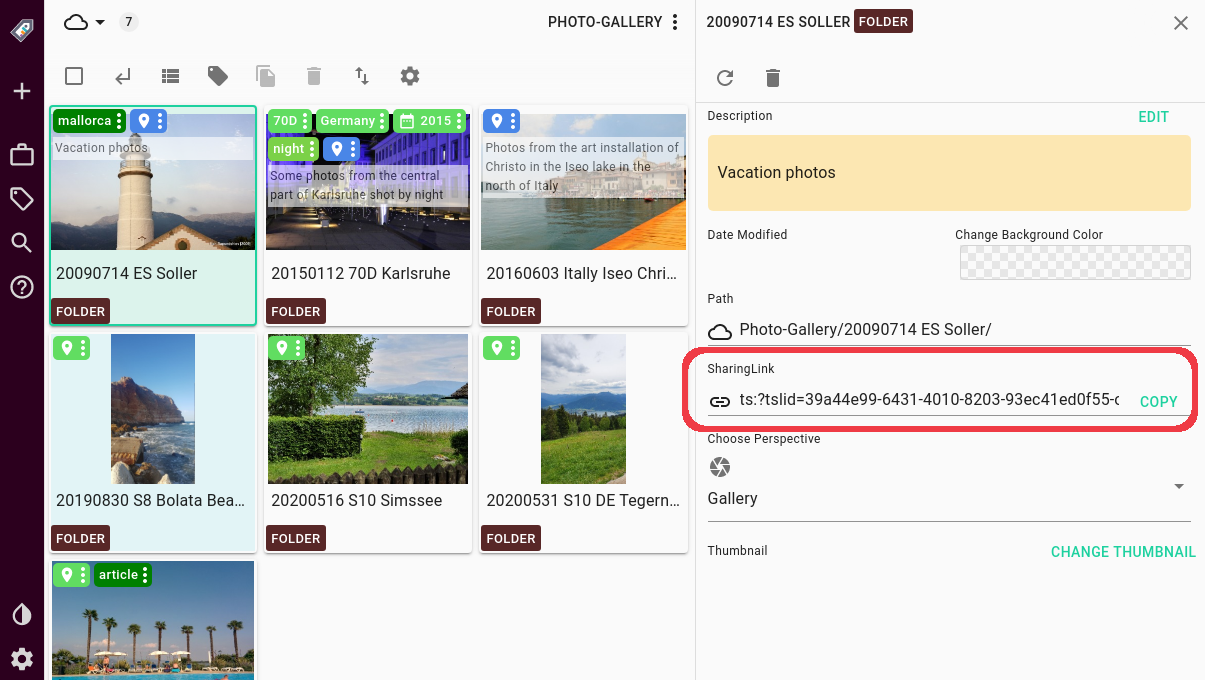
**Showing paths for cloud locations was improved** and **read-only external locations introduced,** while the issue of selecting two locations with the same or no path was fixed.
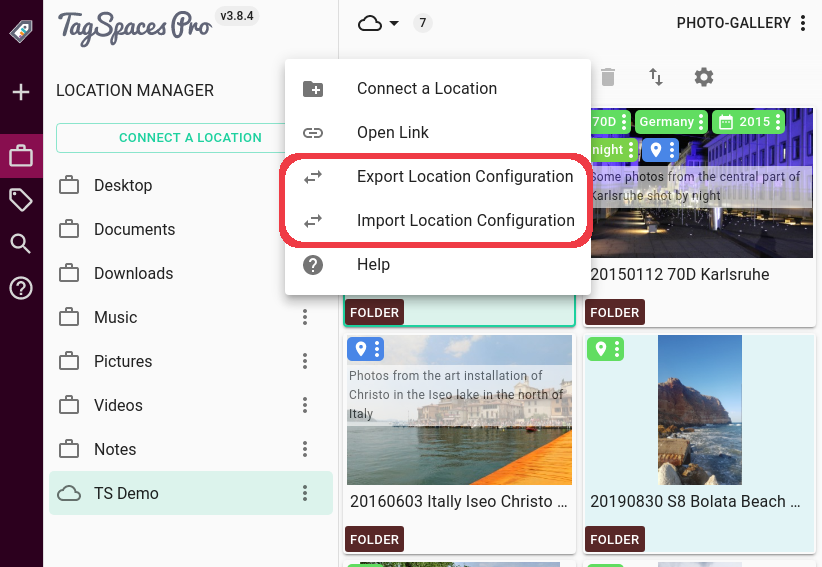
In the **PRO** version, users can now **import and export location configurations,** making it easier to add shared locations across users or devices.
## More to come
The list of changes does not end here. With **3.9.5 available**, there is still **more on offer**. Those we will discuss in the [next article](/blog/whats-new-in-version-3-9).
---
## What’s new in TagSpaces 3.9?
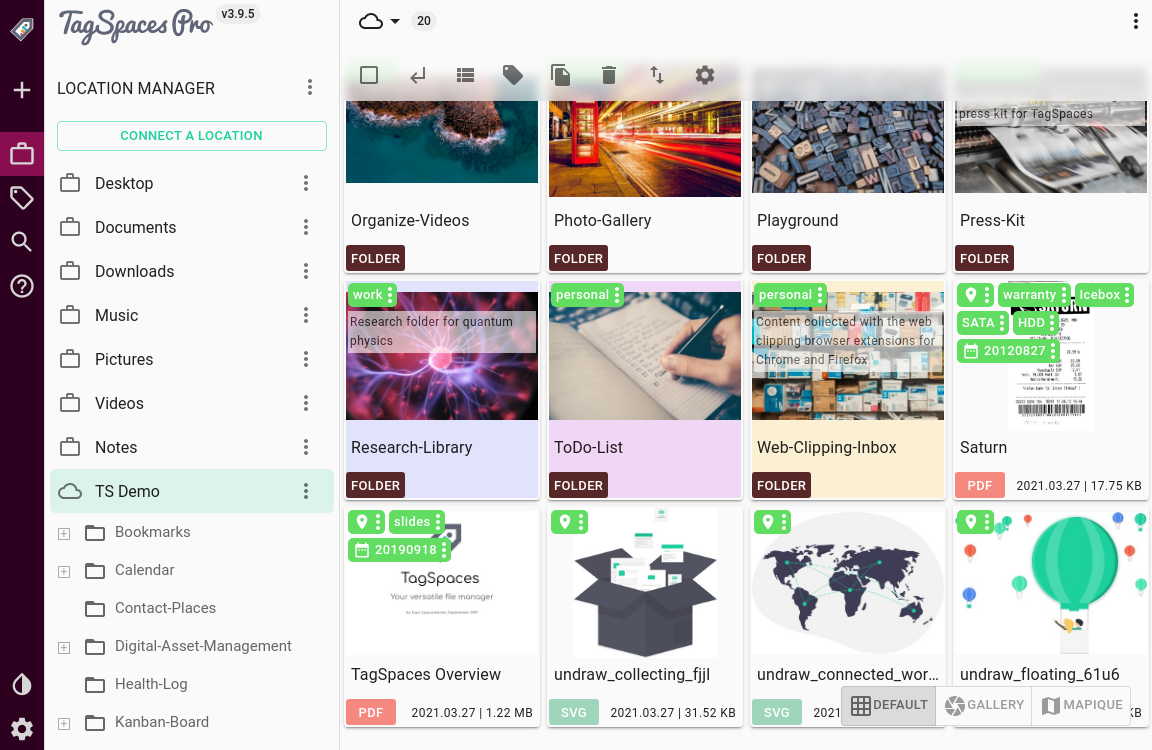
TagSpaces **v3.9.5, our most advanced version yet, is now available**, building upon and further improving the change introduced in previous releases.
## User Interface and UX features and improvements
**Version 3.9.5.** has seen its share of UI and UX improvements.
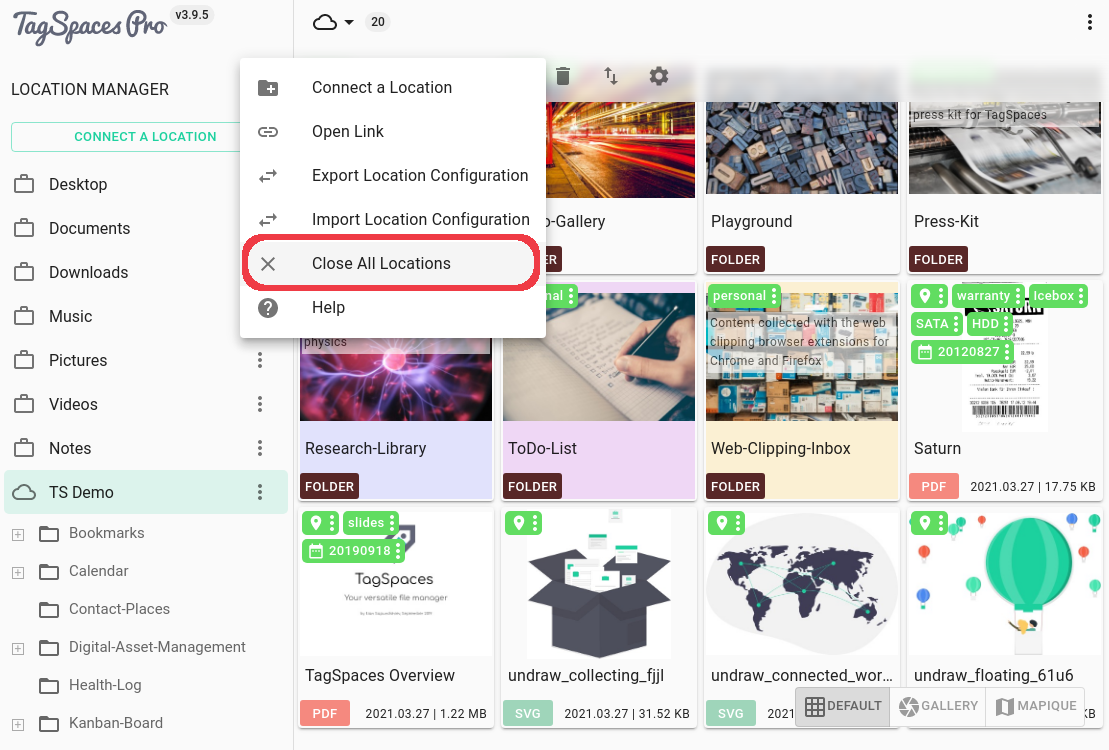
Menus have seen some important additions and changes. The **option to “open parent folders internally” was added to the File menu**, this is most useful for file and folder entries in search results. When in **the Default or KanBan perspective, a right-click on an empty area will bring up the directory menu**, and **the locations context menu gained a “Close all locations” entry.**
File context menus just got smarter too, now **right-clicking a multi-file selection will take into account the selected file-types, and only show the relevant menu options**. Many **dialogues also got an extra close button** now for easier dismissal.
Changing perspectives just got a lot easier in the **PRO** version with **the addition of the new Switcher toolbar**, that brings a serious usability improvement.
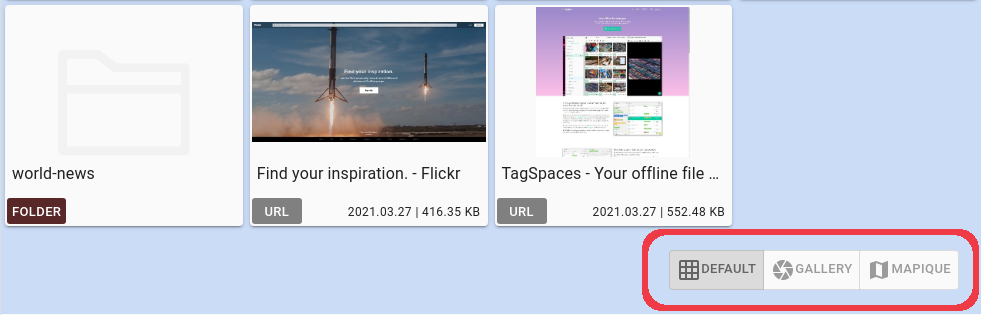
While **the KanBan perspective continued to improve** and got closer to production-ready, the **Default perspective now has user-definable thumbnails for folders.** When you right click a file, and choose “Use as thumbnail for current folder”, this file will become a cover image for that folder in the grid view, or gets displayed at the right-hand side in list-view, similarly to file preview images. This might seem most useful for image folders, but could be used for any kind of content.
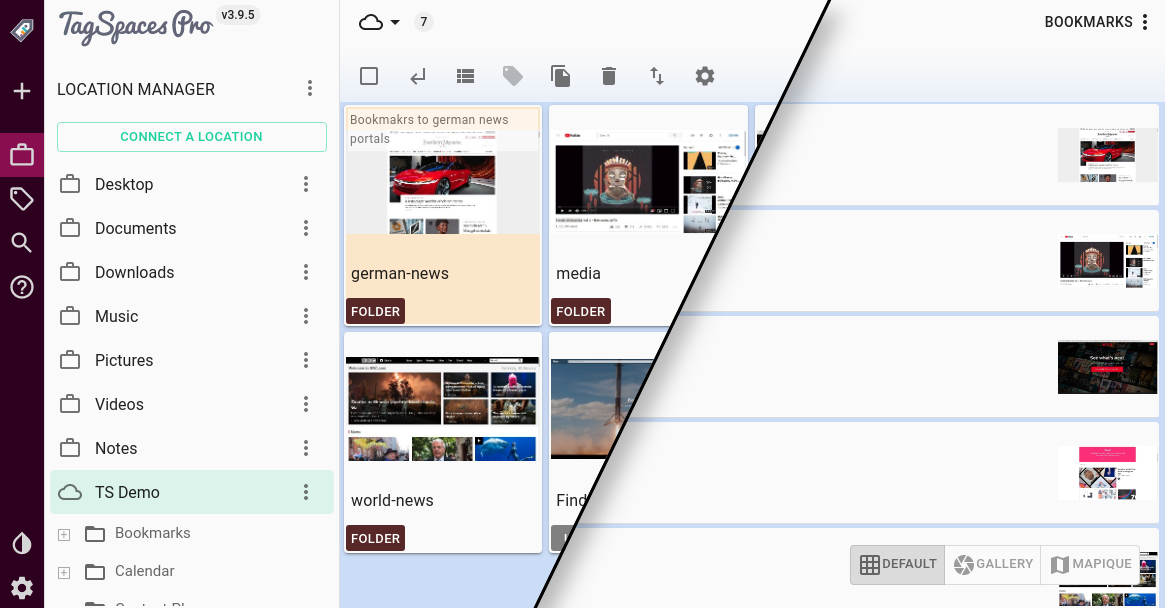
As a subtle change, the **file and folder titles in dark mode have** also **been adjusted**.
## Under the hood
**Version 3.9** offers **fixes for deleting tags and double tags in search results**, along **with updated Korean, Spanish, Armenian and Japanese translations.**
For **PRO** users, **directory watching was adjusted to the new indexing strategy** introduced in the previous version, as well as **changes made in the sidecar file being reflected in the user interface,** while **Enterprise** (not the spaceship) users can now a **load tag library from dynamoDB**.
## Remote storage systems
Remote storage-related improvements in **version 3.9** mainly affect the **PRO** and **Enterprise** versions: Now **deleting non-empty folders is supported on remote file systems**, and you can **rename folders** on object storages. **Custom thumbnails,** as seen above, **work on remote storages too** for **PRO** users, and **the file-upload experience has seen an improvement.**
As an under-the-hood improvement for remote locations, **object storages now have an optional sessionToken parameter**, which is useful for some connections to MinIO based bucket back-ends.
Meanwhile, the **Enterprise** version now has a **login screen with Cognito support.**
## So, should you upgrade?
If you have not already, **the short answer is: Yes, you should**. Most definitely should. Because why would you want to skip on all these cool new features? Until then, see you in the next release.
---
## New features in TagSpaces 3.10
Welcome to the June 2021 release of TagSpaces. There are a number of updates in this version that we hope you will like. Some of the key highlights are:
- [Search improvements](/blog/whats-new-in-version-3-10/#search-improvements)
- [Shareable links](/blog/whats-new-in-version-3-10/#shareable-links)
- [Export folder content and search results as CSV](/blog/whats-new-in-version-3-10/#export-folder-content-and-search-results-as-csv)
- [Viewer for CSV, XLSX and ODS files](/blog/whats-new-in-version-3-10/#viewer-for-csv-xlsx-and-ods-files)
- [Geo tagging improvements](/blog/whats-new-in-version-3-10/#geo-tagging-improvements)
- [Usability improvements](/blog/whats-new-in-version-3-10/#usability-improvements)
- [Multi-factor authentication](/blog/whats-new-in-version-3-10/#multi-factor-authentication)
## Search improvements
The search area of the app is the one which got a lot improvements in this release. But here is definitely more to come we are planing a bigger changes in the search user experience in the upcoming versions.
### Saved searches
The idea for saving searches for later user is not new, version 2 of the application had it already some years ago, but it was not migrated right away in version 3. So now we made a complete new implementation of this feature. The search panel was extended with additional dropdown field where you can select previously saved searches.
The save button from the screenshot above, open a dialog where you can give name to search you want to save. The saving functionality itself just takes all the parameters from the search area and saves them with the name given in the dialog.
There is also an edit button with which you can open a dialog where you can change the name of the query or delete it.
> Info: Search queries are independent from the locations, so they can be used on any location
### Strict and semi-strict search
Until this version TagSpaces was only searching with a hardcoded fussiness allowing to find a broader amount of relevant files. So if your are searching for 'books' TagSpaces will deliver also files containing 'boock' or 'booc' in the file names. There are many use cases where more precise results are needed so we decided to introduce the _strict_ and _semi-strict_ search modes. In strict mode the search will deliver results which are exact match to the search query including the case of the letters there. Semi-strict mode is exactly the same but case-insensitive.
### Index validity duration
This setting will allow you to specify different index validity duration for every location. The default value for all locations is 10 minutes. After this period expires and you start a new search, TagSpaces will re-index the location in order to have relevant results. Having a longer validation duration time makes sense if you have location with many files which do not change very ofter (e.g. you Photo library), or location placed on networks drives where the creation of the index could be slower. The number in this setting represents minutes.
In order to show this setting you have to click on the **Advanced Mode** button of the location's properties dialog, as seen in the next screenshot.
> Note: this setting can be specified also in the [extconfig.js](https://docs.tagspaces.org/dev/external-config/)
## Shareable links
Since this version TagSpaces offers two options for sharing. Both links are available in the entry properties area:
### Internal sharing
The first one which was introduced in version 3.8 is called "Link for internal sharing", available in the left part of the previous screenshot. It is intended for sharing links to files anf folders with other TagSpaces users. Those links will work on locations which are synced with tools such Dropbox, Google Drive or Nextcloud. Other important requirement is that those location should have the same location id. The location id can be changed in the advanced settings of the location properties.
Once copied to the clipboard with the **COPY**-button, the links can be shared for example per email or via messenger. The person with which you share the link needs TagSpaces in order to open it. She just needs to open the three-dot menu of the location area and click on the **Open Link**, as showed in the next screenshot.
### Sharing for downloading
The second kind of sharing links are called "Links for downloading" and are available only for files located on object storages such AWS S3 or MinIO servers. The area responsible for this kind of links is located on the right part of the sharing area. It consists of three elements as seen in the screenshot before the previous one:
- A dropdown where you can select the adjust the **validity duration** of the link. Available options are: 15 minutes, 1 hour, 1 day, 3 days and 1 week
- A **Generate & Copy**-button which will generate the link and copy it to the clipboard
- And a text field where the link is places after the generation
The generated link can be shared to anyone so he/she can start downloading the file.
## Export folder content and search results as CSV
Another long-awaited feature was introduced in this release. We have added a possibility to export the files and the folders of the current folder or from the current search results as CSV file. This will allow you to process the information collected with TagSpaces. The export can be started by clicking on the button from the main toolbar of the default perspective, marked on the next screenshot.
The exported file contains the following columns:
- name - name of the entry
- is file - true if the entry is a file, false if it is folder
- file extension - only for files
- tags - a semicolon separated list of tags
- size - in bytes
- last modified date - milliseconds since 1970/01/01:
- full path -
- description - the entry description in markdown format
You can see how such exported CSV file looks like in the screenshot of the next section.
## Viewer for CSV, XLSX and ODS files
Since version 3.10 TagSpaces ships a simplified viewer for basic spreadsheet file formats such as CSV, XLSX and ODS. This means that you can preview files created with applications such as Microsoft® Excel® or LibreOffice. The preview is really very basic for now, showing only the first sheet of multi sheet documents. Under the hood this extension uses the popular [SheetJS](https://sheetjs.com/) javascript library.
> Note: The support for spreadsheet files is not added automatically for old installation so you have to add these files format in the File Types of application settings dialog.
## Geo tagging improvements
For this version we spend a lot of effort to improve the geotagging experience in TagSpaces and especially in the [Mapique](https://docs.tagspaces.org/perspectives/mapique) perspective.
### Configure OpenStreetMap tile servers in the settings
TagSpaces uses OpenStreetMap based maps to represent maps in the geotagging capabilities of the application. With this version we added a way to add custom OpenStreetMap compatible map tile server. On the [OpenStreetMap wiki](https://wiki.openstreetmap.org/wiki/Tile_servers) there is a list of common map server.
> Note: Please follow policies and the terms of usage of any given map service provider!
With this functionality you can add your own map tile server, in case you want to have completely Internet independent geo-tagging.
You can switch through the all map tile servers entered in the settings, by clicking the button selected on the next screenshot.
> Tip: Users who do not want that TagSpaces is contacting any map tile server when opening the properties of geo-tagged file or folder, can now simply remove the default servers from the list.
### Input fields for entering lat and long in the geo tagging dialog
We extended the geo-tag editing dialog with an advanced mode. Once turned on, with the _Advanced mode_-button located in the bottom left part of the dialog, two new text fields appear for entering the **Latitude** and **Longitude** of the desired places on the Earth.
The simple mode of the geotagging dialog can be turned back by clicking **Simple mode**-button.
### New 'smart' icon as pin for files and folder
We have re-designed the pin icons in the [Mapique](https://docs.tagspaces.org/perspectives/mapique/) perspective. Now with the help of a little pictogram you can directly recognize if the pin is for file or for a folder. The little balkan in the center of the icon represent the first tag of the file or the folder with its color. This will allow you to visually recognize the tagged files and folders. In the following screenshot for example, every pin is a geo-tagged file representing one person. The year of birth is the first tag. And the years are organized in decades with different colors. So now with help of the colored pins on the map you can get a first impression about the age distribution of those people and maybe build some kind of cluster.
## Usability improvements
In this release we have done many improvements in the user experience, the most important once are explained bellow.
### Changing the order of locations with drag and drop
You can simply change the order of the locations in the location's area with drag and drop. Just grab the title of the location and move it up or down to change its order in the location's list.
### Simplified selection of thumbnail for folders
Setting of thumbnails for folders is available since a long time in TagSpaces. But the despite of the fact the default way very flexible it is not straight forward and requires many steps. The user have to open the folder properties, navigate to the very bottom, click a button to open a dialog where the desired image can be selected as a thumbnail and confirm the whole thing. Now, we have significantly simplified this process. We added "Use as thumbnail for current folder"-menu items in the file's context menu and "Use as thumbnail for parent folder" in the context for folders. Once you open a folder and the app generates thumbnails for the files in it, you can simply choose which thumbnail represents best the content of this folder and choose it as thumbnail for it.
## Multi-factor authentication
The Enterprise version deployed with AWS Amplify can now be configured to use MFA (multi-factor authentication). This means that user will be prompted in addition to standard user name and password, for a pin which will be send per SMS or Email. A TOTP (time-based one-time password) authentication process is also supported. For its activation a token app such as [Google Authenticator](https://play.google.com/store/apps/details?id=com.google.android.apps.authenticator2) should be used. The app is needed later for every login.
## Conclusion
So I think this is for now, a detailed list with the changes in this release can be found in the [what's new page](/whatsnew#version-3104--20210615).
---
## New features in TagSpaces 3.11
Welcome to the late August release of TagSpaces. There are a number of updates in this version that we hope you will like.
## WYSIWYG Markdown editor
WYSIWYG stays for _what you see is what you get_ and this describes our new markdown editor best, where you do not have to know anything about Markdown, but you can still use its power.
The new editor is based on the popular [Milkdown](https://www.milkdown.dev) framework and offers a lot of features such as:
- WYSIWYG Markdown editing
- support math expressions such as 
- embedding images, also as data URLs
- support for emojis 🍒
- support for tables
- simple text formatting and headers
- copy and paste markdown text
You can test it live [here](https://demo.tagspaces.com/int.html?tslid=10ades09-c7fd-zt33-fc67-a75db43rt4gz&tsdpath=demo%2FNote-Taking&tsepath=demo%2FNote-Taking%2Fcomplex-markdown-note.md).
> **TIP**: Just type `/` on a new line to get a menu showing all available markdown elements such as headings, bullet lists, images, quotes or tables.
## Show sub-folders in the Mapique perspective
In general, not all folders have a geo tag but the [Mapique](https://docs.tagspaces.org/perspectives/mapique/) perspective shows only files and folder which have such tags. This is kind of problematic if you are trying to navigate through a tree of folders. That's why we have added a new button in the main toolbar of the Mapique perspective, which turning an overlay containing all sub folders of the current folder on and off. Once turned on, the user can seamlessly navigate deep in a folder tree (even if there are not geo tags). The following video shows this process.
## Location based tag group
Location tag groups and tags are very useful for sharing tags with other users who are working on the same files.
To activate this feature, you have to open the advanced tab of the settings and click on the checkbox marked on the following screenshot.
After the activation, a new dropdown called _Store Tag Group in_ will appear in the dialog for creating tag groups.
Technically, the tags in this tag group will be saved in a file located in the `.ts` folder of the current location. This way, these tags will "travel" with the location by copying the location's folder to a new place, USB stick or just syncing it with Dropbox.
## Ignore patterns for locations
This feature is useful if your location has large folders containing many files with which you are not working and would like to be ignored by the application's search function. This is available in the advanced area of the location's properties. Here you have the ability to add and remove ignore patterns for folders.
Once a given pattern is added and the location is reloaded, all the matching folders will be displayed grayed-out as visible on the following screenshot.
## Set file tagging method per location
Choosing the tagging method for all locations as once was limiting and kind of inconvenient. Some locations contain files which do not have to be renamed for various reasons and here the sidecar tagging was the recommended way. On the other hand, there are locations with files where the renaming of the file is not problematic and is even wanted since it sticks the tags to file more robustly. That's why we have introduced in this release the ability to set the tagging method per location. This setting is available in the advanced area of the location's properties.
## Duplicate files
With this feature, you will be able to easily create new documents based on an old one. Just right click a file in the default perspective and choose "Duplicate file", to create a copy of the file. The new file can be easily separated from the original, since it will have the tags: "copy" and e.g. "20210831T1230". The second tag represents the date and time of the duplication.
## Apply to tags from the tag library to selected files
This is an additional method for adding tags to selected files or folders. The main advantage here is that doing so does not require a drag and drop action, which is needed on mobile devices or by using TagSpaces on touch screens, where the drag and drop is generally not available.
## Re-order tag groups and tags with drag and drop
And last but least, there are some usability improvements for managing the tag library and the tag. As seen in the following video, you can now change the order of the tag groups in the tag library with simple drag and drop. On top of that you can change the order of the tags in the tag group also with drag and drop.
## Re-order tag on files with drag and drop
The following video shows the ability to change the order of the tags on tagged file or folder.
> **NOTE**: If you have a file tagged with a combination of sidecar and file name tags, the sidecar tags will always stay in the first place.
---
## How I manage my ever growing collection of photos?
Most of the smartphone companies offer some way to store and organize your photos. Google and Apple for example sync all your photos on their own respective cloud services — Google Drive and iCloud. Although these solutions are convenient, they cost you money and the ownership of your data in the long run.
Recently I took a picture of my son with the iPad. The photo came out at the whooping 15 MB, 5 MB for the picture and 10 MB for the movie, which was automatically created before the actual taking of the photo. I suspect that the storage space taken after pressing the shutter button on the latest iPhone is even larger. The cheapest iCloud plan of 50 GB of space costs you ca. 1 € per month (Google's current price is 2 € per month for 100 GB). It doesn’t look like much, but with the size of the photos and especially with 4k videos you can easily reach the 50 GB, and then you will need the next plan. Once you have so much data on a cloud system you may encounter **vendor locking** issues when trying to move your files from the cloud service.
The main point is not the price but the fact that my photos will be stored in the Cloud, which as we all know is a fancy word for someone else’s computers, with his terms of use and limitations... In addition, in the Apple/iOS case, the most frustrating thing for me is that the photos are hidden in some cryptic file structure, which can be edited only with the Apple's Photo app. Not that I don't like how the Photos app presents my pictures, but the lack of obvious alternative for doing this on a Mac is still an issue.
## Getting the photos from my smartphone
In general, I take a lot of photos. Especially of my kids, trying to capture how they grow up in front of my eyes. During the years I‘ve had a lot of cameras, and I still own a DSLR, but my main source of photos now is my smartphone. Since I am not using a Cloud sync service, I am copying on a regular basis the photos from the phone to my computer because I want to store all the photos I shoot on my phone.
On Android, which is the operating system of my current smartphone, the photos are saved in the internal memory of the phone (or on a SD-card) in a path which usually looks like this `/storage/emulatated/0/DCIM`. Once connected to my Linux laptop it looks like this:
My recent photos are placed automatically by the Camera app in the `Camera` folder. So I simply take this folder and rename it to `Camera_20210929` where the last number represent the current date. Now I am copying this folder to the `Photos` folder on my PC. By renaming the folder, I know which photos I have already copied and when I have done this. Don't worry the `Camera` folder will be re-created as soon as you make you next photos. And at least the Samsung Photo app is clever enough to recognize that this folder was renamed so it will show the photos from all the `Camera_xxxxxxxx` folders.
:::tip
**iOS users**: Once connected to your computer, the folder with the photos will be in read-only mode, so you are not able to change folder names. In this case you have to know which was your last copied photo or video.
:::
## Organizing the photos on my PC
In the `Photos` folder on my PC the first level of sub folders represent the years. The names of the next level of folders contain basic information for the photos in there. For example `20210517 Birthday Party XY S10 DE` or `20210814 Hiking Alps Tirol S10 AT`, where the first 8 digits represent the date (or the last date) when the photos were taken. The next few words are short description of the event or the place, then I usually put the name of the camera/phone with which the photos are taken. Optionally, at the end, I put two characters which are the code of the country where the photos were taken.
So after coping the folder with the last photos from my phone, I open this folder with a regular file manager and separate photos from different events in separate folders. After I am done with this, I rename the folder from `Camera_20210929` to something like `20210929 S10 Misc`. The `misc` in the name tells me that this folder contains miscellaneous images, since the grouped photos are already moved out of there.
Putting the current date in ISO format (e.g. 20210930 for 30th of September 2021) in the front of the folder name has a practical reason. This way my folders will be chronologically sorted once they are opened in a file manager (e.g. Windows Explorer or Mac Finder), where the default sorting is usually by name.
So for now everything looks pretty standard, at least on Ubuntu and macOS. On Windows you may get at least some preview of the images which are inside the folders.
## Preparing the photos in TagSpaces
From here, I continue in the desktop application [TagSpaces Lite](https://www.tagspaces.org/products/lite/). This is a free software initially started by me, with the main purpose to help the organization of files and folders on Windows, macOS, Linux and Android.
The folder containing my photos is connected in TagSpaces with the options to store the tags in the file name. TagSpaces offers two options for tagging files: by adding the tags in the file name and by using a helper file, which we call sidecar files. These files are in JSON format and are stored along the main file in `.ts` sub folder. For photos I prefer to store the tags in the name of the file, because this is a more robust way of tagging which "survives" moving the file or syncing it with services like Dropbox. So when I tag `IMAGE_4265.JPG` with the tags `sunset` and `bestshot` it will be renamed to `IMAGE_4265[sunset bestshot].JPG`. One more advantage is that the tags are usable even outside of TagSpaces. Just use the built-in search of your operating system to find files tagged this way. The file tagging method can be specified per location in the location properties dialog, shown in the next screenshot.
### Generate photo thumbnails
Once the photos are split into folders, I open them in TagSpaces and the app generates thumbnails (small image previews) from the photos, so I can easily preview them the next time I open this folder. Depending on how many images I have in a given folder and how big these images are, the process of thumbnail generation can take some time. I usually do not have folders with more than 500 images, so the time for the thumbnail generation on my laptop is acceptable (< 30 sec).
### Choose thumbnail for a folder
After the thumbnails are generated, I choose one of them as a thumbnail for the currently opened folder. This is done by opening the context menu with a right click of the selected file and choosing "Use as thumbnails for the current folder" from there.
### Manually tag and add descriptions
Now is the time to tag some of the photos. This is, of course, an optional step, where I do not spend too much time. In general, I try to find the best images in the folder and add the tag `favorite` or `bestshot`. If I find a special shots of my kids, I tag those photos with a tag referring to the kid's name. This way I am able to find the best shots of my children for a given year very easy with the search functionality of the application.
The tagging can be done in different ways. In general I use the drag and drop functionality as seen in the following screenshot, where I have selected three photos and I am dragging a tag over the selection. For touch screens there is a tagging dialog, which can be opened by clicking the button with a tag from the toolbar (shown in the same screenshot).
For some special images, might be worth adding a description. This can be done in the file properties area of the app. Basic markdown is supported in the description of the files and folders there.
### Extract geo coordinates from JPGs
I have turned on the storing of the current geographic coordinates (latitude and longitude) as EXIF/IPTC data in the JPG files on my phone. This allows me to extract these coordinates later and present them nicely in [TagSpaces PRO](https://www.tagspaces.org/products/pro/). The PRO version of the app features the Perspectives, which allows me to present the files in a folder with different view depending on the use-case.
So now is the time to open the folder in the [Mapique](https://docs.tagspaces.org/perspectives/mapique/) perspective, dedicated to visualize geo tagged files and folders on a map. This can be done by clicking the button marked with (1) in the following screenshot. Clicking on button marked with (2) will start the extraction of the geo coordinates.
The extraction takes some time depending on how many JPG files you have in the folder. After it finishes, the map will be automatically focused to the place where the photos are taken. All the photos with geo coordinates are now tagged with a geotag and represented as small markers on the map. Clicking on a given marker will open a small preview of the image.
:::tip
**Geotagging Folders**: As an additional step you can tag the current folder with a geo-tag pointing to the current center of the map. This can be done with the button marked in the previous screenshot.
:::
### Browse the photo folder in different perspectives
As a result of the steps so far, now when I navigate to the parent folder, which in my case is `2021`, I will see all the sub folders with previews, so I can easily recognize their content and have a nice overview of my photos taken so far in the year 2021.
The geotagged folder will have a small tag with a marker icon, as seen in the screenshot. Having those tags in place, when I switch again to the Mapique perspective I will get a map presenting the places where I have taken the photos.
Another feature of the Mapique perspective is the additional setup of map tile servers, which will render the map with different styles. The styles can be switched with the button emphasized on the next screenshot. Here we see a topographic map which is generously provided by [opentopomap.org](https://opentopomap.org) and [openstreetmap.org](https://www.openstreetmap.org/).
You can navigate to any sub-folder by clicking on `Navigate to Folder` button in the popup. Or you use the folder list on left, which contains all the sub-folders and not only the geotagged ones.
## Backup of the photos on a NAS (Network-attached storage)
The SSD of my laptop is unfortunately not of infinite size, so I was forced to hold only photos from the current year and the previous two years on my laptop. Images from the other years are stored on my [NAS](https://en.wikipedia.org/wiki/Network-attached_storage). From time to time, during the year, I am syncing the folders containing the photos from the current year to the NAS system, so I have a backup copy of the already organized folders. Speaking for the NAS, mine is of a popular NAS brand, containing two hard-disks in RAID 1 mode, so nothing fancy.
## Sharing my photos with TagSpaces Web Pro
Besides holding my entire photo collection, my NAS has another function. It runs a MinIO service in a Docker container and hosts an installation of [TagSpaces Pro Web](https://www.tagspaces.org/products/proweb/), which is the web based version of TagSpaces. [MinIO](https://min.io) is a service which can display folders as AWS S3 compatible object storage. As such they can be connected in TagSpaces Pro Web. So my main photo folder containing the folders with all the years so far is displayed here, which makes it easy to browse on my mobile phone and tablet.
:::tip
You can make you NAS accessible over VPN from the Internet. This will give you access to your photos on computers, tablets or mobile phones from everywhere.
:::
With the combination of TagSpaces’ organization of files and NAS storage, I have something similar to Google Drive or Apple’s iCloud but running entirely on my hardware with my software and hosting all the files I need for free. No files of mine are hosted on other proprietary networks and I am in complete control of my own content.
Since my photo folder is reaching 1.5 TB, I would be charged by Google or Apple with 9.99 € per month if I want to host my files on their cloud services. My NAS and my DSL connection might have different SLAs compared with the Big Tech but that’s not the point if you really want to own your files, now is it?
The NAS and the integrated hard drives have, of course, their price. We should also not ignore the the time I invest for keeping the things there running.
## Long-term archiving on M-DISC Blue-rays
Since my NAS is always on and connected to the Internet, it should not be used as a backup system. Ten years ago it was enough to burn my photos on CDs or DVDs but this is not feasible anymore due to the size of my yearly photos folder. So I started to search an alternative for my long-term backup strategy.
I came upon the [M-DISC](https://en.wikipedia.org/wiki/M-DISC) technology, which is basically creating special Blu-ray discs. Here the data layer is made from a material, which according to the producer can hold the data for up to 1000 years. This sounded very promising, so I bought an external, M-DISC certified Blu-ray burner, because the only BD-device at home was in my son's Play Station. Writable media are available in 25, 50 and 100 GB. I usually take the 50 GB, since the idea of a potential loss of 100 GB, regardless of the reasons, scares me. The good news is that the M-DISC can be read by almost every Blu-ray device, the bad news is that I do not know if there will be a working Blu-ray reader in let's say 20 years.
## In conclusion
The best thing of using files and not external services is that my photo folders are self-contained, carrying all the information like tags, description, geo-coordinates and thumbnails. I can just copy any folder, from a given year or just from some "events" put it on a USB stick or sync it with e.g. Nextcloud or Dropbox and I will have my organized and enhanced photos on another computer. And, if the other computer has TagSpaces installed I will have the same experience with my photos there.
If TagSpaces is not on the other computer, I will "just" have a backup of my sorted in folders original images and not some downscaled versions (optimized for viewing on mobile devices or with removed EXIF data), which I can still open with the built-in image viewer in operating system of the other computer. All this, without the need of exporting and importing files from online services or migrating databases with metadata.
Please [let me know](https://twitter.com/ilianste) what you think about my photo managing routines. I am open for improvements and other suggestions.
My next article will explain, how I build my personal Dropbox alternative and organize my notes, bookmarks and general stuff found on the Internet, so stay tuned for a follow up.
---
## Major improvements in the brand new TagSpaces 4.0
We recently released version 4.0 of TagSpaces. This is a major release containing many improvements of the user interface and some big changes under the hood of the app. For the desktop app we have decoupled the processes for search index generation and thumbnail creation for images from the main app. Now they run as separate processes, which makes the main user interface run more smoothly. For the image thumbnail generation (for e.g. JPG, PNG, GIF or SVG files), we now use the native [sharp](https://sharp.pixelplumbing.com/) library, which is blazing fast and brings enormous performance gains.
We have redesigned how the left sidebar area of the application behaves, unifying much of differences between the mobile and desktop mode of the application. Furthermore the icons for the buttons for navigating to the next and the previous files were exchanged with down and up arrows.
## Improvements in the search
Another major change in this release was the redesign of the user experience for the search. We moved the search area out of the left panel, where it was not always visible. Now, if you need the search, it easily accessible via the search icon placed in the upper-left part of the central area of the app. Here the button is always visible, even in the mobile mode for Android.
We simplified the search area, by separating the advanced search in a dedicated pop-over, which can be opened by clicking the button with the sliders on the right to the search button.
To search for specific tags, you are now able to enter them directly in the main search input box. So by entering this `jpg +tag1 -tag2` in the search query, you will get file containing jpg in their names, having the tag `tag1` and not having `tag2`. Placing `|` in front of tag will handled as an inclusive logical "or". For example the query: `|tag1 |tag2` will find files and folder having one of the tags or both of them.
As seen in the following screenshot, opening the advanced search will show the tags from the search query in their appropriate places.
## Stored search queries
In version 4 we improved the newly introduced stored searches. While the creation and the changing of the stored searches have remained in the advanced search area, a clear list of all stored search queries is provided in the left area of the app. Here you can directly select such stored queries and execute them on the current location.
:::tip
The stored searches are location independent, so they can be executed on any location.
:::
### Export and import search queries
In the three dot menu of the stored search are you will find menu entries with which you can export and import search queries. The file format of the export is JSON, which can be opened and edited with any modern text editor. In the text editors you can fine-tune the search queries and distribute them to another TagSpaces installations for you or your colleagues.
Due to the fact the search queries have unique IDs, TagSpaces can recognize if the query is already imported so you can skip the re-import or import the newer version of it. An example export can be found in the [documentation](https://docs.tagspaces.org/dev/metafileformats/#format-of-the-exported-search-queries) of the project.
## Linking files and folders
One long awaited functionality is the ability to create links between files managed in TagSpaces, so you can navigate from one file to another. This is possible in version 4, you can use the description field of any file or folder to create links to other files and folders. If you are using markdown for your notes you can place the same kind of links in content of the file.
The context menus of every file and folder in the default perspective now have the menu entry **Copy Sharing Link**, which will generate the sharing link and copy it to the clipboard. This link can be used for creating links to this file inside TagSpaces.
You can find more about how linking works on a dedicated place in our [documentation](https://docs.tagspaces.org/linking/#under-the-hood).
## Redesign of the create file dialog
The create new file dialog was redesigned by adding more explanation to the purpose of every file type you can create here.
## Supporting diagrams in the markdown editor
In version 3.11 we have added a new markdown editor based the Milkdown framework. Luckily they have developed another great plugin for creating diagrams. For more details, you can see the website of the [Mermaid project](https://mermaid-js.github.io/), used in this new plugin. A great advantage of the Mermaid project is the ability to define simple diagrams with human-readable text, making this ideal for embedding in Markdown files.
## Add many tags at once in the tagging dialog
Now it is possible to add many tags at once, separated by commas, in the dialog for tagging multiple files.
## Added MGRS encoding for the geo tags
[MGRS](https://en.wikipedia.org/wiki/Military_Grid_Reference_System) is another standard similar to [Pluscodes](https://maps.google.com/pluscodes/) (already supported by TagSpaces) for geo-coding coordinates of places from our planet.
You can switch to this geo-coding format in the advanced section of the application's settings, as shown in the next screenshot.
The following screenshot shows the geo-tagging dialog, with a MGRS geo tag of a locations somewhere in London.
## Using ISO 8601 for representing datetime tags
With this version we decided to align the representation of tags for date and time to the international [ISO 8601](https://en.wikipedia.org/wiki/ISO_8601) standard. So now we separate the date from time with a big `T` instead of `~` (e.g. 20211105~113021 is now 20211105T113021). The main issue with the `~` was that when used in file name tags, it was wrongly interpreted on some file systems or cloud providers. So, in the end, this representation is more versatile and widely accepted, due to being part of the standard.
## Human readable JSON exports
All the JSON exports are now formatted with 2 chars intend. This makes the files readable without further reformatting and allows the creation of configuration files for TagSpaces with simple copy and paste from the exports.
---
## A tutorial for using Syncthing with TagSpaces
A detailed article about using TagSpaces with Syncthing was published recently on [Medium](https://attilaorosz.medium.com/syncronise-your-offline-notes-across-all-devices-without-the-cloud-1e82fa53d1f1). It describes in detail how you can sync continuously tagged files and folders with the help of [Syncthing](https://syncthing.net/) program across multiple devices.
---
## Version 5 - new features and improvements
We just a released version 5 of TagSpaces, which is a brand-new release including a lot of changes under the hood of the application, but also many new features and improvements. In general we concentrated on enhancing the ability to customize and personalize your folders. Here you will find what is new in this major update of TagSpaces.
## Connecting S3 buckets and web version available in TagSpaces Lite
Maybe the most important change in this version is the making of two major PRO features, available in the free version. The first one is the ability to connect S3 compatible storage (e.g. AWS S3 or Wasabi buckets) as locations. Now the Lite version features this functionality and TagSpaces can be used as a file manager and browser for the S3 buckets.
The second major change is making the web version of the application fully open source. So now there is free web based package of TagSpaces Lite, which can be hosted on a simple web server e.g. a NAS system or from S3 bucket. This way you can open TagSpaces in any common web browser and from different devices including Android and iOS mobile phones and access files located on S3 buckets.
## Supporting multiple windows
Since this version many windows from the same TagSpaces instance can be opened simultaneously. This allows you to open different folders and files at same the same time. So you edit you todo list as markdown file and listen to your favorite music played from another TagSpaces window.
A new window can be opened by a click on the TagSpaces' logo in the upper left corner of the application. Alternatively you can open in a new window every document displayed in the preview area by a click on the button marked in the next screenshot.
:::info
In the web version the buttons opening new windows on the desktop app will open new browser tabs.
:::
## Introducing the quick access area
We created a new major area in the app aiming to allow the users access their files and folders more easily. We call this area "Quick access" and it can be opened by clicking the button near the button for opening the tag library in the bottom left part of the app.
The area contains the following list:
- Stored search queries - already introduced in version 4
- Bookmarks - new in version 5, described bellow
- Recently opened files - new in version 5, described bellow
- Recently edited files - new in version 5, described bellow
- Recently opened folders - new in version 5, described bellow
### Bookmarking for files and folders
A long-awaited feature for the app, was the ability to create bookmarks. Now in version 5 you can create a bookmark for any file or folder, regardless if it is local on your pc or stored remotely on an S3 bucket. This can be achieved by clicking on the button highlighted in the next screenshot.
Once you have created a bookmark, you can go to the quick access area and open the bookmarks list. A click on the bookmark will open in the file or the folder in the preview area. Hovering the bookmarks icon will show a tooltip containing the path to the bookmarked entry the date of the bookmark creation. You can also delete the bookmark by clicking the button with the minus icon on the right.
:::info
The bookmarks are stored in the local storage of the app (or the browser for the web based app), so this is as expected a pure offline functionality.
:::
### Recently used files and folders
Until version 5 the app was not keeping track of the files and folders which have been opened in the application. We have added these features in the latest version, so now you can easily find files you have recently opened or edited. The app is also saving the folder for the folder properties were opened. The three lists can be found in the "Quick Access" area after the bookmarks section.
:::info
The lists with the recent files are stored in the local storage of the app (or the browser for the web based app), so this is as expected a pure offline functionality.
:::
### Configuration in the settings
In the advanced tab of the application settings, you can adjust the amount of files/folders collected in the lists. You can also switch off the collection of this information, by selecting the "disabled"-entry in the dropdown.
## Color gradients for folder background
In the grid and list perspectives, you can now define an image or a color gradient as background for every folder. This can be achieved in the folder properties area.
We have added 4 predefined gradients, which can directly be used as background for folders. Just click on one of the them to apply it as background. You can always clear the background color/gradient via a click on the button with the strike through drop icon, available after the four sample gradients.
A click on the color or gradient in the "Folder background" section will open a color picker which can be used also as gradient editor.
:::tip
You can use the predefined color gradients as templates for creating further gradients in the color picker dialog.
:::
## Images as a wallpaper for folder
Clicking the edit button in the "Background image" area will open a dialog where you can choose a picture from your computer as background image for the folder in the preview area. If you do not have suitable pictures or can use one of the included pictures.
If you do not want a given folder to have a background image, in this dialog you can remove it by a click on "Clear background image"-button.
In order make the choosing of a given picture as a background image, we have created the "Use as Background Image" menu entry to the context menu of images. With this feature you can add a background image with just to clicks.
:::info
If you have selected a background image for a given folder, the background color or gradient won't be visible anymore.
:::
## Folder details and description in the main perspective
### Folder details
In version 5 of the application, the grid perspective shows a folder details area after the perspective toolbar. This area contains the name of the folder, the count of the files and folders in it, a preview of the folder description (if available) and the folder thumbnail (if available). This option is available also in the list perspective and can be turned on and off the corresponding perspective settings.
### Folder description
In addition to the folder details, the list and grid perspective can show the folders description in full length.
:::tip
Since the folder description can be in markdown format which support links, embedded images and basic formatting, you can easily turn every tree of folders to a kind of Wiki system.
:::
### Configuration
Both new options can be configured separately for the list and grid perspective in the corresponding settings dialog.
## Per folder perspective settings
With this feature you can adjust very precisely how a given folder will be presented in the list or the grid perspectives. It is a useful addition to the ability for selected a perspective for every folder. For example if a folder contains photos, you may want to open it always with the grid perspective, hiding all sub folders, showing the folder details on the top and displaying large photo previews. On the contrary if you have a folder containing word and excel documents, a list perspective with a small file preview and showing the sub folders may make more sense.
These options can be configured in the perspectives settings dialog, which can be accessed by clicking on the button marked in the previous screenshot. This dialog has two buttons for confirming the changes:
- The first one called `Set as default` will persist the setting in general way, valid for any folder opened in this perspective (except the folders for which there a custom setting).
- The second one `Set for this folder` will make the setting valid only for the current folder
Once you have created custom perspective settings for a folder, you may want to remove them. This can be achieved with the `Reset custom settings`-button, available in the upper part of the previous screenshot.
## Experimental WebDAV support
We added a initial experimental support for connecting folders from a WebDAV servers as locations in TagSpaces.
:::caution
The current implementation is very limited. For example, the opening of the most file types is currently not possible.
:::
## Some other changes
Here is a list of the most important other features and improvement, which have made it in this release:
- Added the ability to open geo-tags in online map service like OpenStreetMap
- Added button for opening the parent folder of the currently opened file in perspective area of the app. This is useful if you have opened the file from search results or from a shared link and you want to open the parent folder of this file.
- Added a dropdown in the search bar for a quick access of the saved search queries
- Enabled preview of images in AVIF file format
- Made the number of the selected files visible in the drag layer
- Redesigning the entry properties area
- Optimizing the dialog for creating and editing locations
- Added a set of image to be used as thumbnails and icons for folders. We have thankfully used icons provided by [illlustrations.co](https://illlustrations.co/)
## Changes under the hood.
- The user interface of the app was migrated to Material UI version 5, offering a lot of new possibilities and making the source code of the app more future proof.
- The version of the underlying Electron package was also update to a newer one.
- Switching back from yarn to npm for various reasons.
---
## Version 5.1 - what is new?
ProFeature,
EntFeature,
FullScreenImage,
CenteredImage,
CenteredVideo,
} from "@site/src/components/CommonBlocks";
Version 5.1 of TagSpaces was released recently, containing some new features and improvements. The main feature on which we spend a lot of development time is the Kanban perspective, which is again available in the PRO version.
## The Kanban perspective
The [Kanban](https://docs.tagspaces.org/perspectives/kanban/) perspective was rewritten from scratch in
this version and is again part of the PRO version. Basically it gives you the ability to represend any folder with sub folders as a Kanban board, where the sub folders are the columns and the files can represent tasks.
{/* truncate */}
We have also added an import functionality for JSON exports of Trello boards, so you can easy migrate or try out existing Trello boards in TagSpaces. More on this functionality in the documentation of the [Kanban perspective](https://docs.tagspaces.org/perspectives/kanban/#migration-of-trello-boards). Having your boards as simple files and folders on your PC, Mac or Android, makes your work not depend on the Internet and you a full owner of your data (if you have privacy concerns).
In general the Kanban perspective suits most for boards which are used mainly by one person, but you can of course share them with other by sharing the Kanban folder with your favorite sharing service (e.g. Nextcloud, Dropbox, Google Drive). You can of also place this folder on a S3 object storage and connect it as location in the TagSpaces app of different user. This is how we currently use the Kanban perspective to coordinate the development of TagSpaces.
## TagSpaces Links
In order to increase the compatibility with existing applications we have changed the prefix of the TagSpaces links (aka tslinks) from `ts:?` to `ts://?`. Links created with previous version of the app will of course be further supported.
Beside this, in this version you can paste a tslink directly in the search field of the app, hitting the `enter` key will open the folder, file or location to which the link points.
More on the linking concept can be found in the [docs](https://docs.tagspaces.org/linking).
## New themes and support for systems' dark mode
We have added some new light and dark user interface themes in the application. The themes can be changed in the settings of the app. There, you can also select if the app should respect on start the dark mode setting of your operating system.
The following image carousel shows screenshots of the different UI themes.
## Changes in the file creation dialog
A new text field was added on the top of the file creation dialog, showing the automatically generated file name. The text is preselected, so you can easy change it, to what ever you need. This is especially useful for the Kanban perspective where you create this way new cards. Bellow of this text field you will see the path where this file will be created. The path defaults in most of the cases to the current folder, but when there is no opened location, the dialog will create the file in the root folder of the first location in your location manager.
## App history navigation (beta)
In this version we introduce the ability to navigate on the app's history. We have added two buttons, a `go back`-button for going to the last opened file, folder or location and a `go forward`-button for reverting the go-back action, so you should be navigation to the places where you have been before clicking on the go back button. A go back button is useful if you have clicked on an internal TagSpaces link or when you have switched to a folder or location in the location manager. In these cases the go back button will bring you back to the previous place.
Every time a folder, file or location is opened an entry in the app's history is written. These buttons are helping the navigation in the app's history.
:::caution
This feature is still in BETA, not all use cases are tested and supported, but it works for the most of them.
:::
## Various Improvements
- Now all the markdown rendering is happens thanks to the same powerfull [Milkdown](https://milkdown.dev/) framework which we use in the [markdown editor](https://docs.tagspaces.org/extensions/md-editor/) extension.
- The image viewer was extended to show the width and height of the currently viewed image and some more EXIF data points from JPG files.
- We have fixed some user interface glitches in the file types area in the settings.
- The loading of the default location is now skipped while opening TagSpaces links (ts:?..).
- The thumbnail generation for markdown and mhtml files was disabled, since it does not have any practical use.
- The name of the currently opened file is displayed now in the window title.
## Plans for the next major release
We plan a huge revamp of the search user experience and the support for ts:// links as protocol in the operating systems.
---
## Version 5.2 - what is new?
ProFeature,
EntFeature,
FullScreenImage,
CenteredImage,
CenteredVideo,
} from "@site/src/components/CommonBlocks";
Version 5.2 of TagSpaces was released recently. This time the focus was clearly set on the file viewer and editor extensions and on extending the search component. We have migrated all the legacy extension from Bootstrap 3 and jQuery to Bootstrap 5. Many of the used libraries were also updated to the newest versions. But let's start with the newly created extensions.
## Extension for viewing 3D models
We created a brand-new [extension](https://docs.tagspaces.org/extensions/3d-viewer/) for viewing 3d models. For now the extension supports a preview of 3d models in STL, OBJ, GLTF and GLB file formats.
{/* truncate */}
## Extension for previewing emails in MSG format
This version includes a new [extension](https://docs.tagspaces.org/extensions/msg-viewer/) for opening of emails saved in MSG format. This format is used mostly by Microsoft Outlook ®, which can meanwhile export emails in the more common EML format. Previewing EML emails is already supported in [MHTML viewer](https://docs.tagspaces.org/extensions/mhtml-viewer/) extension. Both extensions make TagSpaces a good solution for organizing important emails with the help of tags.
## Extension for viewing reveal.js slides
With this [extension](https://docs.tagspaces.org/extensions/slides-viewer/) you will be able to open slides made with [reveal.js](https://revealjs.com/) directly in TagSpaces. This extension has, for now, an experimental character and may not support all of the countless features of the reveal.js-presentations, but even so it is a nice addition to the application.
## Extension for showing markdown file as mind map
Added new experimental [extension](https://docs.tagspaces.org/extensions/mindmap-viewer/) for displaying the structure of markdown-files as mind map based on [markmap.js](https://markmap.js.org/) library.
## PDF extension support annotations
In this release we updated the pdf.js library which is the core of our PDF viewer. As a consequence you can now annotate PDF files directly in TagSpaces, by adding text and freehand drawing in different brush sizes, colors and transparency.
:::caution
The annotations made to the PDF files are not automatically saved, so you have to save the file manually using the save button in the toolbar.
:::
## Search Enhancements
The search component was greatly improved for supporting common actions in TagSpaces and for easy generation of search queries.
### Search actions
As usually the search can be opened by the CTRL+SHIFT+F (⌘+SHIFT+F on Mac) key binding. New in this version is the opening of a dropdown, having the two sections. The first is called actions and here you can choose among the following items, using the up and down arrow keys or typing the one letter shortcut followed by a column:
- **locations** - typing `l:` will make the dropdown list the current locations, so you easily find and open one by writing the first letters of it
- **filter** - typing `f:` will filter the current content of the folder by, without starting a new search
- **history** - typing `h:`will make the dropdown list the lastly opened or edited files so you can filter and open one of them
- **bookmarks** - typing `b:` will allow to filter and open your bookmarked files or folders
- **search query** - typing `q:`will allow to filter and start your saved search queries
### Search query composition
With the following commands you will have the ability to easy compose complex search queries, combining or excluding tags, choosing the file size limit, type and details.
- **AND tag** - typing `+` will show the list of all tags in the dropdown so you can select tags which should be present in every file or folder in the search results
- **NOT tag** - typing `|` will show the list of all tags in the dropdown so you can select tags which can be presented in file or folder in the search results, so you will get for example all files tagged with "tag1" or "tag2".
- **OR tag** - typing `-` will show the list of all tags in the dropdown so you can select a tags which should be excluded from the search results
- **file type** - typing `t:` will present a list from the support file type group, so narrow the search result to for example documents or images
- **file size** - typing `s:` will present a list with predefined files sizes
- **last modified** - typing `lm:` will present a list of predefined points back in time
- **search scope** - typing `sc:` will allow you to choose among the following search scopes: current folder, current location, global search in all locations
- **search accuracy** - typing `a:` will allow to toggle the search accuracy between: fuzzy, semi-strict or string.
You can find more on composing search queries in the [documentation](https://docs.tagspaces.org/search/).
## Support for deploying on Cloudflare
Both web versions of TagSpaces Lite and Pro can now be easily installed and hosted on [Cloudflare Pages](https://pages.cloudflare.com/). The only you need is the creation of a free Cloudflare account and to follow the steps in this simple [tutorial](https://docs.tagspaces.org/tutorials/tagspaces-web-cloudflare)
## Further enhancements
- We extended the app to preview images and videos of the following file formats: CR2, NEF, DNG, TGA, 3GP and 3G2.
- The version, supports now thumbnail generation for CR2, NEF, DNG, TGA, TIFF files
- We have greatly improved the files editing functionality, by enabling the staying in edit mode after saving, adding cancel editing button and implementing an animation for the saving process.
- Now the lead colors of a given TagSpaces theme are transferring automatically to theme of most file viewer and editor extensions, providing a more consistent user experience.
- We have added a button for generating new location id in the locations setting and implemented a check for existing location id. This is useful if you want to share a given location with somebody else via Dropbox for example.
- Added a switch in the settings of the grid perspective to disable the appearance of file or folder descriptions over the tiles in the grid.
- Extract tag library from redux, solving performance issue with big tag libraries (over 1000 tags)
- Showing two lines of text in the entry title of the grid perspective, allowing a clear view of files with long file names.
- Allowing saving screenshots from some file viewer extensions in the desktop version.
---
## Version 5.3 - what is new?
ProFeature,
EntFeature,
FullScreenImage,
CenteredImage,
CenteredVideo,
} from "@site/src/components/CommonBlocks";
We released version 5.3 of TagSpaces this week. This time the focus was on editing capabilities of the application. So now TagSpaces supports revisions of the edited documents and features an auto-save functionality among the other enhancements.
{/* truncate */}
## File revisions
A key feature of document management systems is the ability to create revisions of the edited files. Until now, this feature was missing from TagSpaces. However, it can now be enabled in the Advanced tab of the application's Settings dialog box. Once activated, a full copy of the current file (e.g. TXT, MD, HTML or JSON) is created with each save.
The revisions are stored in a subfolder of the `.ts` folder, which is located in the same folder as the file being currently edited. The name of the folder is a unique ID, which is the same as the ID of the document's sidecar file. The created file copies are listed in the Revisions tab of the file properties view, as seen in the screenshot.
From here, you can preview and restore old revisions. It is also possible to delete all revisions, by clicking the button with the trash bin icon, located in the revision's table header.
## Auto-saving changes
The auto-save feature can be enabled individually for each editable file. When it is enabled, the application will save any changes you
make automatically every 40 seconds. You can also save the file manually by clicking the save button or by pressing the CTRL+S
key combination.
## Search history
The search experience just got even easier! You can now access your previous searches instantly with the new search history
feature. Simply enter "s:" in the search dropdown and you'll have the option to view and select from your past queries. Use
the up and down arrow keys to select the search and press enter to execute it in the exact same location as it was initially
performed.
## Installable extensions
Installable viewer and editor extensions, laying the ground for installable third party extensions
:::warning
This functionality is still in beta status, please use it very carefully! Installing compromised extensions can be a great risk for your files. Never install an extensions from source you do not trust!
:::
## Computing the folder size
It is now possible to view the size of a folder and its sub-folders and files in the folder properties window. This allows users to quickly and easily assess how much space a folder is taking up on their computer. The feature is available for now only in the desktop application for locally located folders.
## Copy and move folders
The latest feature introduced to local files and S3 buckets is the ability to copy and move folders. This new feature provides users with an improved folder selector, allowing them to easily move or copy files and folders to different locations. With this new update, users can easily transfer files with the click of a button in a more efficient manner.
## Downloading files from URLs
We have added the capability to download files and HTML pages from URL's both locally and onto S3 buckets. This enhancement gives our users the flexibility to access content from both local and cloud sources. The functionality can be found in the re-designed dialog box for creating new files, folders and locations.
## QR Code for download links
The functionality for creating time limited download links for files located on S3 bucket is extracted in a separate dialog box. A QR code for the link is then generated there automatically.
## Location duplication
A new menu option has been added to the context menu of a location that allows the user to create a duplicate location in the same bucket that is pointing to a different sub-folder. The functionality is available in the context menu of every location.
## Further enhancements
Last but not least, you will find here some further improvement in the application.
- Searching for actions is now completely case-insensitive
- The file creation dialog has been visually enhanced
- Thumbnails are now automatically generated upon successful upload to S3 buckets
- The click protection layer for location loading will now disappear automatically after 5 seconds
- The design of the file types tab in the settings has been significantly improved
- Added a parameter for preventing search engine indexing of TagSpaces web installations
---
## TagSpaces as a platform for file-based apps
ProFeature,
EntFeature,
FullScreenImage,
CenteredImage,
CenteredVideo,
} from "@site/src/components/CommonBlocks";
Your Own Decentralized Trello, Evernote, Dropbox Independent from Tech Companies...
In today's digital landscape, where data privacy, offline accessibility, and seamless file management are paramount, file-based apps have emerged as a simple yet powerful alternative to countless App/SaaS solutions. These apps utilize plain text files for storing data, offering numerous advantages such as independence from back-end or online services, offline functionality, easy transferability, and data ownership. TagSpaces not only supports a wide range of file-based apps but also offers a host of features that make it an ideal choice for users seeking a versatile and efficient solution.
{/* truncate */}
## What Are File-Based Apps?
File-based apps leverage plain text files as the primary storage medium for their data and content. By avoiding dependencies on databases and online services, these apps offer a range of benefits that traditional applications struggle to match. Users can operate these apps completely offline, eliminating the need for an internet connection. Furthermore, file-based apps offer effortless data transfer through synchronization services or file transfer software, enabling users to seamlessly switch between devices. The data in file-based apps remains accessible and readable, ensuring that users retain full control and avoid vendor lock-ins. TagSpaces provides the ability to turn a folder on your hard drive into a dedicated file app based on the files inside and their purpose. TagSpaces introduces the concept of perspectives, which can be assigned to folders. When you open a folder assigned to a perspective in TagSpaces, it is visualized accordingly. For example, if a folder contains photos, you can set the [gallery](https://docs.tagspaces.org/perspectives/gallery) perspective for it, or if it contains tasks for a specific project, the [kanban](https://docs.tagspaces.org/perspectives/kanban) perspective is the appropriate choice.
TagSpaces has emerged as a leading platform for file-based apps, providing a comprehensive suite of functionalities that simplify data management and enhance productivity. Let's explore some of the app categories which are currently covered:
### File Management with Tagging Support
TagSpaces offers an intuitive interface for organizing and managing files and folders. Its robust file operations, such as renaming, copying, moving, and tagging, provide users with full control over their digital assets. With desktop application, you can effortlessly navigate through your file system, ensuring quick and efficient access to your documents.
### Digital Note-Taking
TagSpaces serves as an excellent tool for capturing and organizing digital notes. Whether you're creating to-do lists, jotting down ideas, or drafting meeting minutes, TagSpaces allows you to create, edit, and organize your notes seamlessly. With its extensive tagging capabilities, you can categorize and label your notes for easy retrieval.
### Media Gallery and Player
TagSpaces simplifies the management of your multimedia files, including images, audio, and video. It provides a visually appealing gallery view with a presentation mode, allowing you to browse and showcase your media collection effortlessly. Additionally, there is a built-in media player, eliminating the need for external applications to enjoy your favorite audio or video files.
### Document Viewer
With TagSpaces, you can view various document formats, including PDF, Word, and Excel files. This feature eliminates the need for specialized software, enabling you to preview and work with documents directly within the app. Whether you're reviewing reports, studying spreadsheets, or reading e-books, TagSpaces streamlines the document viewing experience.
### Task and Project Management
TagSpaces offers a flexible platform for organizing tasks and managing projects. With its [Kanban](https://docs.tagspaces.org/perspectives/kanban) board functionality, you can create customizable boards to track the progress of your tasks, assign priorities, and collaborate with team members. This feature enhances productivity by providing a visual representation of your workflow.
### Bookmark Manager
TagSpaces, together with its [web clipper](/products/webclipper) browser extension, allows you to efficiently organize and access your bookmarks within its interface. By tagging and categorizing your bookmarks, you can quickly find relevant web pages, articles, or resources. This integrated bookmark manager eliminates the need for browser-specific bookmarking tools, enabling you to centralize and streamline your online references.
### Geotagging and Digital Maps
TagSpaces facilitates geotagging of files, enabling you to associate location data with your photos, documents, or any other files. You can view and manage these geotagged files on digital maps directly within the app, making it ideal for organizing travel photos, field research, or geospatial data.
### 3D Model Viewer
TagSpaces includes a built-in viewer for 3D models, allowing you to preview and interact with various file formats. Whether you're working with CAD designs, architectural models, or 3D visualizations, the applications provides a convenient environment for exploring and inspecting your 3D assets.
## File-Based Apps in Your Browser
All the presented file apps work in the TagSpaces desktop app and do not require an internet connection or a service account (yes, even the geo-tagging can be configured to work with your own local map tile server). The reason for this is that all the data you need is on your hard drive or SSD in the form of files and folders. However, imagine having these files or part of them stored on the cloud, allowing you to share them between different computers, mobile devices, or with others on the internet. In this case, you would need an object storage service such as AWS S3, Wasabi, or Cloudflare R2. You can continue to use the desktop version of the app, which can connect to such storage, or set up your own web application. Setting up the web version only requires a static web server, and enables you to use the application from any device with a modern web browser.
Just imagine having your own Trello, Evernote, or Dropbox without any tracking and vendor lock-in. You would completely own your data and have the freedom to share part of it with others...
## Your File-Based Apps on Many Devices
Working with the same app on multiple devices is an essential requirement in today's app world. To have your file app on other devices, you can either sync the folder containing your file app to another computer or have your devices connect to an S3-compatible object storage containing these files. Here are the available options:
- Using sync services like Dropbox, Google Drive, or Syncthing - connect TagSpaces to locally synced folders.
- Using a common S3 bucket on your NAS (e.g., Minio) - directly connect TagSpaces Desktop or Web (also on mobile devices as a PWA) to the S3 service.
- Using a common S3 bucket on the internet (AWS, Wasabi, etc.) - directly connect TagSpaces Desktop and Web (also on mobile devices as a PWA) to the S3 service.
## Sharing Files
Sharing files is another basic requirement, which is addressed by offering time-limited sharing links for files on object storage, as well as internal sharing links for other TagSpaces users. More details on file sharing can be found in the [documentation](https://docs.tagspaces.org/sharing/) of the application.
## About the software architecture
A picture is worth a thousand words, so here a simple diagram showing the software architecture of the native (Mac, Windows, Linux, Android) and the web (modern browser) applications:
A comprehensive diagram of how TagSpaces can be installed, deployed, and configured can be found in the application's [documentation](https://docs.tagspaces.org/dev/software-architecture/). The most interesting part in both diagrams is that the application consists of only two tiers: front-end and file storage. There is no typical back-end or database for storage. In the current design, the front-end directly accesses the file/object storage. This might sound controversial to some experts but significantly simplifies the deployment, maintenance, and portability of the application. TagSpaces started as a browser extension and expanded into a full-blown desktop application that directly works with local files. In the web version, we chose to keep this simplicity and integrated the ability to directly manage files in S3 object storage. Since TagSpaces primarily targets private users, we believe this decision strikes a good balance. The TagSpaces apps connect directly to the object storage and can store the access keys for the object storage in the user's browser (for the web app). We are aware that this is not always possible or recommended and provide alternative configuration [options](https://docs.tagspaces.org/dev/external-config/#saving-locations-in-the-browser) for saving locations.
## Limitations of this approach
File-based apps have some downsides, primarily due to the absence of a database. This can cause performance issues with full-text search or when searching in folders containing many files. The solution is to externalize the search index creation. There are two options for this: using the [command-line tool](https://docs.tagspaces.org/dev/command-line-tools/) or using AWS Lambda functions to create the search index.
Another potential issue is setting up a web app and maintaining an object storage in your local network or on the internet. Unlike the desktop application, which can be installed with a double click, setting up the web app can be challenging for someone without expertise in web servers or cloud app hosting. Fortunately, services like Wasabi make maintaining an object storage in the cloud easy and affordable (starting at around $5 USD/EUR for 1TB per month).
## Conclusion
TagSpaces has revolutionized the way users manage and interact with their files by supporting file-based apps. By harnessing the power of plain text files and offering a rich set of features, TagSpaces empowers users with data ownership, offline accessibility, and seamless file management. Whether you're organizing files, taking notes, managing projects, or exploring multimedia content, the app provides a versatile and user-friendly platform. Embrace the potential of file-based apps with TagSpaces and experience a new level of productivity and control over your digital assets.
---
## What's new in TagSpaces v6.0
ProFeature,
EntFeature,
FullScreenImage,
CenteredImage,
CenteredVideo,
} from "@site/src/components/CommonBlocks";
# TagSpaces 6.0: A New Era of Enhanced Productivity and File Management
We’re excited to announce the release of **TagSpaces 6.0**, packed with powerful new features and enhancements designed to make your file management smoother and more efficient than ever. Whether you’re a casual user or a TagSpaces Pro, this update delivers innovative tools and improvements that enhance both usability and flexibility across the board. This blog post will cover features introduced in our latest two versions: 5.9 and 6.0. Let’s dive into what’s new!
{/* truncate */}
## Key New Features
### Native Drag and Drop from TagSpaces to other Applications
The long-awaited **native drag-and-drop functionality** is here! You can now seamlessly drag files from TagSpaces to other applications or between different TagSpaces instances. This allows for a more intuitive workflow and better multi-tasking between projects.
### Real-Time Syncing Across Multiple Instances
Do you run multiple local instances of TagSpaces simultaneously? Now, changes made to your **tag library, history, search queries, and recent files** are instantly synced across all currently running instances. No need to manually update or duplicate your work, TagSpaces keeps everything in sync for you.
### Downloading Files Directly From URLs (Desktop Only)
For desktop users, we’ve introduced the ability to **download files directly from URLs** into your TagSpaces locations. This means you can quickly add online resources without having to go through external download managers. Downloading files does not always works due to CORS settings on the web server, but it works in general for URLs to file ot S3 buckets.
### Enhanced File Sharing TagSpaces Links
We’ve made it easier than ever to share your files and folders through **ts:// links**, between TagSpaces installations using the same locations. This functionality is now more prominently placed, simplifying the process of generating and sharing TagSpaces-specific links with collaborators.
### Create Link Files with .URL Extension
A new functionality allows you to create **link files with the .URL extension**, natively supported on both macOS and Windows. This makes it easier to manage and reference external content directly from your TagSpaces workspace. Until now, the creation of URL files was only possible with the TagSpaces Web Clipper browser extension.
### Improved History Tracking
TagSpaces now offers an **own history feature** that tracks the files and folders you’ve opened. Easily revisit previous opened folders or files without needing to search through your location and folder structure.
### Color-Coded Folders on Creation
Customizing your folders just got better. The **folder creation dialog** now supports the ability to choose a folder background color during the creating process, enabling a more organized and visually appealing file management.
### Automatic Opening of Specific file on opening Folders
You can now set specific locations in which files (e.g., index.html) open **automatically when navigating** to a folder. This feature saves time when working on web projects or frequently accessed files.
### Improved Fuzzy Search
Fuzzy search is now **more flexible**. You can search for multiple words simultaneously, and even specify their position within the file name. Finding what you need has never been faster!
## TagSpaces Pro Specific Features
For our **Pro users**, we’ve included exclusive functionalities to boost your workflow:
- **IPTC and EXIF Extraction**: Automatically extract **IPTC and EXIF metadata** from images as file descriptions, perfect for photographers and media professionals.
- **Mapique Perspective Full-Screen Mode**: The **Mapique perspective** now includes a **full-screen button**, offering an immersive experience for spatial and map-based file organization.
- **Kanban Drag-and-Drop to Folders**: Now, you can drag files from a **Kanban column directly to a location or folder** in the location manager, enhancing project management and file organization.
---
## Enhancements and UI Improvements
We’ve also implemented a host of **user experience** and **performance enhancements** to streamline your daily operations:
- **Added a New Tag Group with Emoji Tags**: We have added a new tag group containing tags which have emoji as tag name. This is only a demonstration of the fact that TagSpaces can deal with emojis on various places such as tags, location name, file and folder descriptions and search queries.
- **Redesigned File Creation & Editing Experience**: Both the file creation and editing workflows have been **redesigned** for smoother, more intuitive operation.
- **Improved Multi-File Tagging**: We’ve enhanced the user experience when **tagging multiple files** simultaneously, making bulk operations faster and easier.
- **Redesigned Entry Properties Interface**: The entry properties panel has been revamped for a cleaner and more accessible design.
- **Search Enhancements**: Small improvements, like adjusting the shortcut for opening the search to **Ctrl/Cmd + K** and enabling fuzzy search in the search box, further refine the searching experience.
- **Search in Markdown Editor**: Now you can **search directly within the markdown editor**, making it easier to navigate and manage content in large text files.
## Technical improvements
- **Improved Docker Integration**: The Docker image was improved to support both TagSpaces Web Lite and TagSpaces Web Pro products. Just following this [tutorial](https://docs.tagspaces.org/tutorials/tagspaces-web-docker/) and in few steps you will have a running installation of our web based products.
- **Migration to AWS JS SDK V3**: This was huge change under to hood of the application, greatly improving the support of S3 based locations and enabling us to implement soon a server side encryption of the files located on S3 buckets, so stay tuned.
- **Advanced Search by Entry ID**: Finding your files just got easier with the addition of **search by entry ID**. Moreover, entry IDs are included in sharing links, providing a fallback mechanism if a file is moved.
## Final Thoughts
Out latest version is built around our commitment to **helping you organize, tag, and manage your files** as efficiently as possible. Whether you’re sharing files, syncing across multiple devices, or diving deep into metadata extraction, this update offers powerful new capabilities to enhance your workflow.
Ready to experience the new TagSpaces 6.0? [Get it now](/products) and take your file management to the next level!
---
## TagSpaces 6.2 - Transforming File Management with Advanced AI and Visualization Tools
TagSpaces continues to evolve with its groundbreaking 6.2 release, introducing a suite of innovative features designed to enhance file organization, visualization, and accessibility. Here’s a detailed look at what’s new and how these updates can revolutionize your workflow.
{/* truncate */}
## New Features to Supercharge Your Productivity
### Unlimited Local AI-Chat for Folder-Based Assistance
Experience the future of local AI interaction with TagSpaces! We've integrated support for unlimited folder-based local AI-chat using a locally pre-installed [Ollama LLM engine](https://www.ollama.com). this feature allows you to interact with your files conversationally, ensuring privacy and performance while enhancing productivity. It's not just about storing files anymore; it's about interacting with them smartly. Learn how to enable the AI functionalities in our [documentation](https://docs.tagspaces.org/ai/).
### AI-Powered Tag and Description Generation
Enhance your image and PDF management like never before. With our new Pro feature, you can now leverage AI to automatically generate tags and descriptions for images and PDFs. This intelligent tagging system saves time by understanding the content of your files and providing relevant metadata without manual input. Say goodbye to tedious file labeling—let AI do the heavy lifting!
### Automatic Link Extraction during full-text indexing
Easily extract links from text, markdown, PDF files, and even file and folder descriptions.
These links are displayed in a dedicated tab for quick reference, making it easier to access the related resources.
:::tip
This features is supported only for the desktop client for now.
:::
### Visualize Relationships with New Links Graph View
Explore your files like never before using the Links Graph view in the [FolderViz](https://docs.tagspaces.org/perspectives/folderviz/) perspective. These visual tools provide insights into file relationships and connections, enhancing organization and discovery.
:::tip
In order to display the links between the files, **full-text** search should be enabled for the current [location](https://docs.tagspaces.org/ui/locations/#local-locations),
:::
### Visualize Tag Clouds with New Tags Graph View
The Tags Graph offers a visual representation of how your tags interconnect with files and folders, making it easier to identify patterns and relationships.
### New Text Editor Based on Monaco Library
Experience unparalleled editing power with our new text editor powered by the renowned [Monaco library](https://github.com/microsoft/monaco-editor). Known for its robust features and performance, this editor provides a seamless writing experience that supports syntax highlighting, code completion, and more—ideal for developers and content creators alike.
### New Media Player Extension
Enjoy your media files effortlessly with our new extension based on the [Vidstack library](https://vidstack.io/). This powerful player ensures the playback of various audio and video formats right within TagSpaces, offering a rich media experience without leaving your file management environment.
## Enhancements for a Smoother Experience
### Improved Content Extraction
Accurate extraction of content during the full-text indexing from text, markdown, HTML, and PDF files ensures that all valuable information is captured and easily accessible.
### Create geo-tagged files directly on the map
Use the new context menu in the mapique perspective to create files tagged with your current location directly. This feature enhances spatial organization and contextual file creation, making it easier to manage geographically-relevant data.
{/* */}
### Clustering of Geo-Tagged Entries
Improve your geographical data handling with new clustering capabilities for geo-tagged entries in the mapique perspective. The geographically closely placed files a clustered together to get a clearer view of your spatial information and streamline location-based analysis.
{/* */}
### User Interface Enhancements
We've made several enhancements to improve usability, including interface improvements on small and mobile screens, better design for application settings, pagination for folders in grid and list perspectives, and configurable tag collection limit. These refinements ensure that TagSpaces remains intuitive and user-friendly across all devices.
### Bug Fixes
As always, we’ve addressed a number of minor bugs to enhance stability and performance. Our team is committed to delivering a seamless experience, and these fixes are part of our ongoing efforts to improve TagSpaces for you.
### Why Upgrade to TagSpaces 6.2?
This release reflects our commitment to innovation and user-centric design. By incorporating cutting-edge AI, advanced visualization tools, and interface improvements, TagSpaces 6.2 empowers users to:
- Save time with automated tagging and enhanced content discovery.
- Gain deeper insights through powerful graph visualizations.
- Enjoy smoother navigation and customization for various workflows.
Don’t wait to explore the future of file management. Upgrade to TagSpaces 6.2 today and experience the difference!
---
## TagSpaces 6.3 - Smarter File Management with Enhanced AI and Search Capabilities
TagSpaces is back with another powerful update! Version 6.3 introduces a host of new features and enhancements that improve usability, AI-powered functionalities, and search capabilities. Let’s dive into what’s new and how these updates can streamline your file management experience.
{/* truncate */}
## New Features to Boost Your Productivity
**1. Drag-to-Select in Grid and List Views**
Managing files and folders just got easier! With the ability to select multiple items using mouse dragging, you can now perform bulk actions faster, making file organization a breeze.
**2. Advanced Search and Saved Queries Now in TagSpaces Lite**
Enjoy powerful search capabilities without upgrading! Advanced search and saved queries are now available in TagSpaces Lite, allowing users to quickly find and organize files without hassle. We have also added a nice search query editor:
**3. Ollama AI Integration for Web Version**
Previously limited to the desktop app, Ollama AI can now be used in the web version, enabling smarter file management on any device.
**4. AI-Powered Summarization and Tagging for HTML Files**
The configured AI engine in TagSpaces can now summarize and tag HTML files automatically, making it easier to categorize and retrieve web-based content.
**5. Enhanced AI Customization Options**
- Choose whether to append or replace descriptions with AI-generated content.
- A new bulk AI operations dialog simplifies applying AI enhancements to multiple files at once.
- AI tagging can now use tags from the tag library, improving consistency across your organization.
- A new setting allows users to define the maximum length of AI-generated summaries, ensuring concise and relevant content.
- Support for more image formats in AI analysis enhances the accuracy and reach of the AI chat feature.
### Enhancements for a Better Experience
- The built-in **PDF viewer** has been updated for improved performance and usability.
- **New translations**: Hebrew and Chilean Spanish are now supported, making TagSpaces accessible to a broader audience.
- **Web version flexibility**: Prebuilt third-party extensions can now be configured in the web version, enhancing customization options.
### Bug Fixes and Performance Improvements
- Fixed an issue where the **current folder column** was not hiding in the Kanban board.
- **Index generation improvements** for better performance.
- **General performance enhancements** to make TagSpaces run faster and smoother.
### Why Upgrade to TagSpaces 6.3?
This update makes file management smarter and more efficient by integrating enhanced AI capabilities, expanding search features, and refining the user experience. Whether you're a casual user or a power organizer, TagSpaces 6.3 delivers the tools you need to stay in control of your files.
Upgrade today and experience the next level of file organization!
For more details, visit: [TagSpaces 6.3 Release Notes](https://www.tagspaces.org/whatsnew)
---
## TagSpaces 6.6 - Workspaces and File templates
### Introducing the Latest TagSpaces Release: Smarter, Faster, and More Organized
We’re thrilled to announce a brand new version of **TagSpaces**, a tool for working with your files without cloud lock-in. This release brings powerful new features, smarter ways to work, and plenty of fixes and improvements to make your experience smoother than ever.
{/* truncate */}
---
### 🚀 Organize Smarter with WorkSpaces
One of the biggest highlights of this release is **WorkSpaces**. Now you can group locations and tag groups into dedicated WorkSpaces, making it easier to organize different projects, teams, or areas of your digital life.
Whether you’re managing work documents, personal photos, or creative projects, WorkSpaces help you keep everything neatly separated.
- Use workspaces to **separate professional and personal content**.
- Create dedicated workspaces for **large projects** with their own tag structure.
- If you handle sensitive data, a separate workspace can help keep it isolated.
Find more about workspaces in the [documentation](https://docs.tagspaces.org/workspaces/).
---
### 📝 Smarter File Creation with Templates
Creating new files just got a serious upgrade:
- **Markdown is now the default format** for new files.
- You can now use **customizable templates** for faster, more consistent file creation.
From meeting notes to project outlines, templates save you time and keep your files structured.
All templates can be managed in the tab [File Templates](https://docs.tagspaces.org/ui/settings/#file-templates) of the app settings.
---
### 🔍 More Powerful Search
If you are in the context of a given **workspace**, the global search will deliver only results from the location, which are assigned to this workspaces.
Finding files is even easier thanks to a new **“date created” filter**. You can now filter results not only by when files were last modified but also by when they were originally created. Perfect for digging up older documents or managing files chronologically.
---
### ✨ AI Enhancements
We’ve expanded TagSpaces’ AI-powered features to give you more control:
- Configure AI tasks and queries to fit your workflow.
- Reset AI prompt templates to their defaults with a single click.
- See which AI model generated your file descriptions.
---
### 🖼️ Better Thumbnails & Previews
Visual organization is key, and this release improves it dramatically:
- Thumbnails are now **generated automatically** when you open files in the image-viewer, 3d-viewer and font-viewer.
- In the 3d-viewer, font-viewer and media-player extensions, you can now create thumbnails from the currently visible part of the 3d-model, movie or font glyph.
- Folders get a **default thumbnail** chosen from their contents, making it easier to recognize them at a glance.
---
### 🍏 Easier macOS Tag Import
For macOS users, importing Finder tags is now smoother than ever with a **new, user-friendly dialog**. You can even choose whether or not to import tags recursively.
---
### 📚 Other Notable Improvements
- Search queries are automatically cleared when switching folders or locations.
- More consistent UI and updated translations.
- Performance boosts for Kanban boards and file previews.
- New context menu options for **bookmarks and history**.
---
### 🐛 Fixes That Matter
We’ve also squashed some annoying bugs:
- Fixed crashes when opening folders with Pro-only perspectives in the free version.
- Fixed rename issues when using the context menu.
- Fixed unwanted folder selections after creating a new one in grid view.
- Fixed tag handling issues in Kanban and unnecessary refreshes in file preview.
---
## Try It Today
This release makes **TagSpaces more powerful, customizable, and reliable** than ever. Whether you’re an everyday user or a Pro subscriber, these updates give you smarter ways to manage and explore your digital world.
👉 [Download the latest version](https://www.tagspaces.org/downloads) and experience the new features yourself!
---
## TagSpaces 6.7 - New themes and perspective
### A Fresh Look, Calendar View, and Major Performance Boosts
We are excited to announce the release of **TagSpaces 6.7**! This update is packed with visual enhancements, deep system integration features, and significant improvements to our AI capabilities. Whether you are using the free Lite version or the Pro edition, version 6.7 offers a faster, smoother, and more customizable experience.
{/* truncate */}
---
Here is an overview of what’s new in version 6.7 (including updates from 6.7.2 and 6.7.3).
### ✨ A Fresh Coat of Paint: 7 New Themes
Customization is at the heart of TagSpaces, and with 6.7, we are giving you more ways to make the app your own. We have added **7 brand new user interface themes**. Whether you prefer a high-contrast dark mode for reading late at night or a soft, light theme for organization, there is a fresh look waiting for you in the settings.
### 📅 Calendar Perspective (BETA)
We are thrilled to officially release the **Calendar Perspective** to all users! While currently in BETA, this feature allows you to visualize your files based on their creation or modification dates. It’s a fantastic way to browse photo collections, track project timelines, or simply see what you worked on during a specific week.
### 🚀 Performance & Editor Improvements
Under the hood, we have optimized the React and MUI rendering engines. The result? A **faster and smoother UI** with improved responsiveness throughout the application.
We have also updated our **Markdown Editor**. With new libraries and usability refinements, writing notes and documentation within TagSpaces is more comfortable than ever.
### 🖥️ Deeper System Integration
TagSpaces 6.7 feels more native to your operating system than ever before:
* **Open from Command Line:** On macOS and Windows, you can now launch files directly into TagSpaces via the command line.
* **Default File Opener:** You can now register TagSpaces as the default application for `.md`, `.html`, `.mmd`, and `.txt` files, letting you jump straight into your workflow from your file explorer.
* **Thumbnails for Everyone:** Great news for our Lite users—**thumbnail generation for all supported file types is now available in the free LITE version**, making it easier to browse your images and documents visually.
### 🤖 AI Chat Enhancements
For those using our AI features, we have polished the chat experience significantly:
* **Better Flow:** Message order has been reversed for a more natural conversation flow, and scrolling behavior has been improved.
* **Export & History:** We’ve improved the reliability of exporting chat sessions and added author information to the chat history.
* **Usability:** The AI chat menu has been refined for easier access and the HTML and MD chat exports were improved significantly.
### 🛡️ Safety & Search
* **Folder/File Description Revisions:** We have added revision support for the file and folder descriptions. You can now track changes and revert to previous versions, providing better safety for your documentation.
* **Fuzzy Search:** You can now use fuzzy search inside tag descriptions. You can also use the tag description to add synonyms for the tags, making it much easier to find the specific tag you are looking for.
### 🛠️ Polish & Fixes (v6.7.3)
In our latest hotfix (6.7.3), we focused on refining the user experience:
* **Notifications:** We improved the UX for new version notifications, so you never miss an update.
* **Windows Fixes:** We fixed an issue where `.ts` meta folders were not automatically hidden on Windows.
* **General Fixes:** We resolved layout shifts in the entry viewer, improved tag group coloring for location tags, and fixed a context menu tagging issue.
### 📥 Download TagSpaces 6.7
Ready to explore the new themes and the Calendar perspective? You can download the latest version for your platform from the links below.
### Try It Today
This release makes **TagSpaces more powerful, customizable, and reliable** than ever. Whether you’re an everyday user or a Pro subscriber, these updates give you smarter ways to manage and explore your digital world.
👉 Download the latest [free](/downloads)/[pro](https://tagspacesstore.onfastspring.com/account) version and experience the new features yourself!
---
## Changes in TagSpaces 6.8 and 6.9
### TagSpaces 6.9 & 6.8: Smarter AI, Faster Viewers, and a Fresh Start to 2026
We are off to a running start in 2026! Over the last three months, the team has been working hard to refine the core TagSpaces experience. With the releases of **Version 6.9** (February) and **Version 6.8** (December), we are introducing a powerful new way to manage AI interactions, a massive overhaul of our file viewers, and significant usability improvements for our Pro users.
Here is a deep dive into what is new and how it helps your workflow.
{/* truncate */}
---
### 🧠 AI That Remembers and Adapts
In Version 6.9, we have moved beyond simple chat interactions to make the AI Assistant a more integrated part of your document management.
* **Custom Prompt Management:** We know that many of you use specific prompts repeatedly—whether it is summarizing invoices, extracting keywords, or translating text. You can now **create, edit, and delete custom prompts**. This allows you to build a library of commands tailored to your specific workflow, saving you from re-typing complex instructions every time.
* **Contextual Content Extraction:** Previously, analyzing a document often meant copy-pasting text. Now, we have added the ability to **extract content directly from the file viewers into the AI chat**. You can open a PDF or a text file and ask the AI to work with that content immediately.
* **A Better Chat Experience:** We have refined the UX with a new prompt selection menu and a **history feature** that remembers your last used prompt. Plus, for those writing detailed queries, the editor now supports **multiline editing** (using Shift+Enter), giving you the space you need to be precise.
### 📞 New Extension: Contact Viewer
We are expanding the capabilities of TagSpaces beyond documents and media. With the new Contact Viewer extension, you can now view and manage **VCF (vCard)** files directly within the application.
This effectively turns TagSpaces into a lightweight, privacy-focused contact manager. You can now apply the full power of TagSpaces to your address book: tag contacts by category, add private notes, or group them with related project files. The viewer is fully interactive—clicking an email address instantly opens your default mail client, while clicking a phone number initiates a call (on supported devices).
:::info
VCF (vCard File) is a standard file format used to store contact information such as names, phone numbers, email addresses, and other personal details. It is commonly used to exchange contacts between devices, email clients, and address book applications.
:::
### 📄 The Viewer Overhaul
The ability to preview files without opening external apps is the backbone of TagSpaces. In Version 6.9, we executed a **major refactoring** of our most critical viewers.
* **Performance & Stability:** We have rewritten the underlying code for **PDF, JSON, ZIP, EPUB, RTF, HTML, MHTML, MSG, URL, and Image viewers**. This "spring cleaning" results in faster load times, better rendering, and improved stability when switching between files.
* **New File Format Support:**
* **
* **ODT (OpenDocument Text):** We have added basic preview support for `.odt` files, a highly requested feature for users of LibreOffice and OpenOffice.
* **WEBLOC Support:** Mac users can now preview macOS website shortcuts directly in the URL viewer.
* **Audio Thumbnails:** For musicians, podcasters, and sound engineers, browsing audio files just got easier. TagSpaces now generates visual thumbnails for audio files, making your sound libraries as visual as your image galleries.
### 🎨 UI Flexibility & Visual Feedback
We are constantly trying to find the balance between a clean interface and information density. The recent updates give you more control over that balance.
* **Resizable Properties Panel:** One size rarely fits all. In v6.9, you can now drag to resize the file and folder properties panel. Whether you need a wide view to read long metadata descriptions or a narrow view to maximize the file list, the choice is now yours.
* **Visual Badges (v6.8):** Browsing through hundreds of files? New visual badges in the entry tabs now indicate at a glance if a file or folder has an active **AI chat** or a **description**. You no longer need to click a file to know if you've already analyzed it.
* **Native Desktop Feel:** We have added a dedicated **Window menu** and a **Print option** directly in the File menu, making the desktop application feel more integrated with your operating system.
### 🚀 Pro Power: FolderViz & Calendar
For our Power Users relying on the Pro perspectives, Version 6.8 brought significant granularity to how you visualize your data.
* **Per-Folder Settings:** Previously, changing settings in the FolderViz or Calendar perspectives applied globally. Now, you can apply **per-folder settings**. This is incredibly useful if you want your "Invoices" folder to display a timeline based on modification dates, while your "Photos" folder uses creation dates.
* **Refined Geo-Tagging:** We have enhanced the Geo-tagging capabilities, offering a smoother experience when placing files on the map and managing location metadata.
### 🛠️ Performance & Polish
Beyond the big features, we have smoothed out the edges:
* **Thumbnail Generation:** We have optimized the engine to generate thumbnails faster and more efficiently, reducing the load on your system when opening large folders.
* **Editor Upgrades:** The internally used libraries (Markdown and Monaco) have been updated, resulting in a more stable writing and coding experience.
* **Scroll & Search:** We’ve improved vertical scrolling in the properties panel and refined the search autocomplete to be snappier.
---
## Imprint
TagSpaces GmbH
Höhenkircherstr. 16
81247, Munich
Germany
E-Mail: contactus@tagspaces.org
Web: www.tagspaces.org
Phone: +49 89 41156911
**Represented by the managing director:**
Ilian Sapundshiev
**Commercial register:**
HRB 219816
**Registry court**
Munich Local Court / Amtsgericht München
**Sales tax ID (Umsatzsteuer-Identifikationsnummer gemäß §27a Umsatzsteuergesetz):**
DE301671967
**Place of jurisdiction:**
Munich, Germany
## Editorial office (responsible according to § 55 Abs. 2 RStV)
Ilian Sapundshiev
Hoehenkircherstr. 16
81247, Muenchen
E-Mail: contactus@tagspaces.org
Phone: +49 89 41156911
## Social Media
This imprint applies also to the following social media sites of TagSpaces:
- X(Twitter): https://x.com/tagspaces
- Facebook: https://www.facebook.com/tagspacesapp
- Instagram: https://instagram.com/tagspaces
- Youtube: https://www.youtube.com/@tagspaces
## Legal disclaimer
### Limitation of liability for internal content
The contents of this website were written with due diligence and by the author’s best knowledge. We can be held liable only by general laws, especially for our own contents acc. § 7 TMG (German law on tele-media) and for external contents acc. §§ 8 – 10 TMG. As a Provider of tele-media we can be held liable for external contents only once we have knowledge of a concrete infringement of law. We reserve the right to change or delete contents of this webpage which are not subject to any contractual obligation.
### Limitation of liability for external links
Contents of external websites on which we are linking direct or indirect (through „deeplinks“ or „hyperlinks“) are beyond our responsibility and are not adopted as our own content. When the links were published, we didn’t have knowledge of any illegal activities or contents on these websites. Since we do not have any control on the contents of these websites, we distance ourselves from all contents of all linked websites, which were updated after the setting of the links. For all contents and especially damages, resulting of the use of the linked websites, only the provider of these linked websites can be held liable. If we receive knowledge of illegal contents on these linked websites, we will delete the according links.
## Privacy
Please take a look on our [privacy policy](/legal/privacy/) for more information.
## Notice in accordance with the Online Dispute Settlement Regulation
Under current law, TagSpaces GmbH is obliged to inform consumers of the existence of the European Online Dispute Resolution platform, which can be used to resolve disputes without having to go to court. The EU Commission is responsible for setting up the platform. You can find the European Online Dispute Resolution Platform at: [https://ec.europa.eu/consumers/odr](https://ec.europa.eu/consumers/odr). However, we would like to point out that TagSpaces GmbH is neither willing nor obligated to participate in dispute resolution proceedings before a consumer arbitration board. However, our users have the following option for contacting us: +49 89 41156911 by telephone, or by sending an e-mail to the e-mail address: [contactus@tagspaces.org](mailto:contactus@tagspaces.org)
---
## About
# About this project
TagSpaces is an open source, cross-platform, no backend, no login, no cloud personal data manager and file navigator. It helps you organize your files, photos and other documents with tags on different platforms and/or devices, according to your own preferences and following your own logic, by using the same smart and friendly user-interface everywhere.
The project was initiated in 2012 by [Ilian Sapundshiev](https://ilian.me) in Munich, Germany. Ilian holds a master's degree in computer science and computation linguistics from the Technical University Munich. In 2015 he founded the company TagSpaces GmbH / UG (haftungbeschränkt) which focus is the further development of TagSpaces and derivative products.
---
## Contribute
# Contributor License Agreement
TagSpaces is an open source software, and the code is published under the AGPL License. As such, the code is publicly available on GitHub, and forking is particularly recommended! Still, contribution must be done following some guidelines.
The CLA is an agreement commonly used in major open source project, which aims at protecting all parties implied by a contribution : the contributor, the main code author, and above all, the community. The CLA model we have chosen basically tells the following : the contribution’s copyright is shared between the contributor and the main author. This means each party can do whatever she want in term of relicensing with this contributed piece of code. This is important, because, if in the future, the author wants to change the license in something more in favor of the community, a singular contributor cannot block the process.
The CLA can be downloaded from [here as PDF](https://www.tagspaces.org/content/tagspaces-cla-v2.pdf). You can print it, sign it, scan it and send it back to us via email.
---
## Translating TagSpaces into your language
# Translating TagSpaces
If you like TagSpaces and want to help with the translation in your language, please register in
[Transifex](https://www.transifex.com/tagspaces/tagspaces/) and make your contribution there.
## Already supported languages
This is a list of all languages in which the app is already even partially translated. Clicking on flag will open a demo
version of the web application in the corresponding language. For some languages you will find people which helped with
the translation. Please contact us if you want to be included here.
English
Deutsch (German)
Italiano (Italian)
Chinese 中文
Български (Bulgarian)
Japanese 日本語
Solbianca
Português (Portuguese)
Français (French)
Japotrad
Slovenský (Slovak)
Español (Spanish)
Український (Ukrainian)
Русский (Russian)
Türk (Turkish)
Čeština (Czech)
Català (Catalan)
Korean 한국어
ελληνικά (Greek)
Svenska (Swedish)
Nederlands (Dutch)
Chinese Taiwan BIG5 台灣
NightWhisper
Magyar (Hungarian)
Bahasa Indonesia (Indonesian)
Polskie (Poland)
Maltese (Malta)
հայերեն (Armenian)
Dansk (Danish)
Tiếng Việt (Vietnamese)
Bokmål (Norwegian)
Emil Strømsvåg
עִבְרִית (Hebrew)
Valem
The order of the languages represents the order in which the translations were made by the contributors.
---
## Cookie declaration
---
## Croppr Chrome Extension
**An image viewer for the web!**
Key feature of this extension is the ability to extract the biggest image of the current webpage. This is activated by clicking on the extensions button in the browser's toolbar. This feature is very useful on sites such as Flickr or Facebook where an image is shown with some clutter around it.
This extension enhances the ability of the Chrome browser to display images. Key functionalities include rotation, zooming and flipping of the images. There is also a button on the extension's toolbar for changing the background color of an images. The displayed image is automatically centers in the viewport of the browser.
This extension features in addition some social media functionality such as content sharing on facebook and twitter.
This is screenshot of the extension:

This is its icon:

It can be installed from the [Chrome Web Store](https://chrome.google.com/webstore/detail/croppr/kcpdokjnhifpakecomnlagpkenmnomoe).
---
## Thank you for downloading TagSpaces!
## Thank You for Downloading TagSpaces!
:::info
The version of the app available on Google Play is quite outdated. To access the latest version, please use the following **APK package**.
:::
The older version on Google Play is due to a change in their policies, which prevents updates for apps that have access to your device's file system. Adapting TagSpaces to meet these new requirements would necessitate a significant rewrite of the app, which we are currently unable to undertake.
You can also download SHA256 signatures to [check the integrity](/downloads/integrity-check) of the downloaded package.
## Installing the APK File
To install the APK file on your Android device, please follow these steps:
1. Go to **Settings**.
2. Open the **Security & privacy** option.
3. Scroll down and find **Install from unknown apps**. If you can't find it there, check under **More**.
4. A list of apps will be displayed. Locate your browser (e.g., Firefox or Chrome).
5. Tap on it and select **Allow from this source**.
If the steps above do not work, try the following alternative method:
1. Go to **Settings**.
2. Open **Apps & notifications**, then select **Configure apps**.
3. Scroll down and tap on **Advanced options** or **Special app access**.
4. Scroll to the bottom of the special app access menu and find **Install unknown apps**.
5. Locate your browser, tap on it, and select **Allow from this source**.
:::caution
**Risks of Installing Apps Outside the Play Store** - Installing apps from sources other than the Google Play Store can pose risks, as it may expose your device to malware. Please exercise caution and verify your download sources.
:::
## Support TagSpaces
- Would you like to [help translate TagSpaces?](/contribute/translation)
- Would you like to [contribute code?](https://github.com/tagspaces/tagspaces)
- Would you like to [report bugs or request features?](https://github.com/tagspaces/tagspaces/issues/new/choose)
---
## Thank you for downloading TagSpaces!(Downloads)
## Thank You for Downloading TagSpaces Web Clipper!
Don’t forget to pin the Web Clipper in your browser's extensions area, as demonstrated in the video below for Chrome.
## Tutorial
A short tutorial with helpful tips for using the extension can be found in the [documentation](https://docs.tagspaces.org/web-clipper/).
## Support TagSpaces
- Would you like to [help translate TagSpaces?](/contribute/translation)
- Would you like to [contribute code?](https://github.com/tagspaces/tagspaces)
- Would you like to [report bugs or request features?](https://github.com/tagspaces/tagspaces/issues/new/choose)
---
## Downloads
## For TagSpaces Lite
Here you can download free packages of [TagSpaces Lite](/products/lite) and the [TagSpaces Web Clipper](/products/webclipper) browser extension. The current stable version of the desktop application is , released on . Older releases can be found on our releases page on GitHub. A changelog for the latest releases can be found on the What's New page.
{/*
✨ available here! ✨
*/}
Windows AppDesktop application
Windows PC with 64bit chip (installer)
Windows PC with 64bit chip (zip)
macOS AppDesktop application
Mac with Apple chip (dmg)
{/* Mac with Apple Chip (zip)
*/}
Mac with Intel chip (dmg)
{/* Mac with Intel Chip (zip)
*/}
Linux AppDesktop application
Linux with 64bit chip (AppImage)
Linux with 64bit chip (deb)
Linux with 64bit chip (tgz)
Web versionSelf hosted
package (zip)
Installation with Docker
Android App(deprecated)
{/* */}
Android App from GitHub
Chrome Web Clipper
Chrome Web Store
Firefox Web Clipper
Mozilla Addons
Microsoft Edge Web Clipper
Edge Addons
## Latest Version for TagSpaces Pro
If you have purchased [TagSpaces Pro](/products/pro), you can download the latest published version using the download links you received after purchasing the software. Alternatively you can go to [this website](https://tagspacesstore.onfastspring.com/account), enter the email with which you have purchased the app, and download the latest versions from the link you will receive. Otherwise, you can buy a license by clicking the button below.
{/* Start with TagSpaces Pro */}
{/*
Get TagSpaces Pro
Available for Windows, macOS and Linux
*/}
## Installation Instructions
You can find instructions on how to install TagSpaces on various platforms in our documentation.
If you would like to [check the integrity](/downloads/integrity-check) of the downloaded packages, please use the SHA256 signatures.
## System Requirements
These are the system requirements for the desktop and mobile apps.
Windows
Multi-core x64 bit processor
Windows 10 or later
4GB of RAM and 500MB of available hard-disk space
1280x800 display resolution
macOS
Multi-core x64 or arm64 processor
macOS v11.6.0 or later
4GB of RAM and 500MB of available hard-disk space
1280x800 display resolution
Linux
Multi-core x64 processor
Linux 64 bit
4GB of RAM and 500MB of available hard-disk space
1280x800 display resolution
{/* Android
Android 9 or later
1GB of RAM and 100MB of available space for the installation
*/}
---
## How to check the integrity of the downloaded packages
# How to Check the Integrity of the Downloaded Packages
- Open the command prompt or terminal, depending on your operating system.
- Navigate to the directory where the downloaded file is located.
- Execute the command specific to your operating system. Sample output is provided after each command.
## Windows:
```console
C:\Users\YourUser\Downloads> CertUtil -hashfile tagspaces-win-x64-5.0.3.exe SHA256
SHA256 hash of tagspaces-win-x64-5.0.3.exe:
c3beb23e2621132498cec2c49cc7dc5a542606dbcb6c5ffd4a0837a3ee802868
CertUtil: -hashfile command completed successfully.
```
## macOS:
```console
shasum -a 256 tagspaces-mac-arm64-5.0.3.dmg
55c87cd34c2b4db5eb826c9c9a56c1e6b59e32b3f78282b4fc4edb7207758269 tagspaces-mac-arm64-5.0.3.dmg
```
## Linux:
```console
sha256sum tagspaces-linux-x64-5.0.3.tar.gz
c99f15f89b5a3e0173aa4f54894455febd2707515e05b3e0c673cb1c25beecbc tagspaces-linux-x64-5.0.3.tar.gz
```
After executing the command, verify that the returned checksum value matches the SHA-256 value listed in the SHA256SUMS.txt file for the version of the application you have checked.
If the values do not match, it indicates that the download was incomplete or the package may have been tampered with. In such cases, you should try downloading the file again and repeat this procedure.
---
## Thank you for downloading TagSpaces!(3)
## Thank You for Downloading TagSpaces!
:::info
Your download should start automatically. If it doesn’t, click the appropriate installer below to begin manually:
- **AppImage**
- **Debian installer**
- **TAR.GZ package**
:::
You can also download SHA256 signatures to [check the integrity](/downloads/integrity-check) of the downloaded package.
## Getting Started
:::tip
For a smooth first experience, visit our **[Getting Started Tutorial](https://docs.tagspaces.org/tutorials/how-to-start/)**.
:::
If you downloaded the AppImage, you should make the file [executable](https://docs.appimage.org/introduction/quickstart.html#ref-how-to-run-appimage) using your native file manager or by running the following command:
```console
chmod +x tagspaces-linux-x64-6.x.x.AppImage
```
You can then start it with a double click.
The Debian package can be installed by double-clicking or using the following command:
```console
sudo dpkg -i tagspaces-linux-amd64-6.x.x.deb
```
The `tar.gz` package, should be unpacked into a folder, after which you can execute the **tagspaces** binary.
## Support & Contribute
TagSpaces Lite is an open-source, community-driven project. You can help us grow by:
- 🌍 [Translating TagSpaces](/contribute/translation) into your language
- 💻 [Contributing code](https://github.com/tagspaces/tagspaces) or fixing issues
- 🐞 [Reporting bugs or requesting new features](https://github.com/tagspaces/tagspaces/issues/new/choose)
---
## Thank You for Downloading TagSpaces!(4)
:::info
Your download should start automatically. If it doesn’t, click the appropriate installer below to begin manually:
- For Mac with Intel processor **DMG Installer** / **PKG Installer**
- For Mac with Apple Silicon processor **DMG Installer** / **PKG Installer**
:::
You can also download the SHA256 signatures to [verify the integrity](/downloads/integrity-check) of your downloaded file.
---
## Getting Started
After the download completes, open the **tagspaces-mac-.dmg** file and **drag TagSpaces.app into your Applications folder**, as shown below. More details about the installation can be found in the **[Installation Guide](https://docs.tagspaces.org/installation/#installation-on-windows)**.
:::tip
For a smooth first experience, visit our **[Getting Started Tutorial](https://docs.tagspaces.org/tutorials/how-to-start/)**.
:::
---
## Troubleshooting
If macOS prevents TagSpaces from launching via double-click:
1. Right-click **TagSpaces.app** and select **Open**.
2. In the dialog that appears, click **Open** again.
You only need to do this once.
---
## Support & Contribute
TagSpaces Lite is an open-source, community-driven project. You can help us grow by:
- 🌍 [Translating TagSpaces](/contribute/translation) into your language
- 💻 [Contributing code](https://github.com/tagspaces/tagspaces) or fixing issues
- 🐞 [Reporting bugs or requesting new features](https://github.com/tagspaces/tagspaces/issues/new/choose)
---
## Thank you for downloading TagSpaces!(5)
## Thank You for Downloading TagSpaces!
:::info
If your download hasn't started automatically, click **here** to restart it.
:::
You can also download the SHA256 signatures to [check the integrity](/downloads/integrity-check) of the downloaded package.
## Getting Started
Simply follow these [easy steps](https://docs.tagspaces.org/tutorials/tagspaces-web-cloudflare/) to install TagSpaces Web for free on **Cloudflare**. If you prefer to install it on your own server with **Docker**, follow this [tutorial](https://docs.tagspaces.org/tutorials/tagspaces-web-docker/). You may also be interested in our [How To Start](https://docs.tagspaces.org/tutorials/how-to-start/) tutorial.
## Connecting Your Files to TagSpaces Web
You will need to connect the locations containing the files you want to manage with the application. The web version currently supports only object storage (S3) locations, such as those offered by Amazon AWS and Wasabi, or hosted on your NAS with the help of MinIO. The following tutorials will assist you with the setup:
- Connecting AWS S3 buckets as locations is described in this [tutorial](https://docs.tagspaces.org/tutorials/s3-bucket-locations/).
- Exposing local or NAS folders as object storage for connection in the web application - see the [tutorial](https://docs.tagspaces.org/tutorials/folders-as-objectstorage-with-s3proxy/).
- Connecting Wasabi buckets as locations is described in this [tutorial](https://docs.tagspaces.org/tutorials/wasabi-locations/).
- Installing MinIO and connecting buckets from there as locations is detailed in this [tutorial](https://docs.tagspaces.org/tutorials/setup-minio-bucket-nas/).
## Support & Contribute
TagSpaces Lite is an open-source, community-driven project. You can help us grow by:
- 🌍 [Translating TagSpaces](/contribute/translation) into your language
- 💻 [Contributing code](https://github.com/tagspaces/tagspaces) or fixing issues
- 🐞 [Reporting bugs or requesting new features](https://github.com/tagspaces/tagspaces/issues/new/choose)
---
## Thank You for Downloading TagSpaces!(6)
:::info
Your download should start automatically. If it doesn’t, click the appropriate installer below to begin manually:
- Windows installer
- ZIP package
:::
You can also download the SHA256 signatures to [verify the integrity](/downloads/integrity-check) of your downloaded file.
---
## Getting Started
After downloading, simply double-click on **tagspaces-win-x64-.exe** to launch the installation wizard. More details about the installation can be found in the **[Installation Guide](https://docs.tagspaces.org/installation/#installation-on-windows)**.
:::tip
For a smooth first experience, visit our **[Getting Started Tutorial](https://docs.tagspaces.org/tutorials/how-to-start/)**.
:::
---
## Troubleshooting
In some cases, Windows Defender may display the following warning:
:::info
If you downloaded the app from a trusted source, click on the **More info** link, then confirm the installation by clicking on the **Run anyway** button, which will appear in the bottom right corner of this window.
:::
Occasionally, Windows Defender shows this message for software packages that are not distributed through the Windows App Store or have not yet reached a certain number of installations.
---
## Support & Contribute
TagSpaces Lite is an open-source, community-driven project. You can help us grow by:
- 🌍 [Translating TagSpaces](/contribute/translation) into your language
- 💻 [Contributing code](https://github.com/tagspaces/tagspaces) or fixing issues
- 🐞 [Reporting bugs or requesting new features](https://github.com/tagspaces/tagspaces/issues/new/choose)
---
## Extensions
The concept of extensions was implemented almost from the beginning of the project. The extensions created over the years are extracted from the TagSpaces core and published in a separate [repository](https://github.com/tagspaces/browser-extensions) on GitHub. Almost all of them are licensed under the permissive MIT license, so feel free to fork, extend and improve them. TagSpaces supports three types of extension: perspectives, file viewers and file editors.
## Perspectives
The perspective extensions offer alternative view on the files in a given folder. Depending on the purpose of the folder you can set a different perspective which will be opened by default by navigating to this folder. Depending on you current [use case](/usecases) you can also easily switch between the perspective using the perspective switch in bottom right area of the app. If you what to tag and organize you photos maybe the [Grid](https://docs.tagspaces.org/perspectives/grid/) perspective will be your choice, if you want to present your photos to an audience the [Gallery](https://docs.tagspaces.org/perspectives/gallery/) perspective could be your choice.
TagSpaces integrates currently the following perspectives:
- [Grid](https://docs.tagspaces.org/perspectives/grid/) - the default perspective, allowing viewing of files and folders in a grid.
- [List](https://docs.tagspaces.org/perspectives/list/) - a perspective presenting the files and folders in as rows.
- [Mapique](https://docs.tagspaces.org/perspectives/mapique/) - a perspective showing geo-tagged files and folder on a map.
- [Gallery](https://docs.tagspaces.org/perspectives/gallery/) - a perspective optimized for browsing and viewing photos and images.
- [Kanban](https://docs.tagspaces.org/perspectives/kanban/) - a perspective representing the sub folders of the current folder as columns in a Kanban board.
- [FolderViz](https://docs.tagspaces.org/perspectives/folderviz/) - a perspective visualizing the file and folder structure of a given folder as graphical tree.
- [Calendar](https://docs.tagspaces.org/perspectives/calendar/) - a perspective displaying files and folders on a calendar.
## File Viewers
The viewer extensions are used for opening of different kind of file types, varying from pictures and office documents to music and video formats. A full list of the [supported file types](https://docs.tagspaces.org/supported-file-formats/) can be found in the documentation.
- [3D Viewer](https://docs.tagspaces.org/extensions/3d-viewer/) - viewer for GLB, GLTF, STL and OBJ 3d-file formats
- [Font Viewer](https://docs.tagspaces.org/extensions/font-viewer/) - viewer for TTF, OTF and WOFF font formats
- [Contact Viewer](https://docs.tagspaces.org/extensions/contact-viewer/) - viewer for VCF contact files
- [Media Player](https://docs.tagspaces.org/extensions/media-player/) - player for various audio and video file formats
- [HTML Reader](https://docs.tagspaces.org/extensions/html-viewer/) - viewer for html files, with support readability and theming modes
- [Image Viewer](https://docs.tagspaces.org/extensions/image-viewer/) - viewer images, supporting on the top of the standard formats such as JPG, GIF or PNG, previewing for PSD and some TIFF files.
- [Document Viewer](https://github.com/tagspaces/document-viewer/) - viewer for office documents.
- [Spreadsheet Viewer](https://github.com/tagspaces/spreadsheet-viewer/) - viewer for CSV and spreadsheet files.
- [Bookmark Viewer](https://docs.tagspaces.org/extensions/url-viewer/) - viewer for url or bookmark files, allowing to use the app as a bookmark manager. If the url files has a built-in screenshot of the page taking it is also displayed in this extension.
- [Markdown Reader](https://docs.tagspaces.org/extensions/md-viewer/) - a viewer for Markdown files
- [MHTML Reader](https://docs.tagspaces.org/extensions/mhtml-viewer/) - a viewer for MHTML files (saved web pages) and EML files (saved emails) with integrated readability mode
- [MSG Viewer](https://docs.tagspaces.org/extensions/msg-viewer/) - a viewer for emails saved in MSG file format
- [PDF Viewer](https://docs.tagspaces.org/extensions/pdf-viewer/) - a viewer for PDF documents
- [RTF Viewer](https://docs.tagspaces.org/extensions/rtf-viewer/) - allows preview of RTF (rich text format) documents
- [Text Reader](https://docs.tagspaces.org/extensions/text-viewer/) - a viewer for text files
- [EPUB Reader](https://docs.tagspaces.org/extensions/ebook-viewer/) - viewer for ebooks in EPUB format
- [Archive Viewer](https://docs.tagspaces.org/extensions/archive-viewer/) - allows you to preview the content of zip archives.
## File Editors
As the name says with this group of extensions you can edit the content of some file types directly in TagSpaces.
- [HTML Editor](https://docs.tagspaces.org/extensions/html-editor/) - this is the default editor for note or rich text content in the app.
- [Markdown Editor](https://docs.tagspaces.org/extensions/md-editor/) - a viewer and WYSIWYG editor for Markdown files.
- [Text Editor](https://docs.tagspaces.org/extensions/text-editor/) - a viewer and editor for plain text files, supporting syntax highlighting for markdown and source code from various modern programming languages.
- [JSON Editor](https://docs.tagspaces.org/extensions/json-editor/) - a viewer and editor for JSON files, supporting collapsing sections.
---
## Frequently Asked Questions
## General questions
{Object.keys(generalFAQ).map((faqIndex) => (
))}
## Functionality questions
{Object.keys(functionalityFAQ).map((faqIndex) => (
))}
---
## TagSpaces Lite License
# AGPL Software License
GNU AFFERO GENERAL PUBLIC LICENSE
Version 3, 19 November 2007
Copyright (C) 2007 Free Software Foundation, Inc. http://fsf.org/
Everyone is permitted to copy and distribute verbatim copies
of this license document, but changing it is not allowed.
Preamble
The GNU Affero General Public License is a free, copyleft license for
software and other kinds of works, specifically designed to ensure
cooperation with the community in the case of network server software.
The licenses for most software and other practical works are designed
to take away your freedom to share and change the works. By contrast,
our General Public Licenses are intended to guarantee your freedom to
share and change all versions of a program--to make sure it remains free
software for all its users.
When we speak of free software, we are referring to freedom, not
price. Our General Public Licenses are designed to make sure that you
have the freedom to distribute copies of free software (and charge for
them if you wish), that you receive source code or can get it if you
want it, that you can change the software or use pieces of it in new
free programs, and that you know you can do these things.
Developers that use our General Public Licenses protect your rights
with two steps: (1) assert copyright on the software, and (2) offer
you this License which gives you legal permission to copy, distribute
and/or modify the software.
A secondary benefit of defending all users' freedom is that
improvements made in alternate versions of the program, if they
receive widespread use, become available for other developers to
incorporate. Many developers of free software are heartened and
encouraged by the resulting cooperation. However, in the case of
software used on network servers, this result may fail to come about.
The GNU General Public License permits making a modified version and
letting the public access it on a server without ever releasing its
source code to the public.
The GNU Affero General Public License is designed specifically to
ensure that, in such cases, the modified source code becomes available
to the community. It requires the operator of a network server to
provide the source code of the modified version running there to the
users of that server. Therefore, public use of a modified version, on
a publicly accessible server, gives the public access to the source
code of the modified version.
An older license, called the Affero General Public License and
published by Affero, was designed to accomplish similar goals. This is
a different license, not a version of the Affero GPL, but Affero has
released a new version of the Affero GPL which permits relicensing under
this license.
The precise terms and conditions for copying, distribution and
modification follow.
TERMS AND CONDITIONS
(0) Definitions.
"This License" refers to version 3 of the GNU Affero General Public License.
"Copyright" also means copyright-like laws that apply to other kinds of
works, such as semiconductor masks.
"The Program" refers to any copyrightable work licensed under this
License. Each licensee is addressed as "you". "Licensees" and
"recipients" may be individuals or organizations.
To "modify" a work means to copy from or adapt all or part of the work
in a fashion requiring copyright permission, other than the making of an
exact copy. The resulting work is called a "modified version" of the
earlier work or a work "based on" the earlier work.
A "covered work" means either the unmodified Program or a work based
on the Program.
To "propagate" a work means to do anything with it that, without
permission, would make you directly or secondarily liable for
infringement under applicable copyright law, except executing it on a
computer or modifying a private copy. Propagation includes copying,
distribution (with or without modification), making available to the
public, and in some countries other activities as well.
To "convey" a work means any kind of propagation that enables other
parties to make or receive copies. Mere interaction with a user through
a computer network, with no transfer of a copy, is not conveying.
An interactive user interface displays "Appropriate Legal Notices"
to the extent that it includes a convenient and prominently visible
feature that (1) displays an appropriate copyright notice, and (2)
tells the user that there is no warranty for the work (except to the
extent that warranties are provided), that licensees may convey the
work under this License, and how to view a copy of this License. If
the interface presents a list of user commands or options, such as a
menu, a prominent item in the list meets this criterion.
(1) Source Code.
The "source code" for a work means the preferred form of the work
for making modifications to it. "Object code" means any non-source
form of a work.
A "Standard Interface" means an interface that either is an official
standard defined by a recognized standards body, or, in the case of
interfaces specified for a particular programming language, one that
is widely used among developers working in that language.
The "System Libraries" of an executable work include anything, other
than the work as a whole, that (a) is included in the normal form of
packaging a Major Component, but which is not part of that Major
Component, and (b) serves only to enable use of the work with that
Major Component, or to implement a Standard Interface for which an
implementation is available to the public in source code form. A
"Major Component", in this context, means a major essential component
(kernel, window system, and so on) of the specific operating system
(if any) on which the executable work runs, or a compiler used to
produce the work, or an object code interpreter used to run it.
The "Corresponding Source" for a work in object code form means all
the source code needed to generate, install, and (for an executable
work) run the object code and to modify the work, including scripts to
control those activities. However, it does not include the work's
System Libraries, or general-purpose tools or generally available free
programs which are used unmodified in performing those activities but
which are not part of the work. For example, Corresponding Source
includes interface definition files associated with source files for
the work, and the source code for shared libraries and dynamically
linked subprograms that the work is specifically designed to require,
such as by intimate data communication or control flow between those
subprograms and other parts of the work.
The Corresponding Source need not include anything that users
can regenerate automatically from other parts of the Corresponding
Source.
The Corresponding Source for a work in source code form is that
same work.
(2) Basic Permissions.
All rights granted under this License are granted for the term of
copyright on the Program, and are irrevocable provided the stated
conditions are met. This License explicitly affirms your unlimited
permission to run the unmodified Program. The output from running a
covered work is covered by this License only if the output, given its
content, constitutes a covered work. This License acknowledges your
rights of fair use or other equivalent, as provided by copyright law.
You may make, run and propagate covered works that you do not
convey, without conditions so long as your license otherwise remains
in force. You may convey covered works to others for the sole purpose
of having them make modifications exclusively for you, or provide you
with facilities for running those works, provided that you comply with
the terms of this License in conveying all material for which you do
not control copyright. Those thus making or running the covered works
for you must do so exclusively on your behalf, under your direction
and control, on terms that prohibit them from making any copies of
your copyrighted material outside their relationship with you.
Conveying under any other circumstances is permitted solely under
the conditions stated below. Sublicensing is not allowed; section 10
makes it unnecessary.
(3) Protecting Users' Legal Rights From Anti-Circumvention Law.
No covered work shall be deemed part of an effective technological
measure under any applicable law fulfilling obligations under article
11 of the WIPO copyright treaty adopted on 20 December 1996, or
similar laws prohibiting or restricting circumvention of such
measures.
When you convey a covered work, you waive any legal power to forbid
circumvention of technological measures to the extent such circumvention
is effected by exercising rights under this License with respect to
the covered work, and you disclaim any intention to limit operation or
modification of the work as a means of enforcing, against the work's
users, your or third parties' legal rights to forbid circumvention of
technological measures.
(4) Conveying Verbatim Copies.
You may convey verbatim copies of the Program's source code as you
receive it, in any medium, provided that you conspicuously and
appropriately publish on each copy an appropriate copyright notice;
keep intact all notices stating that this License and any
non-permissive terms added in accord with section 7 apply to the code;
keep intact all notices of the absence of any warranty; and give all
recipients a copy of this License along with the Program.
You may charge any price or no price for each copy that you convey,
and you may offer support or warranty protection for a fee.
(5) Conveying Modified Source Versions.
You may convey a work based on the Program, or the modifications to
produce it from the Program, in the form of source code under the
terms of section 4, provided that you also meet all of these conditions:
a) The work must carry prominent notices stating that you modified
it, and giving a relevant date.
b) The work must carry prominent notices stating that it is
released under this License and any conditions added under section 7. This requirement modifies the requirement in section 4 to
"keep intact all notices".
c) You must license the entire work, as a whole, under this
License to anyone who comes into possession of a copy. This
License will therefore apply, along with any applicable section 7
additional terms, to the whole of the work, and all its parts,
regardless of how they are packaged. This License gives no
permission to license the work in any other way, but it does not
invalidate such permission if you have separately received it.
d) If the work has interactive user interfaces, each must display
Appropriate Legal Notices; however, if the Program has interactive
interfaces that do not display Appropriate Legal Notices, your
work need not make them do so.
A compilation of a covered work with other separate and independent
works, which are not by their nature extensions of the covered work,
and which are not combined with it such as to form a larger program,
in or on a volume of a storage or distribution medium, is called an
"aggregate" if the compilation and its resulting copyright are not
used to limit the access or legal rights of the compilation's users
beyond what the individual works permit. Inclusion of a covered work
in an aggregate does not cause this License to apply to the other
parts of the aggregate.
(6) Conveying Non-Source Forms.
You may convey a covered work in object code form under the terms
of sections 4 and 5, provided that you also convey the
machine-readable Corresponding Source under the terms of this License,
in one of these ways:
a) Convey the object code in, or embodied in, a physical product
(including a physical distribution medium), accompanied by the
Corresponding Source fixed on a durable physical medium
customarily used for software interchange.
b) Convey the object code in, or embodied in, a physical product
(including a physical distribution medium), accompanied by a
written offer, valid for at least three years and valid for as
long as you offer spare parts or customer support for that product
model, to give anyone who possesses the object code either (1) a
copy of the Corresponding Source for all the software in the
product that is covered by this License, on a durable physical
medium customarily used for software interchange, for a price no
more than your reasonable cost of physically performing this
conveying of source, or (2) access to copy the
Corresponding Source from a network server at no charge.
c) Convey individual copies of the object code with a copy of the
written offer to provide the Corresponding Source. This
alternative is allowed only occasionally and noncommercially, and
only if you received the object code with such an offer, in accord
with subsection 6b.
d) Convey the object code by offering access from a designated
place (gratis or for a charge), and offer equivalent access to the
Corresponding Source in the same way through the same place at no
further charge. You need not require recipients to copy the
Corresponding Source along with the object code. If the place to
copy the object code is a network server, the Corresponding Source
may be on a different server (operated by you or a third party)
that supports equivalent copying facilities, provided you maintain
clear directions next to the object code saying where to find the
Corresponding Source. Regardless of what server hosts the
Corresponding Source, you remain obligated to ensure that it is
available for as long as needed to satisfy these requirements.
e) Convey the object code using peer-to-peer transmission, provided
you inform other peers where the object code and Corresponding
Source of the work are being offered to the general public at no
charge under subsection 6d.
A separable portion of the object code, whose source code is excluded
from the Corresponding Source as a System Library, need not be
included in conveying the object code work.
A "User Product" is either (1) a "consumer product", which means any
tangible personal property which is normally used for personal, family,
or household purposes, or (2) anything designed or sold for incorporation
into a dwelling. In determining whether a product is a consumer product,
doubtful cases shall be resolved in favor of coverage. For a particular
product received by a particular user, "normally used" refers to a
typical or common use of that class of product, regardless of the status
of the particular user or of the way in which the particular user
actually uses, or expects or is expected to use, the product. A product
is a consumer product regardless of whether the product has substantial
commercial, industrial or non-consumer uses, unless such uses represent
the only significant mode of use of the product.
"Installation Information" for a User Product means any methods,
procedures, authorization keys, or other information required to install
and execute modified versions of a covered work in that User Product from
a modified version of its Corresponding Source. The information must
suffice to ensure that the continued functioning of the modified object
code is in no case prevented or interfered with solely because
modification has been made.
If you convey an object code work under this section in, or with, or
specifically for use in, a User Product, and the conveying occurs as
part of a transaction in which the right of possession and use of the
User Product is transferred to the recipient in perpetuity or for a
fixed term (regardless of how the transaction is characterized), the
Corresponding Source conveyed under this section must be accompanied
by the Installation Information. But this requirement does not apply
if neither you nor any third party retains the ability to install
modified object code on the User Product (for example, the work has
been installed in ROM).
The requirement to provide Installation Information does not include a
requirement to continue to provide support service, warranty, or updates
for a work that has been modified or installed by the recipient, or for
the User Product in which it has been modified or installed. Access to a
network may be denied when the modification itself materially and
adversely affects the operation of the network or violates the rules and
protocols for communication across the network.
Corresponding Source conveyed, and Installation Information provided,
in accord with this section must be in a format that is publicly
documented (and with an implementation available to the public in
source code form), and must require no special password or key for
unpacking, reading or copying.
(7) Additional Terms.
"Additional permissions" are terms that supplement the terms of this
License by making exceptions from one or more of its conditions.
Additional permissions that are applicable to the entire Program shall
be treated as though they were included in this License, to the extent
that they are valid under applicable law. If additional permissions
apply only to part of the Program, that part may be used separately
under those permissions, but the entire Program remains governed by
this License without regard to the additional permissions.
When you convey a copy of a covered work, you may at your option
remove any additional permissions from that copy, or from any part of
it. (Additional permissions may be written to require their own
removal in certain cases when you modify the work.) You may place
additional permissions on material, added by you to a covered work,
for which you have or can give appropriate copyright permission.
Notwithstanding any other provision of this License, for material you
add to a covered work, you may (if authorized by the copyright holders of
that material) supplement the terms of this License with terms:
a) Disclaiming warranty or limiting liability differently from the
terms of sections 15 and 16 of this License; or
b) Requiring preservation of specified reasonable legal notices or
author attributions in that material or in the Appropriate Legal
Notices displayed by works containing it; or
c) Prohibiting misrepresentation of the origin of that material, or
requiring that modified versions of such material be marked in
reasonable ways as different from the original version; or
d) Limiting the use for publicity purposes of names of licensors or
authors of the material; or
e) Declining to grant rights under trademark law for use of some
trade names, trademarks, or service marks; or
f) Requiring indemnification of licensors and authors of that
material by anyone who conveys the material (or modified versions of
it) with contractual assumptions of liability to the recipient, for
any liability that these contractual assumptions directly impose on
those licensors and authors.
All other non-permissive additional terms are considered "further
restrictions" within the meaning of section 10. If the Program as you
received it, or any part of it, contains a notice stating that it is
governed by this License along with a term that is a further
restriction, you may remove that term. If a license document contains
a further restriction but permits relicensing or conveying under this
License, you may add to a covered work material governed by the terms
of that license document, provided that the further restriction does
not survive such relicensing or conveying.
If you add terms to a covered work in accord with this section, you
must place, in the relevant source files, a statement of the
additional terms that apply to those files, or a notice indicating
where to find the applicable terms.
Additional terms, permissive or non-permissive, may be stated in the
form of a separately written license, or stated as exceptions;
the above requirements apply either way.
(8) Termination.
You may not propagate or modify a covered work except as expressly
provided under this License. Any attempt otherwise to propagate or
modify it is void, and will automatically terminate your rights under
this License (including any patent licenses granted under the third
paragraph of section 11).
However, if you cease all violation of this License, then your
license from a particular copyright holder is reinstated (a)
provisionally, unless and until the copyright holder explicitly and
finally terminates your license, and (b) permanently, if the copyright
holder fails to notify you of the violation by some reasonable means
prior to 60 days after the cessation.
Moreover, your license from a particular copyright holder is
reinstated permanently if the copyright holder notifies you of the
violation by some reasonable means, this is the first time you have
received notice of violation of this License (for any work) from that
copyright holder, and you cure the violation prior to 30 days after
your receipt of the notice.
Termination of your rights under this section does not terminate the
licenses of parties who have received copies or rights from you under
this License. If your rights have been terminated and not permanently
reinstated, you do not qualify to receive new licenses for the same
material under section 10.
(9) Acceptance Not Required for Having Copies.
You are not required to accept this License in order to receive or
run a copy of the Program. Ancillary propagation of a covered work
occurring solely as a consequence of using peer-to-peer transmission
to receive a copy likewise does not require acceptance. However,
nothing other than this License grants you permission to propagate or
modify any covered work. These actions infringe copyright if you do
not accept this License. Therefore, by modifying or propagating a
covered work, you indicate your acceptance of this License to do so.
(10) Automatic Licensing of Downstream Recipients.
Each time you convey a covered work, the recipient automatically
receives a license from the original licensors, to run, modify and
propagate that work, subject to this License. You are not responsible
for enforcing compliance by third parties with this License.
An "entity transaction" is a transaction transferring control of an
organization, or substantially all assets of one, or subdividing an
organization, or merging organizations. If propagation of a covered
work results from an entity transaction, each party to that
transaction who receives a copy of the work also receives whatever
licenses to the work the party's predecessor in interest had or could
give under the previous paragraph, plus a right to possession of the
Corresponding Source of the work from the predecessor in interest, if
the predecessor has it or can get it with reasonable efforts.
You may not impose any further restrictions on the exercise of the
rights granted or affirmed under this License. For example, you may
not impose a license fee, royalty, or other charge for exercise of
rights granted under this License, and you may not initiate litigation
(including a cross-claim or counterclaim in a lawsuit) alleging that
any patent claim is infringed by making, using, selling, offering for
sale, or importing the Program or any portion of it.
(11) Patents.
A "contributor" is a copyright holder who authorizes use under this
License of the Program or a work on which the Program is based. The
work thus licensed is called the contributor's "contributor version".
A contributor's "essential patent claims" are all patent claims
owned or controlled by the contributor, whether already acquired or
hereafter acquired, that would be infringed by some manner, permitted
by this License, of making, using, or selling its contributor version,
but do not include claims that would be infringed only as a
consequence of further modification of the contributor version. For
purposes of this definition, "control" includes the right to grant
patent sublicenses in a manner consistent with the requirements of
this License.
Each contributor grants you a non-exclusive, worldwide, royalty-free
patent license under the contributor's essential patent claims, to
make, use, sell, offer for sale, import and otherwise run, modify and
propagate the contents of its contributor version.
In the following three paragraphs, a "patent license" is any express
agreement or commitment, however denominated, not to enforce a patent
(such as an express permission to practice a patent or covenant not to
sue for patent infringement). To "grant" such a patent license to a
party means to make such an agreement or commitment not to enforce a
patent against the party.
If you convey a covered work, knowingly relying on a patent license,
and the Corresponding Source of the work is not available for anyone
to copy, free of charge and under the terms of this License, through a
publicly available network server or other readily accessible means,
then you must either (1) cause the Corresponding Source to be so
available, or (2) arrange to deprive yourself of the benefit of the
patent license for this particular work, or (3) arrange, in a manner
consistent with the requirements of this License, to extend the patent
license to downstream recipients. "Knowingly relying" means you have
actual knowledge that, but for the patent license, your conveying the
covered work in a country, or your recipient's use of the covered work
in a country, would infringe one or more identifiable patents in that
country that you have reason to believe are valid.
If, pursuant to or in connection with a single transaction or
arrangement, you convey, or propagate by procuring conveyance of, a
covered work, and grant a patent license to some of the parties
receiving the covered work authorizing them to use, propagate, modify
or convey a specific copy of the covered work, then the patent license
you grant is automatically extended to all recipients of the covered
work and works based on it.
A patent license is "discriminatory" if it does not include within
the scope of its coverage, prohibits the exercise of, or is
conditioned on the non-exercise of one or more of the rights that are
specifically granted under this License. You may not convey a covered
work if you are a party to an arrangement with a third party that is
in the business of distributing software, under which you make payment
to the third party based on the extent of your activity of conveying
the work, and under which the third party grants, to any of the
parties who would receive the covered work from you, a discriminatory
patent license (a) in connection with copies of the covered work
conveyed by you (or copies made from those copies), or (b) primarily
for and in connection with specific products or compilations that
contain the covered work, unless you entered into that arrangement,
or that patent license was granted, prior to 28 March 2007.
Nothing in this License shall be construed as excluding or limiting
any implied license or other defenses to infringement that may
otherwise be available to you under applicable patent law.
(12) No Surrender of Others' Freedom.
If conditions are imposed on you (whether by court order, agreement or
otherwise) that contradict the conditions of this License, they do not
excuse you from the conditions of this License. If you cannot convey a
covered work so as to satisfy simultaneously your obligations under this
License and any other pertinent obligations, then as a consequence you may
not convey it at all. For example, if you agree to terms that obligate you
to collect a royalty for further conveying from those to whom you convey
the Program, the only way you could satisfy both those terms and this
License would be to refrain entirely from conveying the Program.
(13) Remote Network Interaction; Use with the GNU General Public License.
Notwithstanding any other provision of this License, if you modify the
Program, your modified version must prominently offer all users
interacting with it remotely through a computer network (if your version
supports such interaction) an opportunity to receive the Corresponding
Source of your version by providing access to the Corresponding Source
from a network server at no charge, through some standard or customary
means of facilitating copying of software. This Corresponding Source
shall include the Corresponding Source for any work covered by version 3
of the GNU General Public License that is incorporated pursuant to the
following paragraph.
Notwithstanding any other provision of this License, you have
permission to link or combine any covered work with a work licensed
under version 3 of the GNU General Public License into a single
combined work, and to convey the resulting work. The terms of this
License will continue to apply to the part which is the covered work,
but the work with which it is combined will remain governed by version
3 of the GNU General Public License.
(14) Revised Versions of this License.
The Free Software Foundation may publish revised and/or new versions of
the GNU Affero General Public License from time to time. Such new versions
will be similar in spirit to the present version, but may differ in detail to
address new problems or concerns.
Each version is given a distinguishing version number. If the
Program specifies that a certain numbered version of the GNU Affero General
Public License "or any later version" applies to it, you have the
option of following the terms and conditions either of that numbered
version or of any later version published by the Free Software
Foundation. If the Program does not specify a version number of the
GNU Affero General Public License, you may choose any version ever published
by the Free Software Foundation.
If the Program specifies that a proxy can decide which future
versions of the GNU Affero General Public License can be used, that proxy's
public statement of acceptance of a version permanently authorizes you
to choose that version for the Program.
Later license versions may give you additional or different
permissions. However, no additional obligations are imposed on any
author or copyright holder as a result of your choosing to follow a
later version.
(15) Disclaimer of Warranty.
THERE IS NO WARRANTY FOR THE PROGRAM, TO THE EXTENT PERMITTED BY
APPLICABLE LAW. EXCEPT WHEN OTHERWISE STATED IN WRITING THE COPYRIGHT
HOLDERS AND/OR OTHER PARTIES PROVIDE THE PROGRAM "AS IS" WITHOUT WARRANTY
OF ANY KIND, EITHER EXPRESSED OR IMPLIED, INCLUDING, BUT NOT LIMITED TO,
THE IMPLIED WARRANTIES OF MERCHANTABILITY AND FITNESS FOR A PARTICULAR
PURPOSE. THE ENTIRE RISK AS TO THE QUALITY AND PERFORMANCE OF THE PROGRAM
IS WITH YOU. SHOULD THE PROGRAM PROVE DEFECTIVE, YOU ASSUME THE COST OF
ALL NECESSARY SERVICING, REPAIR OR CORRECTION.
(16) Limitation of Liability.
IN NO EVENT UNLESS REQUIRED BY APPLICABLE LAW OR AGREED TO IN WRITING
WILL ANY COPYRIGHT HOLDER, OR ANY OTHER PARTY WHO MODIFIES AND/OR CONVEYS
THE PROGRAM AS PERMITTED ABOVE, BE LIABLE TO YOU FOR DAMAGES, INCLUDING ANY
GENERAL, SPECIAL, INCIDENTAL OR CONSEQUENTIAL DAMAGES ARISING OUT OF THE
USE OR INABILITY TO USE THE PROGRAM (INCLUDING BUT NOT LIMITED TO LOSS OF
DATA OR DATA BEING RENDERED INACCURATE OR LOSSES SUSTAINED BY YOU OR THIRD
PARTIES OR A FAILURE OF THE PROGRAM TO OPERATE WITH ANY OTHER PROGRAMS),
EVEN IF SUCH HOLDER OR OTHER PARTY HAS BEEN ADVISED OF THE POSSIBILITY OF
SUCH DAMAGES.
(17) Interpretation of Sections 15 and 16.
If the disclaimer of warranty and limitation of liability provided
above cannot be given local legal effect according to their terms,
reviewing courts shall apply local law that most closely approximates
an absolute waiver of all civil liability in connection with the
Program, unless a warranty or assumption of liability accompanies a
copy of the Program in return for a fee.
END OF TERMS AND CONDITIONS
---
## TagSpaces End-User License Agreement
# END-USER LICENSE AGREEMENT FOR TAGSPACES PRO AND TAGSPACES PRO WEB
IMPORTANT PLEASE READ THE TERMS AND CONDITIONS OF THIS LICENSE AGREEMENT CAREFULLY BEFORE CONTINUING WITH THIS PROGRAM INSTALL:
This End-User License Agreement ("EULA") is a legal agreement between you (either an individual or a single entity) and TagSpaces GmbH (the SOFTWARE PROVIDER) for the SOFTWARE PROVIDER’s software products “TagSpaces Pro” and "TagSpaces Pro Web" (the SOFTWARE PRODUCT) which may include associated software components, media, printed materials, and "online" or electronic documentation. By installing, copying, or otherwise using the SOFTWARE PRODUCT, you agree to be bound by the terms of this EULA. This license agreement represents the entire agreement concerning the SOFTWARE PRODUCT between you and the SOFTWARE PROVIDER, (referred to as "licenser"), and it supersedes any prior proposal, representation, or understanding between the parties. If you do not agree to the terms of this EULA, do not install, access or use the SOFTWARE PRODUCT.
The SOFTWARE PRODUCT is protected by copyright laws and international copyright treaties, as well as other intellectual property laws and treaties. The SOFTWARE PRODUCT is licensed, not sold. You acquire only the right to use the Software and do not acquire any rights, express or implied, in the Software other than those specified in this Agreement. The SOFTWARE PROVIDER shall at all times retain all rights, title, interest, including intellectual property rights, in the Software.
GRANT OF LICENSE.
The SOFTWARE PRODUCT is licensed as follows:
(i) Installation and Use.
SOFTWARE PROVIDER grants you the right to install and use copies of the SOFTWARE PRODUCT on your computer running a validly licensed copy of the operating system for which the SOFTWARE PRODUCT was designed [e.g. Windows, macOS, Linux]. The SOFTWARE PRODUCT may be installed and used on up to 3 devices by a single user (You as an individual or you as a single person affiliated with an entity).
(ii) License Types.
All Licenses are granted to users, not computers or sites. All licenses can be used for personal, commercial purposes and general use and/or in a business environment. If you are an employer, you need one license for each employee who uses the SOFTWARE PRODUCT. Floating or concurrent use is expressly prohibited (except additional agreements are meet). There are 2 (two) type of licenses under which the SOFTWARE PRODUCT may be used.
(iii) Single Payment License.
The "Single Payment License" grants you the license for the SOFTWARE PRODUCT with all features and functionalities.
The "Single Payment License" restricts the use of the SOFTWARE PRODUCT to the person the SOFTWARE PRODUCT is registered to.
The "Single Payment License" holders are eligible to receive all future updates for free.
The "Single Payment License" holders are eligible to receive customer support for 12 months following the date of purchase. After this period they may purchase an extension to the customer support period.
(iv) Subscription License.
The "Subscription License" grants you the license for the SOFTWARE PRODUCT with all features and functionalities.
The "Subscription License" restricts the use of the SOFTWARE PRODUCT to the person the SOFTWARE PRODUCT is registered to.
The "Subscription License" holders are eligible to receive free updates and customer support during the time of their subscription.
DESCRIPTION OF OTHER RIGHTS AND LIMITATIONS.
(i) Maintenance of Copyright Notices.
You must not remove or alter any copyright notices on any and all copies of the SOFTWARE PRODUCT.
(ii) Distribution.
You may not distribute registered copies of the SOFTWARE PRODUCT to third parties.
(iii) Prohibition on Reverse Engineering, Decompilation, and Disassembly.
You may not reverse engineer, decompile, or disassemble the SOFTWARE PRODUCT, except and only to the extent that such activity is expressly permitted by applicable law notwithstanding this limitation.
(iv) Backup Copies.
You may also make copies of the SOFTWARE PRODUCT as may be necessary for backup and archival purposes.
(v) Rental.
You may not rent, lease, or lend the SOFTWARE PRODUCT.
(vi) Support Services.
The SOFTWARE PROVIDER may provide you with support services related to the SOFTWARE PRODUCT ("Support Services"). Any supplemental software code provided to you as part of the Support Services shall be considered part of the SOFTWARE PRODUCT and subject to the terms and conditions of this EULA.
(vii) Compliance with Applicable Laws.
You must comply with all applicable laws regarding use of the SOFTWARE PRODUCT.
TERMINATION
Your rights under this license will terminate automatically and without notice from SOFTWARE PROVIDER if you fail to adhere to any term(s) of this license. Upon License termination, you shall stop all use of the Licensed Application, and destroy all copies, full or partial, of the SOFTWARE PRODUCT.
COPYRIGHT
All title, including but not limited to copyrights, in and to the SOFTWARE PRODUCT and any copies thereof are owned by the SOFTWARE PROVIDER or its suppliers. All title and intellectual property rights in and to the content which may be accessed through use of the SOFTWARE PRODUCT is the property of the respective content owner and may be protected by applicable copyright or other intellectual property laws and treaties. This EULA grants you no rights to use such content. All rights not expressly granted are reserved by the SOFTWARE PROVIDER.
DISCLAIMER OF WARRANTY
The SOFTWARE PROVIDER expressly disclaims any warranty for the SOFTWARE PRODUCT. The SOFTWARE PRODUCT is provided 'As Is' without any express or implied warranty of any kind, including but not limited to any warranties of merchantability, noninfringement, or fitness of a particular purpose. The SOFTWARE PROVIDER does not warrant or assume responsibility for the accuracy or completeness of any information, text, graphics, links or other items contained within the SOFTWARE PRODUCT. The SOFTWARE PROVIDER makes no warranties respecting any harm that may be caused by the transmission of a computer virus, worm, time bomb, logic bomb, or other such computer program. The SOFTWARE PROVIDER further expressly disclaims any warranty or representation to Authorized Users or to any third party.
LIMITATION OF LIABILITY
In no event shall the SOFTWARE PROVIDER be liable for any damages (including, without limitation, lost profits, business interruption, or lost information) rising out of 'Authorized Users' use of or inability to use the SOFTWARE PRODUCT, even if the SOFTWARE PROVIDER has been advised of the possibility of such damages. In no event will the SOFTWARE PROVIDER be liable for loss of data or for indirect, special, incidental, consequential (including lost profit), or other damages based in contract, tort or otherwise. The SOFTWARE PROVIDER shall have no liability with respect to the content of the SOFTWARE PRODUCT or any part thereof, including but not limited to errors or omissions contained therein, libel, infringements of rights of publicity, privacy, trademark rights, business interruption, personal injury, loss of privacy, moral rights or the disclosure of confidential information.
CONTACT INFORMATION
For general inquiries, complaints, questions or claims concerning the Licensed Application, please contact:
TagSpaces GmbH
Hoehenkircherstrasse 16,
81247 Munich,
Germany
contact@tagspaces.org
MISCELLANEOUS
(i) If any of the terms of this agreement should be or become invalid, the validity of the remaining provisions shall not be affected. Invalid terms will be replaced by valid ones formulated in a way that will achieve the primary purpose.
(ii) Collateral agreements, changes and amendments are only valid if laid down in writing. The preceding clause can only be waived in writing.
(iii) The SOFTWARE PROVIDER reserves the right to modify the terms and conditions of licensing. Such updates will not diminish or remove the rights to use the SOFTWARE PRODUCT for "Single Payment License" holders.
Last updated: Mai 2025
---
## Legal
Overview of the legal area:
- [EULA](/legal/eula) - End-User License Agreement for TagSpaces Pro products
- [AGPLv3](/legal/agplv3) - Affero General Public License version 3 for TagSpaces Lite products
- [Subscription Terms](/legal/subscription-terms/) - for TagSpaces Pro and TagSpaces Pro Web
- [Contributor License Agreement](/contribute/) - for contributing source code
- [Third-Party Licenses](https://raw.githubusercontent.com/tagspaces/tagspaces/develop/src/renderer/third-party.txt) - a list of third-party open source libraries we are using to create the TagSpaces app, together with the corresponding open source license.
- [Privacy Policy](/legal/privacy/)
- [Privacy Policy App](/legal/privacy-app) - the privacy policy for our desktop and web app
- [Privacy Policy Webclipper](/legal/privacy-webclipper) - the privacy policy for our browser extension
- [Imprint](/about/imprint/)
---
## Privacy Policy
_Effective date: October 2024_
We are very delighted that you have shown interest in our enterprise. Data protection is of a particularly high priority for the management of the TagSpaces GmbH. The use of the Internet pages of the TagSpaces GmbH is possible without any indication of personal data; however, if a data subject wants to use special enterprise services via our website, processing of personal data could become necessary. If the processing of personal data is necessary and there is no statutory basis for such processing, we generally obtain consent from the data subject.
The processing of personal data, such as the name, address, e-mail address, or telephone number of a data subject shall always be in line with the General Data Protection Regulation (GDPR), and in accordance with the country-specific data protection regulations applicable to the TagSpaces GmbH. By means of this data protection declaration, our enterprise would like to inform the general public of the nature, scope, and purpose of the personal data we collect, use and process. Furthermore, data subjects are informed, by means of this data protection declaration, of the rights to which they are entitled.
As the controller, the TagSpaces GmbH has implemented numerous technical and organizational measures to ensure the most complete protection of personal data processed through this website. However, Internet-based data transmissions may in principle have security gaps, so absolute protection may not be guaranteed. For this reason, every data subject is free to transfer personal data to us via alternative means, e.g. by telephone.
## 1. Definitions
The data protection declaration of the TagSpaces GmbH is based on the terms used by the European legislator for the adoption of the General Data Protection Regulation (GDPR). Our data protection declaration should be legible and understandable for the general public, as well as our customers and business partners. To ensure this, we would like to first explain the terminology used.
In this data protection declaration, we use, among other things, the following terms:
a) Personal data
Personal data means any information relating to an identified or identifiable natural person (“data subject”). An identifiable natural person is one who can be identified, directly or indirectly, in particular by reference to an identifier such as a name, an identification number, location data, an online identifier or to one or more factors specific to the physical, physiological, genetic, mental, economic, cultural or social identity of that natural person.
b) Data subject
Data subject is any identified or identifiable natural person, whose personal data is processed by the controller responsible for the processing.
c) Processing
Processing is any operation or set of operations which is performed on personal data or on sets of personal data, whether or not by automated means, such as collection, recording, organization, structuring, storage, adaptation or alteration, retrieval, consultation, use, disclosure by transmission, dissemination or otherwise making available, alignment or combination, restriction, erasure or destruction.
d) Restriction of processing
Restriction of processing is the marking of stored personal data with the aim of limiting their processing in the future.
e) Profiling
Profiling means any form of automated processing of personal data consisting of the use of personal data to evaluate certain personal aspects relating to a natural person, in particular to analyse or predict aspects concerning that natural person's performance at work, economic situation, health, personal preferences, interests, reliability, behaviour, location or movements.
f) Pseudonymisation
Pseudonymisation is the processing of personal data in such a manner that the personal data can no longer be attributed to a specific data subject without the use of additional information, provided that such additional information is kept separately and is subject to technical and organizational measures to ensure that the personal data are not attributed to an identified or identifiable natural person.
g) Controller or controller responsible for the processing
Controller or controller responsible for the processing is the natural or legal person, public authority, agency or other body which, alone or jointly with others, determines the purposes and means of the processing of personal data; where the purposes and means of such processing are determined by Union or Member State law, the controller or the specific criteria for its nomination may be provided for by Union or Member State law.
h) Processor
Processor is a natural or legal person, public authority, agency or other body which processes personal data on behalf of the controller.
i) Recipient
Recipient is a natural or legal person, public authority, agency or another body, to which the personal data are disclosed, whether a third party or not. However, public authorities which may receive personal data in the framework of a particular inquiry in accordance with Union or Member State law shall not be regarded as recipients; the processing of those data by those public authorities shall be in compliance with the applicable data protection rules according to the purposes of the processing.
j) Third party
Third party is a natural or legal person, public authority, agency or body other than the data subject, controller, processor and persons who, under the direct authority of the controller or processor, are authorised to process personal data.
k) Consent
Consent of the data subject is any freely given, specific, informed and unambiguous indication of the data subject's wishes by which he or she, by a statement or by a clear affirmative action, signifies agreement to the processing of personal data relating to him or her.
## 2. Name and Address of the controller
Controller for the purposes of the General Data Protection Regulation (GDPR), other data protection laws applicable in Member states of the European Union and other provisions related to data protection is:
TagSpaces GmbH
Höhenkircherstrasse 16
81247 Munich
Germany
Phone: +49 89 41156911
Email: contactus@tagspaces.org
Website: https://www.tagspaces.org
## 3. Cookies
The Internet pages of the TagSpaces GmbH use cookies. Cookies are text files that are stored in a computer system via an Internet browser.
Many Internet sites and servers use cookies. Many cookies contain a so-called cookie ID. A cookie ID is a unique identifier of the cookie. It consists of a character string through which Internet pages and servers can be assigned to the specific Internet browser in which the cookie was stored. This allows visited Internet sites and servers to differentiate the individual browser of the dats subject from other Internet browsers that contain other cookies. A specific Internet browser can be recognized and identified using the unique cookie ID.
Through the use of cookies, the TagSpaces GmbH can provide the users of this website with more user-friendly services that would not be possible without the cookie setting.
By means of a cookie, the information and offers on our website can be optimized with the user in mind. Cookies allow us, as previously mentioned, to recognize our website users. The purpose of this recognition is to make it easier for users to utilize our website. The website user that uses cookies, e.g. does not have to enter access data each time the website is accessed, because this is taken over by the website, and the cookie is thus stored on the user's computer system. Another example is the cookie of a shopping cart in an online shop. The online store remembers the articles that a customer has placed in the virtual shopping cart via a cookie.
The data subject may, at any time, prevent the setting of cookies through our website by means of a corresponding setting of the Internet browser used, and may thus permanently deny the setting of cookies. Furthermore, already set cookies may be deleted at any time via an Internet browser or other software programs. This is possible in all popular Internet browsers. If the data subject deactivates the setting of cookies in the Internet browser used, not all functions of our website may be entirely usable.
## 4. Collection of general data and information
The website of the TagSpaces GmbH collects a series of general data and information when a data subject or automated system calls up the website. This general data and information are stored in the server log files. Collected may be (1) the browser types and versions used, (2) the operating system used by the accessing system, (3) the website from which an accessing system reaches our website (so-called referrers), (4) the sub-websites, (5) the date and time of access to the Internet site, (6) an Internet protocol address (IP address), (7) the Internet service provider of the accessing system, and (8) any other similar data and information that may be used in the event of attacks on our information technology systems.
When using these general data and information, the TagSpaces GmbH does not draw any conclusions about the data subject. Rather, this information is needed to (1) deliver the content of our website correctly, (2) optimize the content of our website as well as its advertisement, (3) ensure the long-term viability of our information technology systems and website technology, and (4) provide law enforcement authorities with the information necessary for criminal prosecution in case of a cyber-attack. Therefore, the TagSpaces GmbH analyzes anonymously collected data and information statistically, with the aim of increasing the data protection and data security of our enterprise, and to ensure an optimal level of protection for the personal data we process. The anonymous data of the server log files are stored separately from all personal data provided by a data subject.
### Embedded content from other websites
Parts on this site may include embedded content (e.g. videos, images, articles, etc.). Embedded content from other websites behaves in the exact same way as if the visitor has visited the other website.
[OpenStreetMap Privacy Policy](https://wiki.osmfoundation.org/wiki/Privacy_Policy)
These websites may collect data about you, use cookies, embed additional third-party tracking, and monitor your interaction with that embedded content, including tracing your interaction with the embedded content if you have an account and are logged in to that website.
## 5. Registration on our website
The data subject has the possibility to register on the website of the controller with the indication of personal data. Which personal data are transmitted to the controller is determined by the respective input mask used for the registration. The personal data entered by the data subject are collected and stored exclusively for internal use by the controller, and for his own purposes. The controller may request transfer to one or more processors (e.g. a parcel service) that also uses personal data for an internal purpose which is attributable to the controller.
By registering on the website of the controller, the IP address—assigned by the Internet service provider (ISP) and used by the data subject—date, and time of the registration are also stored. The storage of this data takes place against the background that this is the only way to prevent the misuse of our services, and, if necessary, to make it possible to investigate committed offenses. Insofar, the storage of this data is necessary to secure the controller. This data is not passed on to third parties unless there is a statutory obligation to pass on the data, or if the transfer serves the aim of criminal prosecution.
The registration of the data subject, with the voluntary indication of personal data, is intended to enable the controller to offer the data subject contents or services that may only be offered to registered users due to the nature of the matter in question. Registered persons are free to change the personal data specified during the registration at any time, or to have them completely deleted from the data stock of the controller.
The data controller shall, at any time, provide information upon request to each data subject as to what personal data are stored about the data subject. In addition, the data controller shall correct or erase personal data at the request or indication of the data subject, insofar as there are no statutory storage obligations. The entirety of the controller’s employees are available to the data subject in this respect as contact persons.
## 6. Subscription to our newsletters
On the website of the TagSpaces GmbH, users are given the opportunity to subscribe to our enterprise's newsletter. The input mask used for this purpose determines what personal data are transmitted, as well as when the newsletter is ordered from the controller.
The TagSpaces GmbH informs its customers and business partners regularly by means of a newsletter about enterprise offers. The enterprise's newsletter may only be received by the data subject if (1) the data subject has a valid e-mail address and (2) the data subject registers for the newsletter shipping. A confirmation e-mail will be sent to the e-mail address registered by a data subject for the first time for newsletter shipping, for legal reasons, in the double opt-in procedure. This confirmation e-mail is used to prove whether the owner of the e-mail address as the data subject is authorized to receive the newsletter.
During the registration for the newsletter, we also store the IP address of the computer system assigned by the Internet service provider (ISP) and used by the data subject at the time of the registration, as well as the date and time of the registration. The collection of this data is necessary in order to understand the (possible) misuse of the e-mail address of a data subject at a later date, and it therefore serves the aim of the legal protection of the controller.
The personal data collected as part of a registration for the newsletter will only be used to send our newsletter. In addition, subscribers to the newsletter may be informed by e-mail, as long as this is necessary for the operation of the newsletter service or a registration in question, as this could be the case in the event of modifications to the newsletter offer, or in the event of a change in technical circumstances. There will be no transfer of personal data collected by the newsletter service to third parties. The subscription to our newsletter may be terminated by the data subject at any time. The consent to the storage of personal data, which the data subject has given for shipping the newsletter, may be revoked at any time. For the purpose of revocation of consent, a corresponding link is found in each newsletter. It is also possible to unsubscribe from the newsletter at any time directly on the website of the controller, or to communicate this to the controller in a different way.
## 7. Newsletter-Tracking
The newsletter of the TagSpaces GmbH contains so-called tracking pixels. A tracking pixel is a miniature graphic embedded in such e-mails, which are sent in HTML format to enable log file recording and analysis. This allows a statistical analysis of the success or failure of online marketing campaigns. Based on the embedded tracking pixel, the TagSpaces GmbH may see if and when an e-mail was opened by a data subject, and which links in the e-mail were called up by data subjects.
Such personal data collected in the tracking pixels contained in the newsletters are stored and analyzed by the controller in order to optimize the shipping of the newsletter, as well as to adapt the content of future newsletters even better to the interests of the data subject. These personal data will not be passed on to third parties. Data subjects are at any time entitled to revoke the respective separate declaration of consent issued by means of the double-opt-in procedure. After a revocation, these personal data will be deleted by the controller. The TagSpaces GmbH automatically regards a withdrawal from the receipt of the newsletter as a revocation.
## 8. Comments function in the blog on the website
The TagSpaces GmbH offers users the possibility to leave individual comments on individual blog contributions on a blog, which is on the website of the controller. A blog is a web-based, publicly-accessible portal, through which one or more people called bloggers or web-bloggers may post articles or write down thoughts in so-called blogposts. Blogposts may usually be commented by third parties.
If a data subject leaves a comment on the blog published on this website, the comments made by the data subject are also stored and published, as well as information on the date of the commentary and on the user's (pseudonym) chosen by the data subject. In addition, the IP address assigned by the Internet service provider (ISP) to the data subject is also logged. This storage of the IP address takes place for security reasons, and in case the data subject violates the rights of third parties, or posts illegal content through a given comment. The storage of these personal data is, therefore, in the own interest of the data controller, so that he can exculpate in the event of an infringement. This collected personal data will not be passed to third parties, unless such a transfer is required by law or serves the aim of the defense of the data controller.
## 9. Subscription to comments in the blog on the website
The comments made in the blog of the TagSpaces GmbH may be subscribed to by third parties. In particular, there is the possibility that a commenter subscribes to the comments following his comments on a particular blog post.
If a data subject decides to subscribe to the option, the controller will send an automatic confirmation e-mail to check the double opt-in procedure as to whether the owner of the specified e-mail address decided in favor of this option. The option to subscribe to comments may be terminated at any time.
## 10. Routine erasure and blocking of personal data
The data controller shall process and store the personal data of the data subject only for the period necessary to achieve the purpose of storage, or as far as this is granted by the European legislator or other legislators in laws or regulations to which the controller is subject to.
If the storage purpose is not applicable, or if a storage period prescribed by the European legislator or another competent legislator expires, the personal data are routinely blocked or erased in accordance with legal requirements.
## 11. Rights of the data subject
a) Right of confirmation
Each data subject shall have the right granted by the European legislator to obtain from the controller the confirmation as to whether or not personal data concerning him or her are being processed. If a data subject wishes to avail himself of this right of confirmation, he or she may, at any time, contact any employee of the controller.
b) Right of access
Each data subject shall have the right granted by the European legislator to obtain from the controller free information about his or her personal data stored at any time and a copy of this information. Furthermore, the European directives and regulations grant the data subject access to the following information:
the purposes of the processing;
the categories of personal data concerned;
the recipients or categories of recipients to whom the personal data have been or will be disclosed, in particular recipients in third countries or international organizations;
where possible, the envisaged period for which the personal data will be stored, or, if not possible, the criteria used to determine that period;
the existence of the right to request from the controller rectification or erasure of personal data, or restriction of processing of personal data concerning the data subject, or to object to such processing;
the existence of the right to lodge a complaint with a supervisory authority;
where the personal data are not collected from the data subject, any available information as to their source;
the existence of automated decision-making, including profiling, referred to in Article 22(1) and (4) of the GDPR and, at least in those cases, meaningful information about the logic involved, as well as the significance and envisaged consequences of such processing for the data subject.
Furthermore, the data subject shall have a right to obtain information as to whether personal data are transferred to a third country or to an international organization. Where this is the case, the data subject shall have the right to be informed of the appropriate safeguards relating to the transfer.
If a data subject wishes to avail himself of this right of access, he or she may, at any time, contact any employee of the controller.
c) Right to rectification
Each data subject shall have the right granted by the European legislator to obtain from the controller without undue delay the rectification of inaccurate personal data concerning him or her. Taking into account the purposes of the processing, the data subject shall have the right to have incomplete personal data completed, including by means of providing a supplementary statement.
If a data subject wishes to exercise this right to rectification, he or she may, at any time, contact any employee of the controller.
d) Right to erasure (Right to be forgotten)
Each data subject shall have the right granted by the European legislator to obtain from the controller the erasure of personal data concerning him or her without undue delay, and the controller shall have the obligation to erase personal data without undue delay where one of the following grounds applies, as long as the processing is not necessary:
The personal data are no longer necessary in relation to the purposes for which they were collected or otherwise processed.
The data subject withdraws consent to which the processing is based according to point (a) of Article 6(1) of the GDPR, or point (a) of Article 9(2) of the GDPR, and where there is no other legal ground for the processing.
The data subject objects to the processing pursuant to Article 21(1) of the GDPR and there are no overriding legitimate grounds for the processing, or the data subject objects to the processing pursuant to Article 21(2) of the GDPR.
The personal data have been unlawfully processed.
The personal data must be erased for compliance with a legal obligation in Union or Member State law to which the controller is subject.
The personal data have been collected in relation to the offer of information society services referred to in Article 8(1) of the GDPR.
If one of the aforementioned reasons applies, and a data subject wishes to request the erasure of personal data stored by the TagSpaces GmbH, he or she may, at any time, contact any employee of the controller. An employee of TagSpaces GmbH shall promptly ensure that the erasure request is complied with immediately.
Where the controller has made personal data public and is obliged pursuant to Article 17(1) to erase the personal data, the controller, taking account of available technology and the cost of implementation, shall take reasonable steps, including technical measures, to inform other controllers processing the personal data that the data subject has requested erasure by such controllers of any links to, or copy or replication of, those personal data, as far as processing is not required. An employees of the TagSpaces GmbH will arrange the necessary measures in individual cases.
e) Right of restriction of processing
Each data subject shall have the right granted by the European legislator to obtain from the controller restriction of processing where one of the following applies:
The accuracy of the personal data is contested by the data subject, for a period enabling the controller to verify the accuracy of the personal data.
The processing is unlawful and the data subject opposes the erasure of the personal data and requests instead the restriction of their use instead.
The controller no longer needs the personal data for the purposes of the processing, but they are required by the data subject for the establishment, exercise or defense of legal claims.
The data subject has objected to processing pursuant to Article 21(1) of the GDPR pending the verification whether the legitimate grounds of the controller override those of the data subject.
If one of the aforementioned conditions is met, and a data subject wishes to request the restriction of the processing of personal data stored by the TagSpaces GmbH, he or she may at any time contact any employee of the controller. The employee of the TagSpaces GmbH will arrange the restriction of the processing.
f) Right to data portability
Each data subject shall have the right granted by the European legislator, to receive the personal data concerning him or her, which was provided to a controller, in a structured, commonly used and machine-readable format. He or she shall have the right to transmit those data to another controller without hindrance from the controller to which the personal data have been provided, as long as the processing is based on consent pursuant to point (a) of Article 6(1) of the GDPR or point (a) of Article 9(2) of the GDPR, or on a contract pursuant to point (b) of Article 6(1) of the GDPR, and the processing is carried out by automated means, as long as the processing is not necessary for the performance of a task carried out in the public interest or in the exercise of official authority vested in the controller.
Furthermore, in exercising his or her right to data portability pursuant to Article 20(1) of the GDPR, the data subject shall have the right to have personal data transmitted directly from one controller to another, where technically feasible and when doing so does not adversely affect the rights and freedoms of others.
In order to assert the right to data portability, the data subject may at any time contact any employee of the TagSpaces GmbH.
g) Right to object
Each data subject shall have the right granted by the European legislator to object, on grounds relating to his or her particular situation, at any time, to processing of personal data concerning him or her, which is based on point (e) or (f) of Article 6(1) of the GDPR. This also applies to profiling based on these provisions.
The TagSpaces GmbH shall no longer process the personal data in the event of the objection, unless we can demonstrate compelling legitimate grounds for the processing which override the interests, rights and freedoms of the data subject, or for the establishment, exercise or defence of legal claims.
If the TagSpaces GmbH processes personal data for direct marketing purposes, the data subject shall have the right to object at any time to processing of personal data concerning him or her for such marketing. This applies to profiling to the extent that it is related to such direct marketing. If the data subject objects to the TagSpaces GmbH to the processing for direct marketing purposes, the TagSpaces GmbH will no longer process the personal data for these purposes.
In addition, the data subject has the right, on grounds relating to his or her particular situation, to object to processing of personal data concerning him or her by the TagSpaces GmbH for scientific or historical research purposes, or for statistical purposes pursuant to Article 89(1) of the GDPR, unless the processing is necessary for the performance of a task carried out for reasons of public interest.
In order to exercise the right to object, the data subject may contact any employee of the TagSpaces GmbH. In addition, the data subject is free in the context of the use of information society services, and notwithstanding Directive 2002/58/EC, to use his or her right to object by automated means using technical specifications.
h) Automated individual decision-making, including profiling
Each data subject shall have the right granted by the European legislator not to be subject to a decision based solely on automated processing, including profiling, which produces legal effects concerning him or her, or similarly significantly affects him or her, as long as the decision (1) is not is necessary for entering into, or the performance of, a contract between the data subject and a data controller, or (2) is not authorized by Union or Member State law to which the controller is subject and which also lays down suitable measures to safeguard the data subject's rights and freedoms and legitimate interests, or (3) is not based on the data subject's explicit consent.
If the decision (1) is necessary for entering into, or the performance of, a contract between the data subject and a data controller, or (2) it is based on the data subject's explicit consent, the TagSpaces GmbH shall implement suitable measures to safeguard the data subject's rights and freedoms and legitimate interests, at least the right to obtain human intervention on the part of the controller, to express his or her point of view and contest the decision.
If the data subject wishes to exercise the rights concerning automated individual decision-making, he or she may, at any time, contact any employee of the TagSpaces GmbH.
i) Right to withdraw data protection consent
Each data subject shall have the right granted by the European legislator to withdraw his or her consent to processing of his or her personal data at any time.
If the data subject wishes to exercise the right to withdraw the consent, he or she may, at any time, contact any employee of the TagSpaces GmbH.
## 12. Data protection provisions about the application and use of Cloudflare
To secure our websites and to optimize loading times, we use the CloudFlare CDN (content delivery network). This is a service of Cloudflare Inc., 101 Townsend Street, San Francisco, California 94107, USA, hereinafter referred to as "CloudFlare".
Through certification according to the EU-US Privacy Shield
https://www.privacyshield.gov/participant?id=a2zt0000000GnZKAA0&status=Active
CloudFlare guarantees that it will follow the EU's data protection regulations when processing data in the United States.
The legal basis for collecting and processing this information is Art. 6 Para. 1 lit. f) GDPR. Our legitimate interest lies in the secure operation of our website and in its optimization.
If you access our websites, your queries are forwarded to CloudFlare servers. Statistical access data about your visit to our website is collected and CloudFlare stores a cookie on your terminal device via your browser. Access data includes
- your IP address;
- the page(s) on our site that you access;
- type and version of internet browser you are using;
- your operating system;
- the website from which you came prior to visiting our website (referrer URL);
- your length of stay on our site;
- the frequency with which our pages are accessed.
The data is used by CloudFlare for statistical evaluations of the accesses as well as for the security and optimization of the offer.
If you do not agree to this processing, you have the option of preventing the installation of cookies by making the appropriate settings in your browser. Further details can be found in the section about cookies above.
CloudFlare offers further information about its data collection and processing as well your rights and your options for protecting your privacy at this link:
https://www.cloudflare.com/privacypolicy
## 13. Data protection provisions about the application and use of Twitter
On this website, the controller has integrated components of Twitter. Twitter is a multilingual, publicly-accessible microblogging service on which users may publish and spread so-called ‘tweets,’ e.g. short messages, which are limited to 280 characters. These short messages are available for everyone, including those who are not logged on to Twitter. The tweets are also displayed to so-called followers of the respective user. Followers are other Twitter users who follow a user's tweets. Furthermore, Twitter allows you to address a wide audience via hashtags, links or retweets.
The operating company of Twitter is Twitter, Inc., 1355 Market Street, Suite 900, San Francisco, CA 94103, UNITED STATES.
With each call-up to one of the individual pages of this Internet site, which is operated by the controller and on which a Twitter component (Twitter button) was integrated, the Internet browser on the information technology system of the data subject is automatically prompted to download a display of the corresponding Twitter component of Twitter. Further information about the Twitter buttons is available under https://about.twitter.com/de/resources/buttons. During the course of this technical procedure, Twitter gains knowledge of what specific sub-page of our website was visited by the data subject. The purpose of the integration of the Twitter component is a retransmission of the contents of this website to allow our users to introduce this web page to the digital world and increase our visitor numbers.
If the data subject is logged in at the same time on Twitter, Twitter detects with every call-up to our website by the data subject and for the entire duration of their stay on our Internet site which specific sub-page of our Internet page was visited by the data subject. This information is collected through the Twitter component and associated with the respective Twitter account of the data subject. If the data subject clicks on one of the Twitter buttons integrated on our website, then Twitter assigns this information to the personal Twitter user account of the data subject and stores the personal data.
Twitter receives information via the Twitter component that the data subject has visited our website, provided that the data subject is logged in on Twitter at the time of the call-up to our website. This occurs regardless of whether the person clicks on the Twitter component or not. If such a transmission of information to Twitter is not desirable for the data subject, then he or she may prevent this by logging off from their Twitter account before a call-up to our website is made.
The applicable data protection provisions of Twitter may be accessed under https://twitter.com/privacy?lang=en.
## 14. Data protection provisions about the application and use of YouTube
On this website, the controller has integrated components of YouTube. YouTube is an Internet video portal that enables video publishers to set video clips and other users free of charge, which also provides free viewing, review and commenting on them. YouTube allows you to publish all kinds of videos, so you can access both full movies and TV broadcasts, as well as music videos, trailers, and videos made by users via the Internet portal.
The operating company of YouTube is YouTube, LLC, 901 Cherry Ave., San Bruno, CA 94066, UNITED STATES. The YouTube, LLC is a subsidiary of Google Inc., 1600 Amphitheatre Pkwy, Mountain View, CA 94043-1351, UNITED STATES.
With each call-up to one of the individual pages of this Internet site, which is operated by the controller and on which a YouTube component (YouTube video) was integrated, the Internet browser on the information technology system of the data subject is automatically prompted to download a display of the corresponding YouTube component. Further information about YouTube may be obtained under https://www.youtube.com/yt/about/en/. During the course of this technical procedure, YouTube and Google gain knowledge of what specific sub-page of our website was visited by the data subject.
If the data subject is logged in on YouTube, YouTube recognizes with each call-up to a sub-page that contains a YouTube video, which specific sub-page of our Internet site was visited by the data subject. This information is collected by YouTube and Google and assigned to the respective YouTube account of the data subject.
YouTube and Google will receive information through the YouTube component that the data subject has visited our website, if the data subject at the time of the call to our website is logged in on YouTube; this occurs regardless of whether the person clicks on a YouTube video or not. If such a transmission of this information to YouTube and Google is not desirable for the data subject, the delivery may be prevented if the data subject logs off from their own YouTube account before a call-up to our website is made.
YouTube's data protection provisions, available at https://www.google.com/intl/en/policies/privacy/, provide information about the collection, processing and use of personal data by YouTube and Google.
## 15. Data protection provisions about the use of FastSpring
When you purchase TagSpaces products from our website (https://www.tagspaces.org) the order process is conducted by our online reseller FastSpring.com. FastSpring.com is the Merchant of Record for all our orders. FastSpring provides all customer service inquiries and handles returns. Read FastSprings Terms of Use and Privacy Policy https://fastspring.com/privacy. FastSpring makes use of cookies. You can disable cookies in your browser's preferences to disable FastSpring cookies. Cookies are used for product improvements and to identify unique user journeys. The collected data is not shared with outside parties (only TagSpaces GmbH and FastSpring).
More information is collected, if you purchase TagSpaces through the website and enter your personal data in the necessary fields. If you don't want to share your information with FastSpring, you can alternatively contact us. FastSpring is not integrated into the apps, only into the website. If you purchase TagSpaces products through the website data is collected for order fulfillment, order, and product support but exclude marketing (you won't receive marketing emails to the email address you share with FastSpring, you need to sign up for the newsletter to receive them). Data like your email address, country (for VAT purposes), billing data, etc. will be collected for the mentioned reasons. The use is based on the Art. 6 para. 1 sentence 1 lit. f. GDPR.
## 16. Data protection provisions about the use of Plausible
We use Plausible Analytics to track basic usage statistics of our website. This allows us to get an aggregate overview of website utilization while respecting the privacy of our website visitors. Plausible Analytics does not use cookies and does not store your personal data. For details, see [Data Policy of Plausible Analytics.](https://plausible.io/data-policy)
## 17. Data protection provisions about the use of UserLike
This website uses Userlike, live chat software produced by the company Userlike UG (haftungsbeschränkt), Probsteigasse 44-46, 50670 Cologne, Germany. You can use Userlike to chat with our employees in real-time. At the start of the chat, the following personal data is collected:
* Date and time of the chat,
* Amount of data sent. And if provided by you: first name, surname, and e-mail address.
Depending on the course of the conversation with our employees, further personal data may be provided by you in the chat. The nature of this information depends heavily on your request or the problem you are describing.
All our employees have been trained in data protection and in the handling of customer data. All our employees are obliged to maintain confidentiality and have accordingly signed an addendum to their employment contracts which obliges them to maintain confidentiality and observe data protection.
By accessing the www.tagspaces.org web page, the chat widget is loaded as a JavaScript file from AWS Cloudfront. The chat widget technically represents the source code executed on your computer that enables the chat.
In addition, TagSpaces GmbH stores the history of live chats. The purpose of this is to save our customers from having to go through a long history of requests, and for us to constantly monitor the quality of our live chat service. Processing is permitted pursuant to Art. 6 Para. 1 Book f, GDPR. If you do not wish your live chat history to be stored, please do not hesitate to contact us using the contact details listed below. Stored live chats and any other of your data will then be deleted by us immediately.
The storage of chat data also serves the purpose of ensuring the security of our information technology systems. This is also our legitimate interest, which is why processing is permitted under Art. 6 Para. 1 Book f, GDPR. The legal basis for the processing of the data provided in the chat is also Art. 6 Para. 1 Books b and f, GDPR. Further information can be found in the [Data Processing Terms](http://www.userlike.com/terms#privacy-policy) of Userlike UG (haftungsbeschränkt).
## 18. Data protection provisions about the use of Static Forms
This site makes use of some of the services offered by Static Forms. Static Forms provides contact forms, to be integrated into the site, that allow the visitor to send email messages to the site owner, for information requests or to send communications. It collects various types of data including various usage data and cookies, as described in their privacy policy. At the time of writing this document, they state that "… [they] do not store any data sent via forms on [this] website…".
Static Forms privacy policy: https://www.staticforms.xyz/privacy
## 19. Legal basis for the processing
Art. 6(1) lit. a GDPR serves as the legal basis for processing operations for which we obtain consent for a specific processing purpose. If the processing of personal data is necessary for the performance of a contract to which the data subject is party, as is the case, for example, when processing operations are necessary for the supply of goods or to provide any other service, the processing is based on Article 6(1) lit. b GDPR. The same applies to such processing operations which are necessary for carrying out pre-contractual measures, for example in the case of inquiries concerning our products or services. Is our company subject to a legal obligation by which processing of personal data is required, such as for the fulfillment of tax obligations, the processing is based on Art. 6(1) lit. c GDPR. In rare cases, the processing of personal data may be necessary to protect the vital interests of the data subject or of another natural person. This would be the case, for example, if a visitor were injured in our company and his name, age, health insurance data or other vital information would have to be passed on to a doctor, hospital or other third party. Then the processing would be based on Art. 6(1) lit. d GDPR. Finally, processing operations could be based on Article 6(1) lit. f GDPR. This legal basis is used for processing operations which are not covered by any of the abovementioned legal grounds, if processing is necessary for the purposes of the legitimate interests pursued by our company or by a third party, except where such interests are overridden by the interests or fundamental rights and freedoms of the data subject which require protection of personal data. Such processing operations are particularly permissible because they have been specifically mentioned by the European legislator. He considered that a legitimate interest could be assumed if the data subject is a client of the controller (Recital 47 Sentence 2 GDPR).
## 20. The legitimate interests pursued by the controller or by a third party
Where the processing of personal data is based on Article 6(1) lit. f GDPR our legitimate interest is to carry out our business in favor of the well-being of all our employees and the shareholders.
## 21. Period for which the personal data will be stored
The criteria used to determine the period of storage of personal data is the respective statutory retention period. After expiration of that period, the corresponding data is routinely deleted, as long as it is no longer necessary for the fulfillment of the contract or the initiation of a contract.
## 22. Provision of personal data as statutory or contractual requirement; Requirement necessary to enter into a contract; Obligation of the data subject to provide the personal data; possible consequences of failure to provide such data
We clarify that the provision of personal data is partly required by law (e.g. tax regulations) or can also result from contractual provisions (e.g. information on the contractual partner). Sometimes it may be necessary to conclude a contract that the data subject provides us with personal data, which must subsequently be processed by us. The data subject is, for example, obliged to provide us with personal data when our company signs a contract with him or her. The non-provision of the personal data would have the consequence that the contract with the data subject could not be concluded. Before personal data is provided by the data subject, the data subject must contact any employee. The employee clarifies to the data subject whether the provision of the personal data is required by law or contract or is necessary for the conclusion of the contract, whether there is an obligation to provide the personal data and the consequences of non-provision of the personal data.
## 23. Existence of automated decision-making
As a responsible company, we do not use automatic decision-making or profiling.
## 24. Changes
Our Privacy Policy may change from time to time. We will post any Privacy Policy changes on this page and, if the changes are significant, we will provide a more prominent notice (including, for certain services, email notification of Privacy Policy changes).
_This Privacy Policy has been generated with the help of the Privacy Policy Generator: DGD - Your External DPO that was developed in cooperation with German Lawyers from WILDE BEUGER SOLMECKE, Cologne._
---
## Privacy Policy App
# Privacy Policy for TagSpaces, TagSpaces Pro and TagSpaces Pro Web
_Effective date: January 2022_
## Information Collection and Use
The TagSpaces applications, including the Android, Windows, macOS, Linux and Web applications, do not send any data to any service without your authorization. Any data that TagSpaces saves, such as notes, text files or images, are saved to your own device and you are free to delete this data at any time.
If the user has configured S3 object storage buckets as locations, then the created files are stored on these buckets. In such case the privacy policy of the used third-party S3 hosting service applies.
In order to provide certain features, TagSpaces may need to connect to third-party services. You can disable these features in the application settings:
| Feature | Description | Default | Can be disabled |
| ----------------- | ---------------------------------------------------------------------------------------------------------------------------- | ------- | --------------- |
| Check for updates | On application start TagSpaces connects to https://updates.tagspaces.org/ to check for new releases. | Enabled | Yes [^1] |
| Show digital maps | If you utilize the geo-tagging features, TagSpaces will use [OpenStreetMap](https://www.openstreetmap.org/) to display maps. | Enabled | Yes [^2] |
## Embedded content from other websites or services
The app may include embedded content (e.g. videos, images, articles, etc.). Embedded content from other websites behaves in the exact same way as if the visitor has visited the other website.
As stated before we integrated OpenStreetMap for some features, so be aware that while using these use cases the [OpenStreetMap Privacy Policy](https://wiki.osmfoundation.org/wiki/Privacy_Policy) applies.
These websites may collect data about you, use cookies, embed additional third-party tracking, and monitor your interaction with that embedded content, including tracing your interaction with the embedded content if you have an account and are logged in to that website.
## Changes
We may update this Privacy Policy from time to time, for example if new features are developed which require data collection.
Thus, it might be a good idea to review this page periodically for any changes. Any changes are effective immediately, as they are
posted on this page.
## Contact Us
If you have any questions or suggestions about this Privacy Policy, do not hesitate to contact us.
[^1]: The check for new app version can be disabled in the [general tab](https://docs.tagspaces.org/ui/settings/#general) of the settings.
[^2]: In the [advanced tab](https://docs.tagspaces.org/ui/settings/#advanced) of the settings you can remove the pre-configured map tile servers.
---
## Privacy Policy Web Clipper
# Privacy Policy for TagSpaces Web Clipper
_Effective date: January 2022_
This page is used to inform visitors regarding our policies with the collection, use, and disclosure of Personal Information if anyone
using the TagSpaces Web Clipper browser extension (the Service).
tl;dr: We don't collect anything. Any information we clip from websites remains on your machine.
## Information Collection and Use
This extension reads data on a website you are visiting when you click the button. The URL, metadata and content are clipped and fed
through third-party javascript libraries to transform it into the text you see in the preview.
None of this data is collected or sent back to any server. Any files you download or text you copy from the extension remains on your
machine and none of it is collected by us.
The settings of the extension get stored in the browser's local storage and likewise are never collected or transmitted by us.
## Changes
We may update this Privacy Policy from time to time, for example if new features are developed which require data collection.
Thus, it might be a good idea to review this page periodically for any changes. Any changes are effective immediately, as they are
posted on this page.
## Contact Us
If you have any questions or suggestions about this Privacy Policy, do not hesitate to contact us.
---
## TagSpaces Subscription and Cancellation Terms
## Why subscribe?
- During the subscription you will be eligible to receive free updates for the application.
- The development of TagSpaces is subscriber-supported.
- We do not generate revenue through advertising or any form of data sharing.
- New features will be available mostly to paid subscribers.
## Subscription Details
You can cancel the subscription anytime and still use the lastly obtained version of the software for as long as you need.
If you are a private person, one TagSpaces subscription is valid for a single household. If you are using TagSpaces in a company, you will need a valid license for every user of the software.
Use of TagSpaces requires acceptance of TagSpaces’s [End-User License Agreement](/legal/eula).
## Subscription Terms
You will be billed in advance on a recurring and periodic basis (“Billing Cycle”). Billing cycles are set either on a monthly or annual basis, depending on the type of subscription plan you select when purchasing a Subscription.
You can manage your subscription, renewal, and payment methods at any time through [https://tagspacesstore.onfastspring.com/account](https://tagspacesstore.onfastspring.com/account).
As stated in the [EULA](/legal/eula/), you may not publish, sell, market, distribute, lend, lease, rent, or sublicense the Product, software code, or license. Such acts may result in immediate Subscription forfeiture.
At the end of each Billing Cycle, your Subscription will automatically renew under the exact same conditions unless you cancel it or TagSpaces GmbH cancels it. You may cancel your Subscription renewal either through your online account management page or by contacting TagSpaces GmbH customer support team.
A valid payment method, such as credit card, is required to process the payment for your subscription. You shall provide TagSpaces GmbH with accurate and billing information such as full name, address, state, zip code, telephone number and a valid payment method information. By submitting such payment information, you automatically authorize TagSpaces GmbH to charge all Subscription fees incurred through your account to any such payment instruments.
TagSpaces partners with Fastspring to handle billing and subscriptions.
You authorize Fastspring to store and automatically charge your payment method(s) until you cancel your Subscription.
## Fee Changes
TagSpaces GmbH, in its sole discretion and at any time, may modify Subscription fees for the Subscriptions. Any Subscription fee change will become effective at the end of the then-current Billing Cycle.
TagSpaces GmbH will provide you with a reasonable prior notice of any change in Subscription fees to give you an opportunity to terminate your Subscription before such change becomes effective.
Your continued use of Service after Subscription fee change comes into effect constitutes your agreement to pay the modified Subscription fee amount.
## Cancellation Terms
You can cancel your Subscription renewal at any time via your account page at https://tagspacesstore.onfastspring.com/account or by contacting us at contactus@tagspaces.org.
## Contact us if you have issues
If you have any issues with billing, please contact contactus@tagspaces.org and we’ll happy to help.
## Withdrawal
If the customer is a consumer, he has a right of withdrawal.
### Withdrawal policy
The customer has the right to revoke the subscription contract within **14 days without giving reasons**. The revocation period is 14 days from the date of conclusion of the contract. In order to exercise the right of withdrawal, the participant must inform TagSpaces (TagSpaces GmbH, Hoehenkircherstrasse 16, 81247 Munich, email: contactus@tagspaces.org, phone: +49 89 41156911) of his decision to withdraw from this contract by means of a clear statement (e.g. a letter sent by post or email). The customer may use the attached sample revocation form for this purpose, which is not mandatory.
In order to comply with the revocation period, it is sufficient for the customer to send the notification of the exercise of the right of revocation before the end of the revocation period.
#### Consequences of Withdrawal
If the customer revokes this contract, TagSpaces shall refund all payments received from the customer, including delivery costs (with the exception of additional costs resulting from the fact that the participant has chosen a different type of delivery than the cheapest standard delivery offered by TagSpaces), immediately and at the latest within 14 days from the day on which TagSpaces received notification of the revocation of this contract. For this repayment, TagSpaces shall use the same means of payment that the customer used for the original transaction, unless expressly agreed otherwise with the customer; under no circumstances shall the customer be charged for this repayment.
#### Sample Revocation Form
If the customer wishes to revoke the contract in accordance with the aforementioned revocation instructions, he/she can fill out this form and return it to TagSpaces. However, the use of the form is not mandatory.
```
To:
TagSpaces GmbH
Hoehenkircherstrasse 16
81247 Munich
Germany
Email: contactus@tagspaces.org
Phone: +49 89 41156911
I/we (*) hereby revoke the contract concluded by me/us (*) for the purchase of the following goods:
Ordered on (*): __________________
Order ID: TAG__________________
Name of the customer: __________________
Address of the customer: __________________
Signature (only in the case of paper-based notice): __________________
Date: __________________
(*) Delete as applicable.
```
## Data Protection
TagSpaces processes data required in the context of the conclusion of the contract in accordance with the statutory provisions and our [privacy policy](/legal/privacy).
## Online Dispute Resolution as well as Information According to § 36 VSBG
TagSpaces GmbH is legally obliged to refer you to the European Online Dispute Resolution Platform (ODR Platform) of the European Commission. This ODR platform can be reached at: https://webgate.ec.europa.eu/odr.
TagSpaces does not, however, take part in a dispute settlement procedure before a consumer arbitration body.
## Applicable Law, Contract Languages, Place of Jurisdiction
Only the law of the Federal Republic of Germany shall apply to the contracts to the exclusion of the United Nations Convention on Contracts for the International Sale of Goods (CISG). In the case of consumers, this choice of law shall only apply insofar as it does not deprive the customer of mandatory consumer protection provisions of the state in which the customer has his habitual residence.
The place of performance for all obligations of both contracting parties is the registered office of TagSpaces GmbH.
Contract languages are German and English.
The place of jurisdiction is Munich, Germany, if legally compatible.
Should any provision of these terms and conditions be or become invalid in whole or in part, this shall not affect the validity of the remaining provisions.
---
## Press Resources
# Press & Media Resources
## About the project
TagSpaces is an open source, cross-platform, no backend, no login, no cloud personal data manager and file navigator. It helps to organize your files, photos and other documents with tags on different platforms and/or devices, according to your own preferences and following your own logic, by using the same smart and friendly interface everywhere.
The project was initiated in 2013 by [Ilian Sapundshiev](https://www.linkedin.com/in/sapundshiev/) in Munich, Germany. Ilian holds a master's degree in computer science and computation linguistics from the Technical University Munich. In 2015 he founded the company TagSpaces GmbH, which focus is further development of TagSpaces and derivative products.
TagSpaces is compatible with Windows, Linux, Mac, Firefox and Chrome. It does not require Internet connection to run on your PC, tablet, smartphone, laptop and other devices. You can still use platforms like Google Drive or Dropbox in order to sync your files between devices.
No registration, no databases and no vendor-locking. You can stop using TagSpaces at any time and your files and folders will remain.
- Homepage: [https://www.tagspaces.org/](https://www.tagspaces.org/)
- GitHub: [https://github.com/tagspaces/tagspaces](https://github.com/tagspaces/tagspaces)
- Mastodon: [https://fosstodon.org/@tagspaces](https://fosstodon.org/@tagspaces)
- X: [https://x.com/tagspaces](https://x.com/tagspaces)
- YouTube Channel: [https://www.youtube.com/channel/UCzfSaeg-7mpt96UI97zwbfQ](https://www.youtube.com/channel/UCzfSaeg-7mpt96UI97zwbfQ)
- Product Hunt: [https://www.producthunt.com/posts/tagspaces](https://www.producthunt.com/posts/tagspaces)
## Media Resources
You can use the TagSpaces' demo bellow to download graphic resources you may need.
### Videos
- [TagSpaces Introduction on Youtube](https://www.youtube.com/watch?v=KUO1zvavYMw)
- [What is TagSpaces and how can it improve your file organization.](https://www.youtube.com/watch?v=xbppvgp6E0I)
- [Series of 3 videos about TagSpaces in Spanish.](https://www.youtube.com/watch?v=cY68hGTChII&list=PLtcsmZTb9_0afq2eKznzIyr7FIJ5Xu4pp)
---
## Thank you!
Thank you for purchasing TagSpaces!
Your order confirmation email is on its way. It includes your personal download links for installing TagSpaces Pro on any supported device.
Please use the links from the email to download the appropriate installer for your platform.:
- Download **tagspaces-pro-mac-arm64-x.y.z.dmg** - recommended for **macOS with Apple Silicon** (M1/M2/M3/..)
- Download **tagspaces-pro-mac-x64-x.y.z.dmg** - recommended for **macOS on Intel** processors
- Download **tagspaces-pro-mac-arm64-x.y.z.pkg**
- Download **tagspaces-pro-mac-x64-x.y.z.pkg**
- Download **tagspaces-pro-win-x64-x.y.z.exe** - recommended download for **Windows**
- Download **tagspaces-pro-win-x64-x.y.z.zip**
- Download **tagspaces-pro-linux-amd64-x.y.z.deb** - recommended download for **Ubuntu** and other **Debian based Linux** distributions
- Download **tagspaces-pro-linux-x86_64-x.y.z.appimage** - recommended download for **non-Debian Linux** distributions
- Download **tagspaces-pro-linux-x64-x.y.z.tar.gz**
:::tip
For a smooth start, check out the **[Installation](https://docs.tagspaces.org/installation/)** and **[Getting started](https://docs.tagspaces.org/tutorials/how-to-start/)** guides in the TagSpaces documentation.
:::
Happy organizing with TagSpaces!
---
## Tutorial and Guides
# Tutorials and Guides
- [How to start](https://docs.tagspaces.org/tutorials/how-to-start/)
## Photo management
- [How I manage my ever growing collection of photos?](https://www.tagspaces.org/blog/photo-management-process/)
- [Exporting and organizing photos from Flickr](https://www.tagspaces.org/blog/organize-flickr-export/)
## Advanced topics
- [Collaboratively using tags and tag groups](https://docs.tagspaces.org/tutorials/sharing-tags/)
- [Syncing files between TagSpaces installations](https://docs.tagspaces.org/tutorials/file-syncing/)
- [Synchronize Your Offline Notes Across All Devices Without the Cloud](https://attilaorosz.medium.com/syncronise-your-offline-notes-across-all-devices-without-the-cloud-1e82fa53d1f1)
- [End to end encryption with Cryptomator](https://docs.tagspaces.org/tutorials/e2ee-with-tagspaces-and-cryptomator/)
- [Use custom map tile services in TagSpaces Pro](https://docs.tagspaces.org/tutorials/map-tiler-tutorial/)
## Hosting for your data and TagSpaces Web
- [Using TagSpaces Web with Docker](https://docs.tagspaces.org/tutorials/tagspaces-web-docker/)
- [Setup TagSpaces Web on a Web Server](https://docs.tagspaces.org/tutorials/setup-tagspaces-web/)
- [How to use AWS S3 buckets as locations](https://docs.tagspaces.org/tutorials/s3-bucket-locations/)
- [How to use Wasabi buckets as locations](https://docs.tagspaces.org/tutorials/wasabi-locations/)
- [MinIO buckets hosted on NAS Server](https://docs.tagspaces.org/tutorials/setup-minio-bucket-nas/)
---
## Uninstall Survey
We highly appreciate your opinion and value your feedback!
You can give us feedback also by email contactus@tagspaces.org.
---
## File Management
# File and Folder Management
The app can be used as a simple file manager. It support currently the following operation of files and folders.
## File operations
- File renaming
- File moving
- File deleting
- File opening with the current default application for your operating system
- Opening parent folder of a file with default file manager
### Drag & Drop of files
The user interface of the application is design to be usable on touch screens, but for the pure desktop, we support many drag & drop operation such as:
- Dragging tags from one file to another in the list perspective
[tagspaces drag and drop support]
## Folder operations
- Folder renaming
- Folder deleting (only empty folder can be deleted)
- Folder opening with the default file manager of the operating system
---
## Common Use Cases
# Solutions for Real-World Use Cases
TagSpaces is the go-to offline file organizer and knowledge management tool for individuals, small teams, and privacy-conscious organizations. Our users range from tech startups and design agencies to researchers, lawyers, and digital creatives—all united by the need for structured, secure, and flexible file-based workflows.
**Best suited for teams of 1–20 people who want a no-cloud, no-login, cross-platform productivity solution. 🎯**
## Common Use Cases
### 📝 [Note-taking](/usecases/notetaking/)
Capture and manage ideas with the built-in editor supporting Markdown, HTML, and plain text. Keep your notes organized locally and easily searchable with tags.
### 🎨 [Digital asset management](/usecases/digital-asset-management/)
TagSpaces is ideal for organizing and browsing digital media assets such as photos, images, videos and audio samples. It can be used also as a simple music and video player. With the build EPUB and PDF viewer it can be used as an eBook organizer.
### 🔖 [Bookmark management](/usecases/bookmark-manager/)
With the Web Clipper extension, TagSpaces becomes a powerful offline bookmark manager—ideal for collecting research, articles, or visual inspiration.
### 📍 [Geo tagging](/usecases/geotagging/)
Assign location tags to files and folders. Use the map view to visualize and filter content geographically—perfect for travel documentation or field research.
### 🗂️ Advanced File Management
Beyond tagging, TagSpaces lets you rename, move, delete, and structure files and folders—offline.
### ☁️ [S3 Object Storage Support](/s3-file-manager)
Use TagSpaces as a visual file manager for AWS S3, Wasabi, or self-hosted MinIO. Ideal for secure cloud-based repositories with local-style browsing.
### 📚 eBook & Paper Organization
Researchers and students can manage libraries of PDFs and EPUBs, using built-in viewers and tags to organize papers, books, and academic references with ease.
### 🗃️ Task & Project Management with [Kanban Boards](/kanban)
Visually manage tasks and workflows by turning folders into Kanban boards—where subfolders become columns and files become cards. Ideal for personal task tracking, agile team planning, or organizing content pipelines. Works fully offline and integrates directly with your local file system for total control and flexibility.
{/* */}
## Typical workflow with the TagSpaces' products
## Why Users Choose TagSpaces:
Works 100% offline — no login, no sync, no surveillance
Flexible file-based architecture — you’re never locked in
Supported One-time payment for Pro — no recurring fees
Start with TagSpaces
available for Windows, macOS and Linux
---
## What's new
:::tip
A dedicated article detailing the new features and improvements in **v6.8** and **6.9** is available on our **[blog](/blog/tagspaces-6-9)**.
:::
## Version 6.9.1 / 2026.02.10
### ✨ New Features
- Custom **AI prompt management** (create, edit, delete)
- Prompt history (last used prompt)
- Multiline prompt editing with **Shift + Enter** for line breaks
- New prompt selection menu with improved UX
- Ability to extract content from viewers directly into the AI chat
- Added a viewer for contacts in VCF format
- Major refactoring of the following file viewers: PDF, JSON, Archive, EPUB, RTF, HTML, MHTML, MSG, URL and Image
- Added basic preview support for **ODT** files in the document viewer
- Support for **.webloc** files in the URL viewer
- Thumbnail extraction for **audio files**
- Resizable file and folder properties panel (drag & drop)
- Added **Print** option in the desktop File menu
- Added **Window menu** in the desktop app
- Added option to **hide Pro features** (for Lite version)
### 🎨 Improvements
- Improvements to the **Calendar perspective**
- Enhancements to **Geo-tagging**
- Faster and more efficient thumbnail generation
- Performance improvements across multiple viewers and extensions
- Improved vertical scrolling in file and folder properties
- Updated Markdown and Monaco editor libraries
- Improved HTML and URL viewer rendering
- Improved search autocomplete
- Better copy & paste behavior in text fields
- Added **Paste and Match Style** to the Edit menu
- Improved manual tag editing
- File type filtering in Settings
- Confirmation dialog when resetting file type associations
- Reload on focus is now available in the free version
- Updated app icons for **macOS Tahoe**
### 🧪 Developer / Experimental
- AI chat for files (available in development mode)
- Location watching limited to development mode
### 🐛 Fixes
- Fixed file name selection issue in the file creation dialog
## Version 6.8.1 / 2026.01.10
### ✨ New Features
- Enhanced **FolderViz and Calendar Perspectives** with many improvements
- Added **per-folder settings** for FolderViz and Calendar perspectives
- Visual **badges in entry tabs** for AI chats and descriptions
- New option to **show the first tag** in the tag preview component
- Improved **visual feedback for valid drag-and-drop targets** when managing tag groups
### 🎨 Improvements
- Refined use of **secondary colors** for charts and UI elements
- Redesigned **About dialog** with a cleaner look
- AI chat button now **visually reflects chat availability status** for a the current folder
- Improved **entry title component** and overall entry tab usability
- Updated **new version notification badge** styling
- Bookmark button moved to **entry navigation**
- Improved hover effects and toggle button color consistency
- Optimized perspective switcher to better highlight the **active perspective**
### 🐛 Fixes
- Fixed an issue causing **duplicate tag groups** when dragging or hovering
- Disabled unwanted **autofocus on the tag selector** after reload
- Fixed **tab scrolling issues** in the Settings dialog
- Resolved **overflow issues** in the Move/Copy dialog
- Improved stability and layout consistency in several UI components
## Version 6.7.3 / 2025.12.01
### 📝 Improvements
- Small design changes and optimizations
- Improving the user experience of the notification for new versions
### 🐛 Fixes
- Fix an issue, where new .ts folders were not set automatically to hidden on Windows
## Version 6.7.2 / 2025.11.20
### ✨ New Features
- **New User Interface Themes**
TagSpaces now includes 7 brand new user interface themes.
- **Folder Description Revisions**
TagSpaces includes **revision support for folder descriptions**, providing better safety and version tracking.
- **Fuzzy Search in Tag Descriptions**
You can now search inside tag descriptions, making it even easier to find and organize your files.
- **Calendar Perspective [BETA]**
The Calendar Perspective is now officially released and available for all users (in BETA status).
- **Open Files from the Command Line**
On macOS and Windows, you can now launch files directly into TagSpaces via the command line.
- **Register TagSpaces as Default File Opener**
TagSpaces can now be set as the default application for `.md`, `.html`, `.mmd`, and `.txt` files.
- **Thumbnails Generation**
All thumbnails are now generated with the free LITE version.
### 📝 Improvements
- **Performance Enhancements**
Faster and smoother UI thanks to optimized React/MUI rendering and improved overall responsiveness.
- **Improved Markdown Editor**
Updated editor libraries and refined usability for a more comfortable writing experience.
- **AI Chat Usability Enhancements**
- Cleaner design and improved reliability when exporting chats and AI sessions.
- Added author information to chat history
- Reversed message order for a natural conversation flow
- Improved scrolling behavior
- Refined folder AI chat menu
- **Updated Perspective Switcher**
Redesigned for better clarity, accessibility, and ease of use.
- **Improved Tag Group Color Handling**
More accurate coloring for tag groups originating from locations.
- **General UI & UX Refinements**
Cleaner settings filters, updated UI components, and smoother extension interactions.
### 🐛 Fixes
- Fixed tagging issue from the context menu of the tag library [#2388](https://github.com/tagspaces/tagspaces/issues/2388)
- Updated all extensions with new libraries and improved usability
- Fixed layout issues where content shifted in the entry viewer during certain extension actions
## Version 6.6.4 / 2025.10.13
:::tip
A dedicated article detailing the new features and improvements in **v6.6** is available on our **[blog](/blog/tagspaces-6-6)**.
:::
### 🌟 Improvements
- Small user interface Improvements
### 🐛 Fixes
- Fixed issue preventing showing of the file title, for files which do not have extension
## Version 6.6.3 / 2025.09.30
### 🐛 Fixes
- fixed issue with Workspaces
- fixed issue with the tags for new files in Mapique perspective
- fixed issue with search results in FolderViz and Calendar perspectives
## Version 6.6.2 / 2025.09.27
### 🎉 New Features
- **WorkSpaces** – Organize your locations and tag groups into WorkSpaces for better structure and navigation.
- **AI Improvements** – Reset AI prompt templates easily, configure AI queries, and see which AI model generated descriptions.
- **macOS Tag Import** – A new, more user-friendly dialog lets you import macOS tags with optional recursion.
- **Smarter File Creation** – Create new files from customizable templates, with Markdown now set as the default format.
- **Search by Date Created** – Refine your searches by when files were created, not just last modified.
- **Author Info** – Set your author name in settings, and it can be used in new file templates.
- **Configurable Tag Delimiter** – Choose how tags appear in filenames (space, comma, or underscore).
- **Better Thumbnails** – Thumbnails are now created when opening files in the image-, 3d-model- and font-viewers. Folders automatically get a default thumbnail, chosen from the already generated thumbnails.
- **Bookmarks & History** – New context menu entries make it easier to manage your bookmarks and history.
### 🌟 Improvements
- Search queries are automatically cleared when you switch folders or locations.
- Performance boosts in file previews and Kanban views.
- More consistent and polished UI with translation updates.
- Smoother handling of indexing, including a new confirmation dialog for force indexing.
### 🐛 Fixes
- Fixed crashes when opening folders with Pro-only perspectives in the free version.
- Fixed issues with renaming files from the context menu.
- Fixed folders being selected along with files after creation in grid view.
- Fixed problems with tag colors and tag removal in Kanban view.
- Fixed unnecessary refreshes when adding tags to files.
## Version 6.5.3 / 2025.07.30
### 🌟 Enhancements
- Improvement in the usability of the AI functionalities
- Added FAB button and menu for perspective change in mobile mode
- Improving the design of the entry container tabs
- Added options for updating the file content of grid and list perspective on gaining focus
### 🐛 Bug fixes
- Fixed issue with the functionality for importing MacOS tags
- Fixed issue in the tag collection functionality [#2354](https://github.com/tagspaces/tagspaces/issues/2345)
- Fixed issue in the update after file-renaming in Kanban perspective
- Fixed issue preventing loading previews of the older file revisions
## Version 6.5.2 / 2025.07.14
### 🎉 New features
- Adding support documents, eBooks, bookmarks and media file types in the Gallery perspective
- Updating extension to support thumbnail preview in the image viewer
### 🌟 Enhancements
- Many small improvements and bug fixes in the KanBan perspective
- Showing current zoom level in the Mapique perspective
- Creating new geo-tagged files with the coordinates from the map where the context menu is opened in the Mapique perspective
- The thumbnail generation for HTML und URL files is now part the lite version
- Automatically open the first level of sub-folders on opening a location in the location manager
- The file copy and move functionalities and user interface was improved
- Improving file management functionalities on network drives in Windows (partial support for locations with \\ path)
- Added printing support in the markdown viewer/editor extension
- Adjusted sizes of headers and internal links in Markdown areas
### 🐛 Bug fixes
- Fixed shortcut for tagging [#2334](https://github.com/tagspaces/tagspaces/issues/2334)
- reenabling the treemap view in the folderviz perspective
- Fix upload meta on upload files with DnD
- Fixed introduced new file types upon update
## Version 6.4.10 / 2025.06.06
### 🌟 Enhancements
- Automatically showing the sub folders of a location after opening it
- Update markdown library for the editor and the file and folder description
- The height of the entry properties areas is now persisted the location settings
- Selected files are not clearer anymore after drag and drop
- Added switch for enable link extraction during location indexing
- Removing the thumbnail path for folders in the index
### 🐛 Bug fixes
- Fixed broken file sharing in the file content menu
- Improvements in the geo-tagging functionality
- Fix issue in the HTML viewer extension
- Fix adding new tag groups after deleting all tag groups (#2313)
## Version 6.4.8 / 2025.05.25
{/*
:::tip
A dedicated article detailing the new features and improvements in **v6.4** is available on our **[blog](/blog/tagspaces-6-4)**.
::: */}
### 🎉 New features
- Added experimental auto refresh for kanban boards on gaining window focus
- Added loading animation for kanban boards
### 🌟 Enhancements
- Improve focussing of the selected files after changing files in the Mapique perspective
- Added option to extconfig for enabling location tags
- Improving the handling of location tags in the tag library
- Adding parameter in extconfig for hiding the app logo and version
- Major updates for korean, chinese and french translations
- Added parameter in extconfig for using only tags from the tag-library for tagging
- Added parameter in extconfig for defining default map bounds for the Mapique perspective
### 🐛 Bug fixes
- Fix issue with scrolling in Grid and List perspectives on Android
- Fix issue with creation of `` elements in the entry description
- Fix issue on editing year and month smart tags
- Fix thumbnail after adding sidecar tags on S3 object storage
- Fix issue showing the thumbnails only for the first 1000 files on S3 object storage
- Fix skipping automatic collection of date tags like 20250422T030000
- Fix links and images in the entry description
- Fix issue with initial color in the folder background dialog
- Fixed issue when in edit description mode the arrow keys are sometimes changing the files
## Version 6.4.3 / 2025.03.27
{/*
:::tip
A dedicated article detailing the new features and improvements in **v6.4** is available on our **[blog](/blog/tagspaces-6-4)**.
::: */}
### 🎉 New features
- New user interface design - we finished the transition from material design to a new more modern looking look and feel.
- Images in the clipboard can now be pasted in the dialogs for changing the background of a folder and the thumbnail of files or folders.
chore: adding new experimental md-editor based on crepe, some other ui changes-
- We added a new markdown renderer for the description of files and folder based on [Milkdown's Crepe](https://milkdown.dev/) library.
- A new experimental markdown editor based on [Milkdown's Crepe](https://milkdown.dev/) was added.
### 🌟 Enhancements
- New folder background images
- The AI-based tagging and description generation was extended to the file types, which can be edited in the application.
- You can now export the description of a file or folder as HTML or markdown file.
- The list of the recently opened files and folders is now part of the LITE version.
- We added a new menu entry for the creation of search queries in the search query menu.
- The editing of search queries was greatly improved.
- By dragging files with drag in drop in the application, the user is now asked to choose between move or copy actions on dropping the dragged files.
- Added alternative location for the extconfig.js in the desktop versions
- Added support for read only tag groups in the extconfig.js
- Enhancing the logic for searching by file size
- Added dedicated symbols for marking internal (⇒) and external (⧉) links in the description and some extensions
- Added the ability to export the screenshot embedded in URL files as JPG image in the [URL Viewer](https://docs.tagspaces.org/extensions/url-viewer/) extension.
- Added the `MMD` and `MMDOWN` file extensions for opening markdown files directly with the [Mindmap Viewer](https://docs.tagspaces.org/extensions/mindmap-viewer/) extension.
### 🐛 Bug fixes
- Fix bug preventing loading thumbs for more than 100 files in a page of grid or list perspective
- The AI tag generation from a folder perspective is now fixed.
- Fixed adding files to AI chat from the grid and list perspective
- Fix video thumbnail generation for web version and S3 based locations
- Fix thumbnail generation for files with hash character (#) in the name
## Version 6.3.1 / 2025.02.14
:::tip
A dedicated article detailing the new features and improvements in **v6.3** is available on our **[blog](/blog/tagspaces-6-3)**.
:::
### 🎉 New features
- Use dragging with the mouse to select files and folders in the grid and list perspectives
- Advanced search feature is now part of TagSpaces Lite
- Saving search queries feature now part of TagSpaces Lite
- Ollama can used now also from the web version
- Enabled AI functionality to summarize and tag HTML files
- Added setting to append or replace the description with the AI generated content
- Added a new dialog for AI operations on many files
- Added setting to use tags from the tag library for AI tagging
- Added setting for the max length of the AI generated summary
- Enabled more image formats for the AI analysis in the chat
### 🌟 Enhancements
- The PDF-Viewer extension was updated
- Added Hebrew and Chilean spanish translation for the application
- Prebuild third party extensions can be now configured in web version
### 🐛 Bug fixes
- Hiding of the column for the current folder in KanBan fixed
- Improvements in the web service for the index generation
- Performance improvements
## Version 6.2.1 / 2025.01.14
:::tip
A dedicated article detailing the new features and improvements in **v6.2** is available on our **[blog](/blog/tagspaces-6-2)**.
:::
### 🎉 New features
- Added support for unlimited folder-based local AI-chat, by utilizing a locally installed Ollama LLM engine and models.
- Added AI-powered tag and description generation for images and PDFs.
- Added two new views (Tags Graph and Links graph) in the [FolderViz](https://docs.tagspaces.org/perspectives/folderviz/) perspective.
- Added link extraction from the content text, markdown and PDF files and from the description of files and folders.
- Added a separate tab for showing the extracted links in the file and folder properties.
- Added new text editor based on [monaco library](https://github.com/microsoft/monaco-editor).
### 🌟 Enhancements
- Improved content extraction from text, markdown, html and pdf files.
- Added context menu for the mapique perspective with ability to create files tagged with current location of the map.
### 🐛 Bug fixes
- Fixed update issue by moving files from one instance to another with drag and drop.
- Fixed assigning custom date and geo-location tags to multiple files [#2225](https://github.com/tagspaces/tagspaces/issues/2225).
- Fix bug in the tag collection functionality [#2223](https://github.com/tagspaces/tagspaces/issues/2223).
## Version 6.1.1 / 2024.12.09
### 🎉 New features
- New media player extension based on [vidstack](https://vidstack.io/) library
### 🌟 Enhancements
- Added clustering of the geo tagged entries in the mapique perspective
- Some improvements in the user interface of the kanban board
- Added pagination for folders in the grid and list perspectives
- 500 limit for the collected tags in now configurable in the settings
- Improving user interface for small/mobile screens
- Improving the design of the application settings
### 🐛 Bug fixes
- Some minor bug fixes
## Version 6.0.4 / 2024.11.02
### 🎉 New features
- Added full-text search for PDF files, currently in beta status
### 🌟 Enhancements
- Redesigning settings of the app to support vertical tabs
- Added editing tag description in the edit tag dialog
- Added tag preview in the edit tag dialog
- Added more steps in the resizer of the file preview area
- Improved design of the create and edit locations dialog
### 🐛 Bug fixes
- Fixed generating thumbnails in meta folder
- Fixed text overflow in rows of the list perspective
- Fixed no index message on disable indexing
- Fixed the index creation on readonly S3 locations
- Fixed adding tags to the tag library with context menu and drag & drop [#2196](https://github.com/tagspaces/tagspaces/issues/2196)
- Fixed issue with custom folder settings [#2190](https://github.com/tagspaces/tagspaces/issues/2190)
## Version 6.0.2 / 2024.10.08
### 🎉 New features
- We've updated the pdf.js library, which now supports marking content in PDF files, enhancing our PDF editing capabilities.
### 🌟 Enhancements
- Copy and paste for text field: We have integrated a context menu with copy and paste menu items for the most text fields of the application.
- Improvements in the indexing service: The integration of the indexing service was improved.
- Added a warning message by trying to upload folders.
### 🐛 Bug fixes
- Save Audio File: We have fixed the issue with saving audio files, ensuring that your audio recordings are saved correctly.
- Fixed opening of file in TagSpaces from the command line.
- Fixed the abort file uploads functionality.
- Fixed scrolling issue on readonly s3 buckets.
- Fixed issue in the markdown editor on Android.
- Fixed open link from different location.
## Version 6.0.1 / 2024.09.23
### 🐛 Bug fixes
- fix the color of the file extension in the file properties area
## Version 6.0.0 / 2024.09.14
:::tip
A dedicated article detailing the new features and improvements in **v6.0** is available on our **[blog](/blog/tagspaces-6-0)**.
:::
### 🎉 New features
- the application now support native drag and drop of file from it to other applications and between to TagSpaces instances
- syncing changes in the tag library, history, search queries and recent files among currently running instances of the application
- implementing downloading file from URL functionality for the desktop app only
- functionality for opening sharing links (ts://?) was placed more prominently
- added functionality for creating link files with the URL extension, supported natively on mac OS and Windows
- added own history functionality for the opened files and folders
- the folder creation dialog was extended to support choosing of the folder's color during the creation
- added search by entry id, added entry id to the sharing links as fallback mechanism in case the file is moved
### 🌟 Enhancements
- added a new tag group containing emoji tags
- the file creation user experience was redesigned and improved
- the file editing user experience was improved
- the user experience in the dialog for tagging multiple files was improved
- the user interface of the entry properties was redesigned
- improved the design of the search autocomplete component
- adding 3-dot menu for the entries in the list perspective
- migration to AWS JS SDK V3
- added limited experimental support for server-side encryption for object storage
- added search functionality in the md-editor extension
- application asks before closing if there is unsaved document or entry description
- increasing amount of the collected tags to 1500 per tag group
### 🐛 Bug fixes
- fix opening new window from location's context menu
## Version 5.9.2 / 2024.07.10
### 🎉 New features
- added a location setting for opening a file automatically (e.g. index.html) on navigating to a folder in this location
- showing the internal ID the current folder or file in the entry properties section, if available
- dragged files from your desktop can be dropped on sub folders in the current perspective or location manager
- fuzzy search was improved by allowing the search of many words at once and the possibility to specify the position of the searched word in the searched contend (e.g. file name)
- extraction of IPTC and EXIF information as file description
- added full screen button for the Mapique perspective
### 🌟 Enhancements
- it is now possible to drag a file from a kanban column to location or folder in the location manager
- many small improvements in the search user experience
- the input in the search box is using now fuzzy search, for easy finding of the right command
- after duplication, the newly created file is the only selected file
- added download menu item to the context menu of a file in grid and list perspectives
- adjusting the internal shortcut for showing search to c+k
- making the background of some user interface areas translucent
- preventing opening file directly in edit mode if previous the file was in edit mode
### 🐛 Bug fixes
- fix extraction of IPTC keywords as tags
- fix bug csv export for tags
- fix map not showing in the entry properties of a folder with geo tag
- fix creating search index for location with relative paths (relevant for the portable mode)
- fixed lost sorting after change thumbnail size in folder settings
- fixed wrong tooltip on data period tags
- fix the sorting in the custom folder settings
- fixed opening in new window from context menu of folder in grid perspective
- fix alert while opening next or previous file in edit mode
- fixing the play/resume button and shortcuts
- fixed not change the description by browsing files in the entry properties
## Version 5.8.6 / 2024.06.21
### 🐛 Bug fixes
- fixed file sorting in the Android App
- fixed crash by selecting folder with hold CTRL and SHIFT keys
## Version 5.8.5 / 2024.06.18
### 🎉 New features
- added switch in the settings for specifying the place of the filename tags in the filename
### 🌟 Enhancements
- make md-editor-next is the default markdown editor
- making the color of the tags in the tag library with higher priority than the tags in the sidecar files
- optimizing the design of the tag component, making it visually more lightweight
### 🐛 Bug fixes
- fix notification message after trying to create folder with existing name
- fix app reloading from the advanced tab in the settings
- cancel loading kanban S3 sub-folders on folder change
- fix in the kanban perspective to allow sharing single file
- fix clean all tags in mixed sidecar and filename tags
- autofocus on the entry description after a double click it
## Version 5.8.4 / 2024.06.07
### 🌟 Enhancements
- improving the generated html in file sharing functionality
- making .ts folders on Windows hidden after the folder creation
- adding the file and folder meta id in the search criteria
### 🐛 Bug fixes
- fix prev and next buttons in treeviz perspective
- fix issues with location tags
- fix issue by enabling third-party extensions
- fix issue with loosing meta data after html file save
- fix issue with bookmarks to s3 folders
- fix uploading files with drag and drop in the web version
- fix start thumbnail generation on copying local files with drag and drop
- fix issue by searching for entry's description
- fix issue by copying or moving a file to a folder where the file with the same name already exists
- fix issue by renaming file to the same filename
## Version 5.8.3 / 2024.05.31
### 🎉 New features
- add new markdown editor (md-editor-next in the settings) based on the next version milkdown
- upload from files with drag and drop from local folder to s3 and vice versa
### 🌟 Enhancements
- thumbnail generation for PDF files is now available in free version of TagSpaces
- improvement in the global search and index creation
- revisions tab is now shown, when any file type has revisions
- newly opened folders are scrolled to the top independent of the previous scroll position
- improving interface of the edit description functionality
- enabling automatic thumbnail generation after upload
- global shortcuts are disabled by default
### 🐛 Bug fixes
- fix issue with by loading third party extensions
- fix updating the content of the current file by restoring a revision
- fix move up and down functionality for kanban cards
- fix crash by writing folder properties on read-only s3 folder
- fix description text truncated when adding a tag (#2100)
- disable showing welcome panel after empty search (#2098)
- migrating to the latest PDF.js version on viewer in the thumbnail generation for fixing the CVE-2024-4367
- adding text to the actions in the search
- fixing image size in the gallery perspective
- fixing previous and next buttons in gallery, kanban and mapique perspectives (#2096)
- fix using the thumbnail of a given folder as thumbnail for the parent folder
- fix issue allowing opening of non existing folders from ts-links
- fix cancel indexing functionality
- fix thumbnails in global search results
## Version 5.7.13 / 2024.04.12
### 🌟 Enhancements
- enabling to copy image to clipboard from the image viewer
- optimizing build-in thumbnail images for folder thumbnails
- added icon for entries with description in the entry container
- changing the way for signalization for folder specific settings
### 🐛 Bug fixes
- fixed issue with swapped tag color in tag preview component for sidecar tags
- fixed issue with to short expiration date of signed urls
- fixed issue with opening edited files from the history
- fixed thumbnail generation in the Android app
- fixed various issue in the Android app
## Version 5.7.12 / 2024.04.03
### 🌟 Enhancements
- improved the creation of sharing links, added a name to the link when copied to the clipboard
### 🐛 Bug fixes
- fix the tree creation for FolderViz perspective on Windows
- fix issue with disconnecting the thumbnails from renamed file
## Version 5.7.10 / 2024.03.20
### 🌟 Enhancements
- improved selection of the background color for folders
- disabled closing of the dialog for creating files on backdrop click
- improved support for sharing links (ts-links) in the viewer extensions
### 🐛 Bug fixes
- fix disappearing not saved entry description of resize of the area
- fix selecting tags in advanced search
- fix issue with more than one link on a line in markdown description
## Version 5.7.9 / 2024.03.16
### 🌟 Enhancements
- optimizing the onboarding and pro-teaser dialog for desktop and mobile
### 🐛 Bug fixes
- fix issue when tags added in folder properties not visible in the title of the grid perspective
- fix issues with image height in some extensions and issue with with page height in ebook viewer
- fix broken fall-back indexing in desktop app by switched off web service
- fix issues by choosing folder thumbnail and background image in folder properties
- fix issue with ignoring files in locations
- fix created date in the revision history should be taken from the file name
## Version 5.7.8 / 2024.03.04
### 🎉 New features
- added ability to insert images in pdf files
### 🌟 Enhancements
- location name is now visible in the app title, useful by many TagSpaces windows
- improvement in the image viewer
- migration to a new version of Electron
- improvements in the gallery perspective
### 🐛 Bug fixes
- fix thumbnails in Folderviz perspective on S3 locations
- fixes in the moving files functionality
## Version 5.7.6 / 2024.02.23
### 🎉 New features
- added switch for disabling thumbnail generation in location properties
- added support for the dock menu for mac OS
- added thumbnail generation and classification as video in the search for MOV files
- added thumbnail generation for S3 buckets
- added initial implementation for downloading multiple files in the web version
### 🌟 Enhancements
- disable automatic file opening after successful upload
- adding button for calculation of folder size in folder properties
- considering show Unix hidden entries switch by displaying trees in the FolderViz perspective
### 🐛 Bug fixes
- fix issue with memorizing the warning for opening files externally
- fix issue showing that a edited file is externally modified after app resize
- fix extraction Exif information from JPG for the web versions
- fix integration issue with Pro extensions for the web versions
- fix issues with moving files
- geo tags can now be added also as tags in filenames
- fix issue by rename files in the gallery perspective causing reset in the slideshow
## Version 5.7.4 / 2024.01.29
### 🎉 New features
- FolderViz perspective reimplemented
- activating spellchecker for desktop app according to app language
- greatly improved the integration of the desktop app on MacOS
- redesign of the grid and list perspective, added ability to zoom the entries
### 🌟 Enhancements
- improving masonry view in gallery perspective
- showing location name in the app title
- updating translations
- added a shadow to the text elements in the folder details area to increase readability in dark mode
- manually chosen perspective should stay while navigation through folders
- added badge icon notification for new version
- hide thumbnail generation on folder change
- add web sockets for the communication with file watched on the desktop app
- improved user interface of the search autocomplete
- improving file deletion experience
- added new keybinding for opening a file in full width and improvements in entry menu
- improved many keybindings
- add ability for moving directories in Cordova for files
### 🐛 Bug fixes
- fix map resize issue in the Mapique perspective
- fix rights for audio recording on MacOS
- disabled unsigned-executable-memory on MacOS
- fixed inconsistences in the file sorting order (#2022)
- creating files in S3 location without path not possible
- updating url parameter on navigation to parent folder
- fix issue with loading the app in specified language (#2030)
- fix entry deletion in full width
- fix moving files with dnd to the root of a location
## Version 5.6.2 / 2023.11.28
### 🎉 New features
- added ability to record audio files (#108)
### 🌟 Enhancements
- optimizing macOS tray icon by utilizing template images and supporting dark mode
- improving the display of the app version
- new TagSpaces logo
- redesigning the way how the app version is shown
- adding a file creation menu
- migration most of the redux functions to context providers
- added open directory from the search results
### 🐛 Bug fixes
- fix issue with adding and removing many tags
- manipulate tags on files it scrolls back all the way to the top (#2009)
- disabling directory menu in case no location is opened
- fix issue with connecting locations located in the same drive as the app installation [#1999](https://github.com/tagspaces/tagspaces/issues/1999)
- fix reflect create/delete entries in KanBan
- Show correct folder content menu on right click on the folder background
- fix the colors of the tags in the stored search queries
- fix uploading file in root of S3 bucket
- fix markdown previewing and editing in dark mode [#1990](https://github.com/tagspaces/tagspaces/issues/1990)
- fix reflect create/delete entries in KanBan
## Version 5.5.4 / 2023.10.16
### 🐛 Bug fixes
- fixed some minor bugs
## Version 5.5.2 / 2023.10.02
### 🎉 New features
- redesign of the area for viewing the file properties by adding tabs and extracting the description in separate tab
- added new description viewer supporting markdown based on Milkdown 7
- added context menu in the file extensions for the desktop app supporting operations such as copy, paste or select all
### 🌟 Enhancements
- updated to electron 25.8.3, fix for CVE-2023-4863
- added a confirmation dialog for listing more than 1000 objects on a S3 bucket
- optimizations in the functionality for uploading files
- migration to react 18 and typescript 5
- adding button for toggle entry preview height
### 🐛 Bug fixes
- fix body background color of the file extensions according to the theme
- fix issue with thumbnails in search results [1961](https://github.com/tagspaces/tagspaces/issues/1961)
- fix allow using only file urls in the electron window
## Version 5.4.4 / 2023.07.19
### 🎉 New features
- - Sharing of multiple files from a S3 object store at once
### 🐛 Bug fixes
- fix issue by file selection with the SHIFT key [#1957](https://github.com/tagspaces/tagspaces/issues/1957)
- fix issue in the selection of the search results [#1956](https://github.com/tagspaces/tagspaces/issues/1956)
- fix broken saving of files in Android [#1955](https://github.com/tagspaces/tagspaces/issues/1955)
- fix broken support custom logo
## Version 5.4.2 / 2023.07.08
### 🎉 New features
- Added open in new window functionality for files, folder and locations
- Added background icons for audio, video, image, ebooks and note files
### 🌟 Enhancements
- Greatly improving the usability of the search functionality
- CSV export now support exporting the selected file or the files from the search results
- Improvement in the file creation dialog
- UX improvement in the dialogs
- Show number of selected entries in the grid and list perspectives
- Enhancing the icon for selecting files and folder in the grid and list perspectives
- Improving the move/copy dialog
- Various performance optimizations
- - Allow filtering for ebooks in the search
- - Improvement in the gallery perspective
- - Fixed read-only mode in Kanban
- - Enabling folder drag and drop in Kanban
### 🐛 Bug fixes
- Fixed error on handling issues on connecting S3 buckets
- Fixed issue with the map pointer of the geo-tags
- - Fixed issues with file watcher
:::tip
A dedicated article describing the new features and improvements in **v5.3** is available in our **[blog](/blog/tagspaces-version-5-3)**.
:::
## Version 5.3.4 / 2023.04.27
### 🐛 Bug fixes
- Fixed broken media player
- Fixed search results not updating correctly [1912](https://github.com/tagspaces/tagspaces/issues/1912)
- Fixed search results get lost after opening a file via double-click [1913](https://github.com/tagspaces/tagspaces/issues/1913)
## Version 5.3.3 / 2023.04.14
### 🐛 Bug fixes
- Fixed crash on "show files with this tags"
- Fixed issued by downloading files in the create file dialog
- Fixed crash by previewing or downloading big files from S3 buckets
## Version 5.3.2 / 2023.04.07
### 🎉 New features
- Computing the folder size in the desktop application
- Moving folders is now possible in local files and within s3 buckets
- Improved folder selector for moving and copying files and folders
- Installable viewer and editor extensions, laying the ground for installable third party extensions
- Added support for downloading files and HTML pages from URL locally and on S3 buckets
- The link creation functionality for time limited S3 download links is extracted in a separate dialog, support generation of QR code for the link.
- Added menu item for duplicate location in the location's context menu (#1877)
- Added configurable auto save for edited files
- Added file revisions for the editable files
- Added search history
### 🌟 Enhancements
- Search for actions are now case insensitive
- The file creation dialog was visually improved
- Thumbnail are now generated after successful upload on S3 buckets
- Making click protection layer for location loading disappear automatically after 5 secs
- The design of file types tab in the settings was improved
- Added parameter for preventing search engine indexing of TagSpaces Web installations
### 🐛 Bug fixes
- Improving work with keyboard and tab key, changing opening file key from enter to alt+enter, fixing #1837
- Removed the default styling in new HTML files, fixing issue with the dark mode
- Add sorting for search results by relevance (#1875)
- Fixed adding and removing sidecar tags in search results
:::tip
A dedicated article describing the new features and improvements in **v5.2** is available in our **[blog](/blog/tagspaces-version-5-2)**.
:::
## Version 5.2.4 / 2023.02.08
### 🌟 Enhancements
- Search for actions are now case insensitive
### 🐛 Bug fixes
- Fixed bug with the colors of the file name based tags
## Version 5.2.3 / 2023.02.02
### 🌟 Enhancements
- Making imprint and privacy policy links configurable in the extconfig.js
- Updating electron and sharp libraries
- Added new experimental extension for viewing slides based on [reveal.js](https://revealjs.com/)
- Added new experimental extension for displaying md-files as mind map based on [markmap](https://markmap.js.org/)
### 🐛 Bug fixes
- Fixed issue by loading EPUB files on Windows
- Fixed issue with random sorting of files in the grid perspective [1694](https://github.com/tagspaces/tagspaces/issues/1694)
- Fixed issue with tag collection functionality
- Fixed close and clear to clear the uploads
- Fixed navigation to parent folder from search results
- Fixed broken opening of files from the command line
## Version 5.2.2 / 2023.01.26
### 🎉 New features
- Created new [extension](https://docs.tagspaces.org/extensions/3d-viewer/) for preview of 3D model files in STL, OBJ, GLTF and GLB formats
- Create new [extension](https://docs.tagspaces.org/extensions/msg-viewer/) for preview of emails in MSG format
- Enabled staying in edit mode after saving, added cancel editing button, added animation for the saving process
- Added support for deploying TagSpaces Web on [Cloudflare Pages](https://docs.tagspaces.org/tutorials/tagspaces-web-cloudflare/)
- Add new component for composing search queries
- Added new version of pdf.js in PDF viewer supporting adding text and drawing to PDF files
- Integration of the opening locations and filtering history from the new search component
- Added preview for CR2, NEF, DNG, TGA, 3GP and 3G2 files
- added thumbnail generation for CR2, NEF, DNG, TGA, TIFF files
### 🌟 Enhancements
- Transferring theme color to extensions
- Migration of the most extensions to Bootstrap5
- Added a button for generating new location id and check for existing location id
- Added a switch in the settings of the grid perspective to disable showing the description of files and folders
- Extract tag library from redux, solving performance issue with big tag libraries (over 1000 tags)
- Upgrading to a newer electron version (21.3.3)
- Showing two lines of text in the entry title of the grid perspective
- Allowing saving screenshots from viewer/editor extensions
- added Kanban cards filter
### 🐛 Bug fixes
- Fixed saving shortcut to not trigger the browser's save web page dialog
- Fixed issue preventing creation of new location having space in the path: https://github.com/tagspaces/tagspaces/issues/1831
- Fixed adding tags not reflected in search results
- Fixed updating the settings after adding new file types in the settings
- Fixed broken check for new version
- Fixed an issue with the number of tags in tags preview
- Fixed thumbs on search in custom location on Android
- Fixed removing of tags on files with the same name
- Fixed creating and deleting new column/folders in Kanban of web
- Fix column background image and color not refreshed on change in Kanban
## Version 5.1.3 / 2022.12.14
:::tip
A dedicated article describing the new features and improvements in **v5.1** is available in our **[blog](/blog/tagspaces-version-5-1)**.
:::
### 🌟 Enhancements
- improvements in the [Kanban](/kanban) perspective
- Added Chinese Hong Kong Language
### 🐛 Bug fixes
- Fixed issue with saving text files on S3 location, after location switch
## Version 5.1.2 / 2022.12.07
### 🎉 New features
- Added go back and go forward buttons for the navigation in the app's history (still in BETA)
### 🌟 Enhancements
- Marking URLs leading to external web sites in the markdown files as external
- Making the ts sharing/internal links to start with ts://?
- Various improvements in the Kanban perspective
- Add a configuration key in the extconfig.js for skipping the check for new version.
### 🐛 Bug fixes
- Fixing links in file and folder description
- Fixing embedding of images in file and folder description
- Fix issue with not loading default location introduced in 5.1.1
## Version 5.1.1 / 2022.11.29
### 🎉 New features
- The Kanban perspective was improved
a lot and is again part of the PRO version
- Importing Trello boards as files and folders
- TagSpaces' Links (starting ts:?) pointing to files, folders and location can be now pasted in the search field, starting the search will open the link in the application
- Add some new user interface themes
- Introducing support for system dark mode
- Added new how to start walkthough on the welcome screen
### 🌟 Enhancements
- The new file creation dialog was extended with a text field containing the name of the file which will be created (for easy changing)
- Introducing the Milkdown markdown rendered in the app for file and folder descriptions
- Migrating the build system to webpack v5
- Updating the underlying Electron platform to 20.x
- The image viewer was extended to show the width and height of the currently viewed image and some more EXIF from JPG files
- Small improvements in the user interface and icons of the list and grid perspectives
- Fixed user interface glitches in the file types area in the settings
- Skipping opening default location while opening TagSpaces links (ts:?..)
- Disabling thumbnail generation for markdown and mhtml files
- Displaying the name of the currently opened file in the window title
### 🐛 Bug fixes
- Editing datetime tags was fixed, fixing date picker issue
- Added the location id to the currently edited file to prevent some edge cases in by saving
- Fixed not loading folder meta on when opened from TagSpaces link (ts:?..)
- Fixed inability to open folders containing percent character in the folder name (#1796)
- The dragging of images is now disabled, preventing some edge cases with the drag and drop functionality
- Fixed position of the file and folder context menus according to the mouse click
- Fixed uploading files with 0 bytes for AWS
- Fixed broken keyboard shortcuts for location manager and tag library #1777
:::tip
A dedicated article describing the new features and improvements in **v5.0** is available in our **[blog](/blog/tagspaces-version-5)**.
:::
## Version 5.0.6 / 2022.11.16
### 🐛 Bug fixes
- Fix: app crash on canceling tag editing [1790](https://github.com/tagspaces/tagspaces/issues/1790)
- Fix: loading file description
- Fix: crash on opening new window from file menu
## Version 5.0.5 / 2022.10.27
### 🐛 Bug fixes
- Fix: reduce width of vertical splitter
- Fix: not loading folder meta on opening s3 location
- Fix: use of Metadata Features Prevents Preview of Files (#1702)
- Fix: reloading the background image on every file opening
- Fix: use as wallpaper image functionality on S3
## Version 5.0.4 / 2022.10.20
### 🐛 Bug fixes
- Fix crash on opening a folder properties in Safari
- Fix creating tsi.json on Android
- Fix showing folder thumbnail in search results
- Fix loading the folder meta from the breadcrumbs
- Removing double click for opening files externally in list perspective
- Fix opening the folder properties opens the default perspective of the folder
- Fix issue with deleting to trash bin
- Improving full text indexing
## Version 5.0.3 / 2022.10.10
### 🐛 Bug fixes
- Fix broken folder rename functionality
## Version 5.0.2 / 2022.10.08
### 🎉 New features
- Making access to S3 buckets as locations a non-PRO feature
- Providing a free and open source web version of the app
- Improving the integration of the saved search queries, adding a dropdown menu as shortcut
- Quick access area redesigned by adding bookmarks and recently opened/edited files and folders lists
- Enabling preview of images in AVIF file format
- Allow multiple opening of the current file in a new window or tab
- Supporting creation of a new app instances in a separate window or tab by clicking the tagspaces logo or the file menu
- Added ability to open geo-tags in online map service like OpenStreetMap
- Added button for clearing custom directory perspective settings
- Added button for opening the parent folder of the current file in the app
- Add ability to set an image or a color gradient as a background of a folder
- Added functionality for bookmarking of files and folders
- Added ability to collect and display recently opened or edited files
- Added ability to collect and display recently opened folders
- Added support for custom perspective settings per folder
- Initial experimental integration of WebDAV
### 🌟 Enhancements
- Migration to the MUI v.5 featuring slightly changed user interface controls
- Switching back to npm
- Making the number of the selected files visible in the drag layer
- Updating German, Chinese, French and other translations
- Redesigning the entry properties area and the advanced search popover
- Optimizing the dialog for creating and editing locations
- Added a set of default folder thumbnails and icons
- Add sample images to be used as background for folders
- Added option for canceling the subscription for the PRO version
### 🐛 Bug fixes
- Fix inability to edit empty markdown file
- Fix Android build
- Fix broken drag and drop of files in sub folders
## Version 4.5.2 / 2022.07.20
### 🌟 Enhancements
- Improving performance in grid/list perspectives
- Improving loading performance by extracting the loading of meta sidecar from the loadDirectoryContent
- Offer move or copy dialog on drag and drop of files in the app
- Update typescript to version 4.x
### 🐛 Bug fixes
- Fix S3 upload progress dialog
- Fix moving and copying with drag and drop for S3 locations
- Fix broken thumbnails for folders on linux (#1679)
- Fix Move / Copy file functionality json and thumb files are not copied/moved if the name of the main file contains spaces
- Fix thumbnails issue on Windows
- Fix broken indexing on S3 buckets
- Fix minio upload issue
- Fixes issues by multiple file renames
## Version 4.4.3 / 2022.05.20
### 🐛 Bug fixes
- Fixes issue with broken tag deletion in the tag library
## Version 4.4.2 / 2022.05.18
### 🎉 New features
- Selecting a default perspective in settings of the app is now possible
- Double click on files in list perspective will open the file natively
- New search widget instead of search icon
- Improvements for the search bar
- Making search tooltip interactive
- Improve usability inline search on mobile devices
- Extract shooting datetime from EXIF in JPG files
- Disabling EXIF extraction on readonly locations
### 🌟 Enhancements
- Added app for notarization for macOS
- Updating to electron 17.1.2
- Enabling making newly create .ts folder hidden on Windows (winattr lib re-integration)
- Updating the German, French and Canadian French translations
- Added initial implementation for adding background images and gradients as backgrounds for the folders
in the Kanban perspective
### 🐛 Bug fixes
- Fix disabled perspective selector in the setting of the non-PRO version
- Fix for taking _isreadonly_ mode of a location into account for enabling the "apply tag" functionality
- Fix thumbnail generation for HTML files
- Fix displaying the last modified tag datetime in tag edit dialog #1628
- Fix reordering tags in tag groups with drag and drop #1619
- Fix saving order of the folder and files in the folders in the Kanban perspective
- Fix show folder content in the Kanban perspective
## Version 4.3.1 / 2022.03.16
### 🎉 New features
- Improved usability of the inline search
- Added search scope switch and tooltips
- Added initial tag preview
- Separating the default perspective into grid and list perspectives
- Extracting thumbs from .number, .pages and .key documents
- Added new experimental wiki perspective
- Show description and tags for the current folder
- Adding initial wiki perspective, refactoring perspectives
- Extending the thumbnail extraction logic for images having preview in the name
### 🌟 Enhancements
- Fine-tuning perspective switching
- Updating Canadian-French and Chinese translations
- Rounding corners of the description field in the cell
- Extracting markdown conversion, refactoring deprecated execute command
- Disabling link for downloading S3 files on folders
- Improving showing description, adding folder navigator in the Gallery perspective
### 🐛 Bug fixes
- showing confirm delete dialog on empty selection
- making the entry close button always on top
- added missing vertical scrollbar in the folder properties
- improving color handing by tags and tag preview
- issue with ignoring search boxing in advanced search
- Fixed issue with currently selected files not kept after opening it in the right panel in the Gallery
perspective
- Fixed changing folders in Kanban perspective not working
## Version 4.2.1 / 2022.02.01
### 🎉 New features
- A viewer for EPUB files is re-integrated
- Tag collection is now part of the free version as suggested in #1598
- Added info about the number of files and folders at the bottom of the default perspective
- Added print/export functionality for the description of files and folders
### 🌟 Enhancements
- Internal links link to files are opened now in full width
- Added entry size and last modified date time as title to the rows in the grid perspective
- Added show folder properties button in the default perspective' toolbar
- Maximal height of the file and folder description set to 400px, scrolling for the content is enabled
- Enabling the open in full-width button for folders
- The S3 endpoint URL is moved from the advanced to the simple location's settings
- The pause/resume playback global shortcut and tray option does not bring the app windows on top anymore
- Now ':' can be used in the file names e.g. by renaming
- The close fullscreen button was visually improved
- Select all now selects also folders
- The auto-hide controls in the media player is disabled
- Videos are now vertically centered in the media player
- Persisting opened folder tree in the location manager after switching back for another tab
- Speeding-up the loading of sub-folders in the location manager by removing the deep-level analysis
- Deactivated the folder change feature while loading folder content
- Improve the dark theme support in the md-editor
- Added shadow to file extension to increase readability
- Improved theming support for extensions
- Changed zoom-in shortcut for the desktop version to ctrl+shift+plus #1600
- Improving in PWA experience
- Added loading animation for listing object storage
- Adjustments in the thumbnail generation for ZIP and EPUB files
### 🐛 Bug fixes
- Fixed broken folder sharing path
- Fixed potential issue with window.open functionality
- Fixed embedding local images in description markdown
- Fixed setting thumbnail for the parent folder
- Fixed issue with the tag group creation
- Fixed thumbnail rename issue
- Fixed print mode for the html and md editors
## Version 4.1.3 / 2022.01.05
### 🌟 Enhancements
- Added entry size and last modified date time as title to rows (small view) in the grid perspective
- Improve the support for themes in the extensions
- Added info about the number of files and folders
- Design of empty folders improved
- Added printing mode for markdown files
- Last modified date in CSV exports is now ISO compatible
### 🐛 Bug fixes
- Thumbnail rename issue fixed (#1581)
- Updated the summernote html editor,
- Fixed issue by setting thumbnail for the parent folder
- Fixed key shortcut for show drawer by clicking F1 and opening tag library
- Fixed issue with uploading files on Wasabi S3 service
## Version 4.1.2 / 2021.12.20
### 🎉 New features
- added new Canadian French translation
- added support for htm files
- copy sharing link url functionality is accessible in read-only mode
- create new user interface for user's profile
### 🌟 Enhancements
- TagSpaces does not show in foreground on changing files with global key combination
- Fully migrate the electron and cordova platforms to new the tagspaces-platform
- Updated husky, babel and other libs
- Updated various translations,
- Updated the pro teaser
- App's help and onboarding sections polished
- partial WebDAV re-integration
- various improvement for the Markdown editor
- improving the rendering of rows in the default perspective
- deselect files by click on empty space
- select all now selects also folders
### 🐛 Bug fixes
- after deleting file the view now does not scroll to top
- deleting file in full width mode does not leave a blank white window
- improve slow tagging drag and drop action on a folders with many tagged files
- fix issue with deleting files to trashcan on Electron
- fix PDF thumb generation on Android
## Version 4.0.9 / 2021.11.24
A dedicated article describing with more details the key new features in version 4.0 is available in this [blog article](/blog/major-improvements-in-v4).
Version 4.0.9 contains some bug-fixes:
- fix issues with links and diagrams in markdown files
- fix partially broken thumbnail generation on Linux
## Version 4.0.8 / 2021.11.17
Version 4.0.8 contains mainly bug-fixes and small improvements for version 4.0 of the application.
## Version 4.0.4 / 2021.11.03
A dedicated article describing with more details the key new features in version 4.0 is available in this [blog article](/blog/major-improvements-in-v4).
### 🎉 New features
- redesign of the user interface, with a new library for splitting the working areas of the app
- allow adding many tags at once separated by comma in the tagging dialog
- finalizing the functionality for generation of links for sharing
- added dedicated area for the stored searches
- format json exports with 2 chars intent, improving the readability
- greatly improved the speed of thumbnails generation for images by utilizing the blazing fast [sharp](https://sharp.pixelplumbing.com/) library, which is running as separate web service
- search index creation speed improved by running it as separate web service
- new more specific checks for application updates
- added iCloud folder on macOS as location
- redesign create new file dialog
- an optional MGRS geo tagging system was integrated
- the password field for export locations dialog is now hiding the input
- partially supporting the ISO standard for date and time by adding T as delimiter
### 🌟 Enhancements
- the icons for the button for navigating to the next and the previous file were exchanged with down and up arrows
- the app was migrated to electron 15.2.0
- the default mode of the grid perspective is now small, which looks better or smaller screens
- improve the design of filetypes in settings
- user interface in the search and entry container was optimized
- text from the perspective switcher button was removed
- updating Armenian and Norwegian translations
- the react-image-gallery library used in the Gallery perspective was updated
- making the new markdown editor default for editing and viewing markdown files
- scroll in pagination on folder change
- added navigation to parent folder in folder area of the Mapique perspective
### 🐛 Bug fixes
- file renamed on drag and drop without drop of tag
- position of pagination and perspective changer
- the size of the tray icon on macOS is fixed
- wrong height of images in the gallery perspective was fixed
- fixed issue with not stopping slideshow in Gallery perspective after exiting fullscreen
---
Changes for older versions can be found here [version 1](/whatsnew/version1/), [version 2](/whatsnew/version2/) and [version 3](/whatsnew/version3/).
---
## Changes in TagSpaces version 1.x
# What's new (Archive)
Changes in version 1 of the TagSpaces:
## Version 1.12.0
_Released on 2015.07.29_
- Added a new audio/video player extension based on plyr.io library
- Added a new viewer for EPUB files
- Added a new viewer for ZIP files
- Hungarian and Chinese Taiwan (big5) languages added
- Scrolling to bottom of the settings after adding new file type
- Fixing drag and drop issue for smart tags
- Directory watcher implemented for node webkit
- Import tagGroups from settings
- Added a web clipper for the Firefox
- Added a an Android widget allowing to take photos and create notes directly from desktop
- Fixing stopping of the playback of audio and video files after closing them [#251](https://github.com/tagspaces/tagspaces/issues/251)
- The settings of the Android app are now saved in a file in the app folder
- Fixing issue with not recognizing folder on some webdav servers
## Version 1.11.0
_Released on 2015.04.15_
- adding korean, greek, catalan, czech, swedish, turkish and dutch translations
- add a new system tag group collecting all new applied tags
- added delete selected files functionality to the list and grid perspectives
- adding generating thumbs for pdf, bmp, webp and svg files in grid perspective
- added import tag groups functionality
- internationalizing the UI of the chrome extension
- reimplementing loading animation
- adding confirmation on the app closing by unsaved changes on the currently opened file
- fixing drag and drop issue of tags from files to tag groups
- exchanging pdf.js with a newer version, moving it as core lib
- improving code quality by adding jshint and jscs to the project
- clearing search results on directory change
- adding handler for the add file button
- adding title editing to the web scrapping function
- correcting binding of fastclick lib
- disabling the support of AVI files in the default settings [#242](https://github.com/tagspaces/tagspaces/issues/242)
## Version 1.10.3
_Released on 2015.01.29_
- Supporting adding of files on Android and the WebDAV edition
- Fixing issue in the search
- Fixing adding existing files in the native version [#187](https://github.com/tagspaces/tagspaces/issues/187)
- Fixing broken following of symlinks
- Fixing doubling the main menu [#193](https://github.com/tagspaces/tagspaces/issues/193)
- Fixing not loading of external json with tag groups on windows
- Enabling strikeout of text in HTML editor on Android
- Persisting sort order in list perspective [#165](https://github.com/tagspaces/tagspaces/issues/165)
- Enable setting of the language through url parameter
- Updating translations
## Version 1.10.1
_Released on 2015.01.15_
- Bugfixes in the search and for Mac OSX
## Version 1.10.0
_Released on 2015.01.10_
- redesigning the search functionality
- typing esc in the search box will close the search area
- considering the parent directory name in the search results
- showing search area by filtering for tags
- adding new extension(viewerMHTML) for previewing of MHTML files
- updating the Russian, German, French, Japanese, Slovak, Portuguese and Bulgarian translations
- redesigning settings adding new css toggle switch
- adding exif reader and automatically rotation of JPG files according to their exif orientation
- making main menu configurable in the settings
- adding the path to the file in the tooltip of the extension button
- adding ico as supported file type
- adding dom purify lib to the project
- fixing [#176](https://github.com/tagspaces/tagspaces/issues/176) selecting the same directory twice
- fixing refresh after deleting [#149](https://github.com/tagspaces/tagspaces/issues/149)
- fixing broken notification for new versions
- [native] adding script for running TagSpaces in portable mode
- [native] fixing handling of broken symlinks links [#182](https://github.com/tagspaces/tagspaces/issues/182)
- [OSX] fixing native menu with edit, copy, paste and window menus [#174](https://github.com/tagspaces/tagspaces/issues/174)
- [chrome] adding page capturing capabilities to the chrome extension
- [chrome] disabling opening of the application on first install
- [chrome] adding internationalization for the chrome store
- [chrome] fixing double slash in the begin of a path in chrome
- updating bootstrap to 3.2.0 and font-awesome to 4.2
- adding spinkit to the project
## Version 1.9.0
_Released on 2014.11.22_
- added new builds for 64bit Windows and Mac OSX
- adding new HTML viewer with themes and content zooming
- loading the background for transparent images after the loading of the image
- images pasted in the HTML editor are saved as data urls allowing easy web scrapping
- adding gradients at the begin and end of the left and middle UI areas
- disabling the wrapping in of the title in the file editor by a long title
- updating pdf.js to a newer version, solving error by opening of PDFs
- keeping file selection after renaming/tagging
- reconfiguring the default viewer and editors for html and json files
- embedding default css styles in html files created by TagSpaces
- MHT files are now opened in a new window in chrome and node-webkit, due restriction in security restrictions in chromium
- adding printing and zooming capabilities to the html, markdown and image viewer
- enable tagging of the selected files by double click on a tag
- adding button for opening of the files natively
- adding styling themes for markdown files
- adding sandboxing for the viewer's for image, odf and html files
- disallowing space as a character in dialog for adding new tags in a tag group
- enabling the export to csv button in chrome and Webdav edition
- adding experimental thumbnail generation to the grid perspective
- fixing [#119](https://github.com/tagspaces/tagspaces/issues/119)
- fixing the utf8 issues [#131](https://github.com/tagspaces/tagspaces/issues/131) and [#134](https://github.com/tagspaces/tagspaces/issues/131)
- fixing issue with using webdav of different port [#137](https://github.com/tagspaces/tagspaces/issues/137)
- fixing issue [#125](https://github.com/tagspaces/tagspaces/issues/125) remind the user to enable "Allow access to file URLs"
- fixing typo in the about box [#133](https://github.com/tagspaces/tagspaces/issues/133)
- fixing the reload of tagspaces on enter in dialogs [#126](https://github.com/tagspaces/tagspaces/issues/126)
- native versions based on Node-webkit v0.11.1
Learn more in the corresponding [blog post](/blog/tagspaces-1-9-0-released/).
## Version 1.8.6
_Released on 2014.10.01_
- implementing of a new file edit functionality
- implementing of an add file functionality in the desktop versions
- implementing of the editorJSON extension as viewer and editor for JSON files
- adding natural sorting of the file in the list perspective
- adding initial russian translations thanks to **darvin** and **ijon**
- adding **BMP** as supported file type for viewing
- adding key bindings for edit document `ctrl+e` and adding tags `ctrl+t`
- enabling the export of all tag groups as json file in the settings
- enable importing of multiple tag groups from the `.ts\tsm.json` file in a location
- preventing adding of tags and renaming while file in edit mode
- disabling cleaning of the file selection on file close
- fixing broken drag and drop of files and tags
- increasing the size of the select file button
- adding input validators for various dialogs
- adding save binary file function
- adding new file and dir create functionality
- adding new color chooser in the some dialogs
- implementing new file save concept
- adding file move / copy functionality to the file menu
- focusing the first edit box automatically after opening of a dialog
- fixing [#107](https://github.com/tagspaces/tagspaces/issues/107) enabling the renaming of tags from for example todo in ToDo
- replacing of the old chrome extension with a new one called **TagSpaces Light** supporting the read only functionalities of TagSpaces.
This step is needed due the [phasing out of the NPAPI](https://blog.chromium.org/2013/09/saying-goodbye-to-our-old-friend-npapi.html) functionality in the Chrome browser.
Learn more in the corresponding [blog post](/blog/tagspaces-1-8-6-released/).
## Version 1.8.5
_Released on 2014.07.28_
- adding support for drag & drop of files into TagSpaces from your native file manager
- adding copy and move file functionality
- adding duplicate file functionality
- viewer for .url .website and .desktop files added, allowing you to use TagSpaces as a bookmark manager
- sorting functionality for the tags in a tag group added
- adding Spanish and initial Ukrainian translations
- adding support for loading tags from the current location directory, feature can be enabled in the experimental tab of the settings
- opening new files directly in edit mode
- removing default content of new markdown and text files
- disabling the blinking cursor in readonly mode
- disable closing of the current location if a path was wrong or can not be opened.
- adding focus window function to the platform APIs
- adding a white background for the image viewer, useful for viewing transparent images
- extending the directory browser with drive selector in windows
- fixing issue with opening the directory select dialog
- [#101](https://github.com/tagspaces/tagspaces/issues/101) duplicated main menu
- [#102](https://github.com/tagspaces/tagspaces/issues/102) unable ti select text in the markdown viewer
- [chrome] exchanging the chrome with chromelite ioapi not dependent on NPAPI
- [firefox] adding file copy functionality and fixing messaging api change introduced with Firefox 30
## Version 1.8.3
_Released on 2014.06.17_
- brazilian-portuguese translation added
- portuguese translation added
- japanese translation added
- french translation added
- slovak translation added
- adding delete directory functionality
- adding rename directory functionality
- adding an export to CSV in the perspectiveList
- disabling automatic resizing of the main window
- fixing missing tags in the file viewer issue
## Version 1.8.1
_Released on 2014.05.15_
- adding chinese and bulgarian(50%) translation to the project
- releasing a [technology preview](/blog/webdav-edition/) of a self hosting version of TagSpaces based on WebDAV
- [marked](https://github.com/chjj/marked/) integrated as a new markdown rendering library, allowing github's [gfm](https://help.github.com/articles/github-flavored-markdown), tables and more
- now it is possible to associate a file type to be opened with TagSpaces by default
- associating the applications in OS X, Ubuntu and Android to open markdown and mhtml files by default
- adding file `download` functionality, allowing you to save a file locally wherever you want
- adding top menu for the native applications, allowing you to access quickly basic functionalities
- now it is possible to add keybinding to a tag
- adding a new tag group with rating tags e.g. 1star with the keybinding `t 1`
- adding tags to the file properties dialog
- the file types in settings are now sorted alphabetically
- adding keybinding for showing tag libraries `s t` and directory navigator `s f`
- [#65](https://github.com/tagspaces/tagspaces/issues/65) implementing clean tags functionality
- [#68](https://github.com/tagspaces/tagspaces/issues/68) showing files from hidden directories fixed
- [#62](https://github.com/tagspaces/tagspaces/issues/62) fixing issue where the UI was not refreshed after file deletion
Learn more in the corresponding [blog post](/blog/version-1-8-1-released/).
## Version 1.8.0
_Released on 2014.05.02_
- german and italian (50%) translations added
- making the keyboard shortcuts configurable
- adding shortcut for loading the previous (`left` or `up` arrows) and the next (`right` or `down` arrows) document
- improvements in the options dialog
- fixing opening links in the default browser instead of the application [#53](https://github.com/tagspaces/tagspaces/issues/53) in markdown files
- fixing undo issue in text editor [#45](https://github.com/tagspaces/tagspaces/issues/45)
- adding setting for showing confirmation dialog before recursive scan
- [osx] re-enabling the menu on mac [#44](https://github.com/tagspaces/tagspaces/issues/44)
- [firefox] fixing [#59](https://github.com/tagspaces/tagspaces/issues/59) about saving utf8 content
- [firefox] optimizing the start TagSpaces button in the toolbar for support of Firefox 29
- [android] new icon
Learn more in the corresponding [blog post](/blog/version-1-8-0-released/).
## Version 1.7.9
_Released on 2014.04.02_
- removing of many tags on many files now possible in one step
- adding swipe left and right gestures for image navigation
- fixing text wrapping issues in list perspective
- adding key bindinds for left and right keys for document navigation
- redesigning the alternative path navigation in bottom part of the application
- adding "close file" and "send to" actions to the file menu
- making the toolbar icons flat
- preventing opening links in html files
## Version 1.7.8
_Released on 2014.03.21_
- enabling opening of the last opened location by the start of the application [#29](https://github.com/tagspaces/tagspaces/issues/29)
- adding the following key bindings
- `ctrl+r` / `command+r` - reloads the current document
- `ctrl+s` / `command+s` - saves the current document if opened for editing
- `esc` - closes the current document
- `alt-enter` - shows the document properties
- making all dialogs not disappear by clicking outsite of the dialog
- fixing issue with not displaying local images in MARKDOWN files
- adding WEBP as supported image format (not in firefox)
- starting hints are shown only if you don't have last opened location
- preventing drag & drop of files in the application
- [android] new rounded icons for android added
- [android] added "send to" functionality for all file types
- [android] eliminating the 300ms wait time by adding the fastclick library
- [android] fixing the failing opening of the first document after the start of the app
## Version 1.7.7
_Released on 2014.03.10_
- Improving and refactoring the layouting algorithm for a better responsible behaviour, especially on mobile phones
- Adding support for viewing of ODF files (e.g. ODT, ODS, ODG, ODP) not available in firefox and chrome
- Adding new version of pdf.js with support of printing, rotating, dragging, document properties and goto first/last page
## Version 1.7.6
_Released on 2014.02.28_
- Releasing Linux and Debian 32bit packages of tagspaces for the first time
- Improving the HTML WYSIWYG editor
- Improving the Markdown viewer
- The last state of the application window (e.g. maximized) is now remembered and restored on startup
- Fixing issue with empty file titles, e.g. handling the case .txt by extracting of the filename without extension
- Files are now sorted by name in the perspectiveList
- Correcting the opening of the containing folder in the file viewer
- Correcting opening of the containing folder functionality in node-webkit
- Setting the min length of the tags to 2 chars
- Setting space and comma as a separators for multiple tag entering
- [android windows linux osx] Fixing saving utf8 content
- Fixing: [#23](https://github.com/tagspaces/tagspaces/issues/23), [#26](https://github.com/tagspaces/tagspaces/issues/26), [#27](https://github.com/tagspaces/tagspaces/issues/27), [#30](https://github.com/tagspaces/tagspaces/issues/30), [#31](https://github.com/tagspaces/tagspaces/issues/31), [#32](https://github.com/tagspaces/tagspaces/issues/32), [#33](https://github.com/tagspaces/tagspaces/issues/33)
- Partly fixing [#25](https://github.com/tagspaces/tagspaces/issues/25)
## Version 1.7.4
_Released on 2014.02.17_
- adding hints for the format of the tags in the dialogs
- clearing current filter on location change
- adding hover for the file title editor
- facebook button added
- disabling reloading of directory by tag rename
- open files natively added to main file context menu
- migration to node-webkit 0.9.1
## Version 1.7.3
_Released on 2014.02.05_
- Added native client for Windows
- Added native client for Linux
- Added native client for Mac OS
- Added native client for Android
- Adding new welcome screen by the first start of the application
- Redesigning the options dialog
- Adding a new contact us popover
- Adding settings for tag calculation, tagdelimiter and prefix of a tag container
- Disabling automatically opening of the directory browser after directory change
- Adding an alternative directory browser in the perspective footer
- Adding a title to the perspective switcher
- Adding hotkeys for reloading, full-screen and devtool in node-webkit
- Adding of a new contact us dropup
- Adding a button for the activataion of recursive search
- Vizualizing extracted tags from the search results
- Extracting all tags from the current search results added as experimental feature
- Integrating viewerText as default opener for unknown file types
- File properties dialog added
- Adding predefined perspective per location
- Added XHTML as a new file type
- New search functionality implemented. Added popup with search rules description
- Adding location edit functionality
- Fixing [#19](https://github.com/tagspaces/tagspaces/issues/19) markdown viewer scrollbar
- Zooming with mouse wheel added to the image viewer
- Panning and zooming added to the image viewer
- Adding support for audio, video and source code filetypes
- Move tag to first position functionality implemented
- Adding of many tags at once separated by comma. Minimum tag length is 3 characters
- [android] Adding HTML directory browser for android
- [android] Opening files on double tap now possible
- [android] Reading date and size file meta now supported
- [android windows linux osx] Added support for natively opening of files
- [android windows linux osx chrome] Fixing the huge horizontal scrollbar
- [android] Recursive folder scanning now implemented in cordova
## Version 1.6.1528
_Released on 2013.09.18_
- Redesigning the new version notification dialog
- Correcting the sort order of the dates
- Added new mindmap visualization in the perspectiveGraph
- Editing of HTML files is now possible
- Added grouping by tag groups
- The file list is refreshed after tag color change
- Added some new visualizations to the perspectiveGraph
- Smart tags added
- Added custom scrollbar for webkit browsers
- Footer shows found files count
- Set filter is now perspective specific
- Implementing search functionality in the perspective thumb
- Added grouping by day, month and year in the thumbPerspective
- Added warning for chrome users if TagSpaces has no access to local file URLs
- Tags are now colored in the file opener
- Filter in default perspective has now a red icon if it is not empty
- New library fixing a bug preventing opening a directory selection dialog in linux on chrome
- [Chrome] TagSpaces opens automatically on first install in chrome
---
## Changes in TagSpaces version 2.x
# What's new (Archive)
Changes in version 2 of the TagSpaces:
## [Version 2.9.0](#2.9.0)
_Released on 2017.07.15_
### Community
- added support for playing FLAC and MP3 files
- added switch for disabling global keybindings [#574](https://github.com/tagspaces/tagspaces/issues/574)
- allow navigation in the alternative directory with a single click
- updating electron to 1.6.8
- fixed size of a iframe viewer in the edge browser
- fixed missing thumbnails of files from search results
- adding additional check for file path
- update i18n files for spanish, chinese, russian and dutch languages
### Pro
- fixed issues with handling tags in sidecar files [#582](https://github.com/tagspaces/tagspaces/issues/582) and [#604](https://github.com/tagspaces/tagspaces/issues/604),
## [Version 2.8.0](#2.8.0)
_Released on 2017.04.14_
### Community
- adding support for opening internal links in MD and HTML documents and in file and folder descriptions
- redesigning the user interface of the [list perspective](https://github.com/tagspaces/perspectiveList), adding support for folders
- adding a button in the [editorHTML](https://github.com/tagspaces/editorHTML) extension for selecting/deselecting of all checkboxes in the current document
- adding a [viewer for RTF](https://github.com/tagspaces/viewerRTF) as new extension
- adding Vietnamese language thanks to _dd721411_
- disabling editing of the description on click, due to the need to open links
- moving the tags after the subfolders in the folder navigator
- fixing issue preventing creating new files
- fixing CSV export of the file list in Chrome
- adding last changed date to the CSV export functionality
- Firefox webclipper now generates .url files, added bookmark button to Firefox web clipper
- fixing issue with handling paths containing % in the name
- enable content search in webdav edition
- export tag groups as json with unique id's, for easy reimporting
- adding button for restoring the original tag groups
- fixing issue with loading files on startup
- fixing issue with removing multiple tags
- removing deprecated _nwjs_ support from the project
### Pro
- adding thumbnail generation for text based files such as md, text, json, xml, javascript and other
- fixing the black background of html thumbnails
## [Version 2.7.0](#2.7.0)
_Released on 2017.02.04_
### Community
- adding support for [Cryptomator](https://cryptomator.org/), allowing the use of TagSpaces as encrypted Evernote alternative with the cloud provider of your choice
- redesigning the user interface for file and directory properties
- read only support for file and directory description
- showing the count of tags in a tag group only if it is collapsed
- adding support for gfm breaks for the markdown transformer
- updating the user ideas link to point to a [trello board](https://trello.com/b/TGeG5bi9/)
- fix for the form validation in the dialogs
- adding danish translations
- saving the windows state, size and location for the next start of the app
- cap max result to 2000 in settings instead of setting the limit to 0
- redesigning the file properties area
- changing the reload application shortcut key to F5
- added link to the new tagspaces documentation website
- improved performance by search
- migration to electron 1.4.14
- [#494](https://github.com/tagspaces/tagspaces/issues/494) fixed - ignore file/directory names that start with dot, instead of full paths
- [#430](https://github.com/tagspaces/tagspaces/issues/430) fixed - undefined in the file name
- [#498](https://github.com/tagspaces/tagspaces/issues/498) fixed - support for relative path in portable mode
- [#489](https://github.com/tagspaces/tagspaces/issues/489) fixed - psn startup parameter issue on mac
- [#454](https://github.com/tagspaces/tagspaces/issues/454) fixed
- [#405](https://github.com/tagspaces/tagspaces/issues/405) fixed
- [#411](https://github.com/tagspaces/tagspaces/issues/411) fixed
### Pro
- added file description editor in the file properties area
- added directory description in the directory properties are
### Chrome Extension and Firefox Addon
- improved onboarding for the chrome extension
#### Android App
- corrected the loading of meta data
## [Version 2.6.0](#2.6.0)
_Released on 2016.11.23_
### Community
- Adding a tray icon with a menu
- Adding global shortcuts for showing the application, opening the previous and next files, pausing the playback
- Adding new keyboard shortcuts for open, open native and delete
- Added buttons for changing background color in viewerMHTML, viewerHTML, viewerImage, perspectiveImageSwiper
- Added editing capabilities for the tag colors in tag groups
- Correcting printing functionality in some extensions
- Added a default color for the tags in the settings
- Add a checkbox in the settings to open the tag library on startup
- Added editor for date and time smart tags
- Add readability mode in viewerMHTML and viewerHTML extensions
- Adding support for reading emails in EML format
- Added GIF to the list of supported image extensions for creating thumbnails on the fly.
- Adding a new plus menu for creating the standard file types
- Adding global shortcut for saving edited text files
- Added 64bit RPM package
- Arrow keys are now moving the selection of the current opened files in the grid and list perspectives
- Tags are displayed now in the image swiper perspective
- Added sorting and grouping capabilities to the grid perspective
- Completely reimplementing the viewerImage with the viewer.js library adding many new features
- Added markdown preview functionality in the editorText extension
- Show source url and saved date in viewerHTML extension
### Pro
- Added geo tagging with the leaflet library
- Making thumbnails size and format configurable
- Correcting the generation of PDF thumbnails
### Chrome Extension and Firefox Addon
- Minor bug fixes
#### Android App
- Correcting adding external files
- Improving position of alert messages
## [Version 2.5.0](#2.5.0)
_Released on 2016.09.05_
### Community
- Support for folders in the grid perspective
- Added colored file extensions by default and making them optional in the settings
- Support for ToDos/Checkboxes in the rich text (html) editor extension
- Added ability to browse folders in the grid perspective, should be enabled in the perspective's settings
- New file menu items in the top menu
- Placing the tag import and tag group create functionalities in the tag area
- Added new logo
- Added text to confirm and cancel buttons in dialogs
- Added new menu items in electron's help menu
- Button animation enabled
- Added Maltese and Armenian translation
- Added online/offline check for the webDAV version
- Added extCommon library as a place to share common code between the TagSpaces extensions
- File context menu in the list and grid perspective
### Pro
- Minor bug fixes
### Chrome Extension and Firefox Addon
- Added close button for the chrome extension popup
#### Android App
- A free app for Android released on google play store, called TagSpaces Lite
## [Version 2.4.0](#2.4.0)
_Released on 2016.06.09_
### Community
- Added initial implementation for searching in the HTML and MD viewers
- The user interface of the audio/video player was updated
- Audio/video player will trigger the opening of the next file in the current folder on finishing playback, allowing you for example to listen many audio files one after another like in a regular music player.
- The minimum length of the tags was reduced to 1 character
- Added the `F2` key binding for renaming files
- Added a help screen showing the key binding on `F1`
- Fixed directory listing issue with the nginx webDAV module [#409](https://github.com/tagspaces/tagspaces/issues/409)
- Fixing showing files containing a tag [#441](https://github.com/tagspaces/tagspaces/issues/441)
- Starting the search in the advanced search dialog on enter now possible
### Pro
- Minor bug fixes
### Chrome Extension and Firefox Addon
- Added the ability to save the source url and date in the saved HTML web page
#### Android App
- Supporting playing of audio while the app is not in foreground
- Fixing issue with opening files from search results on android [#438](https://github.com/tagspaces/tagspaces/issues/438)
## [Version 2.3.0](#2.3.0)
_Released on 2016.04.30_
### Community
- Redesigning the search user interface, adding options
- Considering the parent directory name by the search algorithm
- Added an option in the settings for limiting the search results
- Added an option in the settings for deactivating the default search in sub folders
- Improving handling of not recursive search
- Adding a "goto previous folder" button in the folder navigation
- Adjusting the functionality for showing the availability of new versions
- Fixing open files natively on OS X
- Fixing user interface issue caused by too long file names in list perspective
- Add experimental functionality for watching directories for changes
- Fixing issue [#358](https://github.com/tagspaces/tagspaces/issues/358) which was preventing file renaming on network shares under OS X
### Pro
- Initial release of [TagSpaces Pro](/products/pro/)
### Chrome Extension
- Fixes needed for the file system API changes in Chrome 49
#### Android App
- Reenabling the add existing file functionality on Android
## [Version 2.2.5](#2.2.5)
_Released on 2016.04.24_
- Firefox only release, with a signed addon
- Addon migration to JPM
## [Version 2.2.1](#2.2.1)
_Released on 2016.03.28_
- Fixing embedded images in HTML with data url
- Fixing search in ImageSwiper perspective
- Fixing opening of the source link in MHTML viewer
## [Version 2.2.0](#2.2.0)
_Released on 2016.03.24_
- Migration the desktop app to the [Electron](https://electron.atom.io) shell
- Adding live thumbnails for images in [Grid](https://docs.tagspaces.org/perspectives/grid/) and [ImageSwiper](https://docs.tagspaces.org/perspectives/gallery/) perspectives
- Adding language detection on the first application run
- Adding polish translation thanks to fringoo
- Fixing refresh issue after dir rename
- Fixing issues in MD and HTML file viewer extensions
- Showing Exif and IPTC information from JPEGs in the [ImageViewer](https://docs.tagspaces.org/extensions/image-viewer/) extension
- Fixing opening external links
- Fixing drag & drop of tags and files in grid perspective
- Adding url of the opened file for the webdav version allowing sharing links to the opened document
- Correcting loading documents on startup
- Adding startup parameters like -p for portable mode or -d for debugging
- Adding npm command for running a local test webdav server
- Correcting opening of files on startup
- Disabling the firefox file browser in the addon
## [Version 2.1.4](#2.1.4) (Android only release)
_Released on 2016.03.22_
- Adding live thumbnails for images in grid and image-swiper perspectives
- Adding language detection on first run
- Adding polish translation thanks to fringoo
- Fixing refresh issue after dir rename in Android
- Fixing issues with the MD and HTML file viewers
- Showing Exif and IPTC information from JPEGs in the image viewer extension
## [Version 2.1.1](#2.1.1)
_Released on 2016.02.03_
- Fixing issue with renaming folder in the WebDAV edition
- Fixing missing icons
- Fixing loading extension in Firefox
## [Version 2.1.0](#2.1.0)
_Released on 2016.01.28_
- Added new perspective(ImageSwiper) for browsing of photos and image
- Separating all the extension in separate modules/repositories, so they can be now easily extended by advanced users
- Adding support for search in sub folders for the webdav and chrome versions
- Improving general stability, by migration of IO-APIs to promises
- Script for generation of image thumbnails added
- Fixed loading of directory tag groups
- Fixed collect renamed tags issue [#372](https://github.com/tagspaces/tagspaces/issues/372)
- Fixed creating multiple tag groups [#367](https://github.com/tagspaces/tagspaces/issues/367)
- Fixed the opening of the containing folder of a file from the search result [374](https://github.com/tagspaces/tagspaces/issues/374)
- Correcting the export of the tag groups
- Loading thumbnails finding the thumbnail path if available
- Allow printing of images in the webdav version
- Load tag groups from last opened location meta data
- Almost all modal dialogs can now be moved with the mouse
- Enabling loading of meta data in non-PRO version
- Correcting the opening of external links
- Hosting the current jsdoc of the application on [docs.tagspaces.org](https://docs.tagspaces.org/)
## [Version 2.0.1](#2.0.1)
_Released on 2015.10.30_
- redesign of the user interface using material paradigms
- using flexbox for performance optimization of the user interface
- show file names in delete confirmation message
- adding Noty as a notification framework for the project, showing messages for failed operations
- confirming the rename file, create tag, create tag group, edit tag group, create and rename directory dialogs with enter key
- support opening of files in full-screen
- adding fx-extra node module. solving the issue with moving files over different partitions in the Windows, Linux and Mac apps
- cleaning search results count on location close
- adding initial getting started tour with the hopscotch library
- making the tag group title also collapse and persist the tag groups
- adding a default viewer for the EPUB files
- single click opens files in grid perspective
- save collapsed state of tag groups
- rearranging file opener button toolbar, exchanging icons
- added default startup location functionality
- redesigning the viewerHTML and viewerMD extensions
- fixing issue with opening files from command line
- fixing issue with start in portable mode
- added key binding `ctrl+f` for the search functionality
- added key binding `ctrl+a` for selecting all files
- adding badges for order of steps in the web clippers
- adding confirm dialog for deleting perspective and file types in the settings
- disabling directory watcher in native apps, due to performance issue
- added Korean and Indonesian
- integrating of the rendering engine crosswalk(chromium) for supporting older android devices with SDK 4.1
- exchanging the pdf.js lib with a newer version
- enabling back button on android
---
## Changes in TagSpaces version 3.x
# What's new (Archive)
Changes in version 3 of the TagSpaces:
## Version 3.11.6 / 2021.08.31
A dedicated article describing with more details the key new features of this release can be found in our blog: [What's new in version 3.11](/blog/whats-new-in-version-3-11)
### 🎉 New features
- set tagging method per location
- move tag groups with drag and drop
- allow to change the order of the tags on a tagged file or folder with drag and drop
- added file duplicate feature — the newly created files get automatically two new tags: _copy_ and the current date and time (old_file_name [tag1].txt -> old_file_name [tag1 copy 20210702~183456].txt)
- add "Apply tag" feature to the tag's menu in the tag library, allowing you to add a tag to selected files without drag and drop
- new optional WYSIWYG markdown editor added as editor and viewer extension
- sorting file extension list in the settings alphabetically
- added an option for disabling the warning by opening external files (#1495)
- Add folder ignore patterns for navigation, indexing and watching (#1440)
- Stored search queries for later use
- Location tags allowing you save the tag groups in the location's folder, for easy sharing by syncing
files to other users
- Add show folders in the Mapique perspective, allowing navigation in sub directories
### 🌟 Enhancements
- migration to a new extension structure, adjusting the list of the supported file types
- improve handling location tag groups
- user interface improvements in the search area
- migrate away from using remoteModule in Electron due to potential security issues
- do not show hidden files in search results if setting is do not show files with dot(.)
- added close button to all dialogs
- adding help links to perspectives
- adjusting fuzzy search parameters
- added a flag for generating thumbnails on loading directory content
- improving on-boarding dialog
- improving pagination of search result and default perspective, fixing Cordova issues
- updating to electron 13.2.2
- Many improvement in the Mapique perspective
- Optimizing the CSV export of the search results, redefining the exported columns
### 🐛 Bug fixes
- fix refresh issue after adding tags #1371
- fixed issue for creating sub directories in location with a relative path
- fix Opening parent folder from the button in perspective does not always work on Windows network drives
- fix issue with empty search query
- fix hamburger menu in the mobile mode
- fix Android paths on locations
- upload in web to MinIO server broken
- fix Cordova android upload files
- fix downloader plugin
- remove takePicture for Android DirectoryMenu.tsx
- remove export and saveAs functionalities for Android
## Version 3.10.4 / 2021.06.15
More on this release can be found in our [blog](/blog/whats-new-in-version-3-10/)
### 🎉 New features
- added new viewer for opening spreadsheet files like CSV, ODT or XLSX
- make OpenStreetMap tile server configurable in the settings
- allow changing the order of locations with drag and drop
- geo tagging and custom date tagging many selected files does not work
- use the thumb of a folder as thumb for the parent folder
- extend the tag menu with add to tag group entry, enable dnd of tag from the default perspective to tag library
- added strict(case sensitive) and semi strict search
- adding support for JIF and JFIF files #1442
- added maximum age of the search index per location locations
- added support for saved searches
- added support for sharable links with validation duration in object storage locations
- add input fields for entering lat and long directly in the geo tagging dialog
- export current folder content or search results entries as CSV file
- added new smart icon as pin for files and folder, redesigning pin popup
- implement coloring map icons according to the color of the first tag
- extend the tag menu with add to tag group
- added support for multi-factor auth (MFA)
### 🌟 Enhancements
- create tab for advanced settings
- improve dark mode for the entry properties
- update Norwegian, Hungarian and Japanese translation
- improvements in the search and thumbnail generation snackbar
- parse text query for containing tags and optimize search reset (#1422)
- improving thumbnail generation for text files
### 🐛 Bug fixes
- reducing the usage of openFileNatively, fixing #1420
- removing the location limitation of the search string in the fussy search
- making index preparation more robust
- clear folder background color
- default sorting per name is now alphabetic
- search tags by camel case #1426
- fix deleting folder in object storage containing others folders
- hide mobile side-menu during the amplify login process
- improve folder creation in object stores
- fix show thumbnails in object stores
## Version 3.9.5 / 2021.03.27
### 🎉 New features
- Added "Open parent folder internally" to the file menu, useful for file and folder entries in search results
- Searched for any of the tags in a given tag group (OR search) (#1364)
- Show directory menu on right click in the default and KanBan perspective
- Added experimental support for Mac arm64 architecture
- Changes in the context menu for files in the default perspective depending on the current selection
- Added "Close All Locations" functionality in the locations context menu
- Added "Use as Thumbnail for Current Folder" menu item in the file menu of the default perspective
- Added support for deleting not empty folders on object storage (#1351)
- Added missing rename folder functionality on object storage (#1352)
- Enable setting custom thumbnails on object storage locations
- Directory watching adjusted to the new indexing strategy, changes in the sidecar are now reflected in
the user interface
- Added switcher toolbar for easy switching between perspectives
- Added optional sessionToken parameter to object store locations
- Many improvements in the KanBan perspective
- **[Enterprise]** Added login screen with Cognito support
- **[Enterprise]** Added user profile area and a sign out button in the help section
### 🌟 Enhancements
- Korean, Spanish, Armenian and Japanese translations updated
- Added auto-focus on the tagging input field in the tagging dialog #1320
- Added extra close button to some dialogs
- Improving file uploading experience on object storage
- Improvements in location export dialog, added select/deselect locations functionality
- Refresh current folder after closing upload dialog in object storage mode
- add isNotEditable in location's model, preventing exporting and editing locations
- **[Enterprise]** Allow tag library to be loaded from dynamoDB
### 🐛 Bug fixes
- Fixing double tags in search results fixing #1354
- Fixing issue with deleting tags on multiple files
## Version 3.8.4 / 2021.01.29
### 🎉 New features
- introducing open link functionality for handling external and internal links
- added link in entry properties for sharing files and folders
- integration of the help panel for mobile mode
- add reload app button in the setting general tab
- make uuid of locations visible and editable
- enable opening folders from command line as parameter
- added tool-tip in about dialog showing detailed version information
- improve showing paths for cloud locations
- adding history navigation in the desktop app as a experimental feature
- redesign entry extension badge in the entry opener and grid perspective
- read-only externally configured locations
- adding support for importing and exporting location configurations
### 🌟 Enhancements
- hide file menu by default on Windows and Linux. It can be made visible by clicking the ALT key.
- removing transparency of tags in the default perspective
- making default perspective toolbar translucent
- limit the logo width to 200px
- disable context menu on locations in read-only mode
- update German, Indonesian and Italian translations
- added current user interface theme as URL parameter for the viewers and editors
- making smart tag deactivatable in the external config
- theme colors are now customizable in the external config
- welcome panel is configurable in the external config
- make sidebar color and advanced search configurable in the external config
- added custom logo for the web version
- polish PWA app
### 🐛 Bug fixes
- **[android]** fix folder selection for location in the Android app
- **[android]** fix Cordova paths for the SD card
- correct folder name in the deletion dialog
- re-enable open file from command line
- fix issue with two cloud locations with the same or no path are not selected properly
- fix update issue on folder deletion from top left folder menu
- fix rename a folder from the 3-dot menu
- fix select all entries state after change to empty location
- fix colors of the file and folder title in dark mode
- fix broken file editing after changing description or adding tag
- handle renames and uploads on read-only S3 connection
- switching S3 locations with no path broken
- enable exiting full-screen in gallery perspective on mobile devices
## Version 3.7.6 / 2020.11.11
### 🎉 New features
- Indexing of a location on opening is now disabled
- Indexing starts on the first search in a given location. The index is valid for 10 minutes, after this time is elapsed the index is recreated on the next search. Every time a index is created it is saved in the current locations .ts folder as tst.json file
- After a successful indexing the amount of the indexed files is shown in the search panel
- Size of the location index was significantly reduced
- If an entry has a geo tag, a map is displayed in the entry properties showing the exact location of the tag
- The default electron spell-checker for desktop apps is enabled for the file and folder description filed and by editing of html files
- Pagination for the grid perspective was added, the max count of file in given page can be adjusted in the settings of the perspective
- PDF thumb generation in now in the main app windows, the hidden worker window is not shown anymore if a folder contains PDFs
- Explanation before stating the mac tag extraction was added
- Previewing files on Android was disabled due to security reasons
- Added support for ACC audio format
- Added ACC and FLAC file formats in search settings as audio formats
- Close and clear uploads button added in the upload status dialog
- Previewing files on S3 is optimized to load only the first 10000 bytes of a given file.
- The editing of the description for files and folder can now be initiated with double click on the
description field
- Embedding images in the file and folder description and opening external links from there, basic
markdown help added
- In is now possible to select a default perspective for every folder
- Format of the date in the date editor dialog changed to YYYY-MM-DD for 2020-09-24
- A new perspective in BETA status called KanBan was added
### 🌟 Enhancements
- The tray menu on macOS was re-enabled
- The Smart Tags group can now be collapsed (#1246)
- Exiting full screen from the PDF-viewer fixed on touch enabled devices
- Folder properties are now be opened always with details switched on, switching the details off is not possible anymore
- The smart tags are now read-only and emoji icons were exchanged with real platform independent icons
- Generation of thumbnails for ZIP files was disabled due to a potential performance issues on large files
- Armenian, Japan, Korean and Chinese translations were updated
- Button for navigation to parent directory added in the Mapique and Gallery perspectives
### 🐛 Bug fixes
- Fixed showing thumbs and opening files from global search
- Fixed global search crash on no location
- Issues on switching directories and location locally and on S3 fixed
- Map in the Mapique perspective is now re-drawed after closing of a file or folder entry
- Fixed issues with uploading files to S3 from the desktop and the web version
## Version 3.6.2 / 2020.09.16
### 🎉 New features
- added upload progress dialog for copying/uploading many files at once
- running in portable mode now visible in the desktop app
- taking advantage of the automatic rotation of JPG according to EXIF now native starting from Chrome 81
- add a download button for files on S3 in Android
- added a feature in beta status for importing macOS tags in TS
- upload to S3 from/to sub directories tree only now possible
- uploading many files from local folder to a S3 folder in the location manager and from the Desktop now
possible
### 🌟 Enhancements
- improved using of the Enter key for confirming most of the dialogs
- updated Japanese and Chinese translations
- enabling exit of the full screen from the PDF-viewer in touch screen only systems
- moving the PDF thumb generation in main windows in order to prevent showing the worker window
- fine tuning the importing of files
- added a custom preview for DnD tags
- added an uuid for the current folder in its tsm.json
- added hover for row elements in grid perspective
- improved entry selection in the row mode of the default perspective
- upgraded pdf.js to 2.4.456 and electron to 9.0.3
### 🐛 Bug fixes
- fixed scrolling in the main folder panel
- fixed a typo and wrong tooltip (#1167)
- fixed user interface glitch in folder navigation (#1095)
- fixed drag and drop to leaf nodes
- fixed Move many files from local folder to sub folder on the same level
- fixed tag library import functionality
- fixed issue with deleting tags with the same name in different tag groups #1145
- fixed various small issues in the tag library
- fixed icon of broken thumbnail images
- fixed toggling file operation on selection change
- fixed open prev and next documents with keyboard shortcuts
## Version 3.5.4 / 2020.06.08
### Community
- 🎉 added support for picture-in-picture (PIP) playing mode in the media player
- 🎉 added switch for playing video with audio only, useful for saving cpu/battery resources while playing music videos
- 🎉 adding path or URL as title to entry extension
- 🎉 improving usability search area
- 🎉 showing URL in the property's path field
- 🎉 showing different icon in the property path depending on the where the file is located
- 🎉 enabling re-indexing switch for all kinds of searches
- 🎉 move files with drag & drop to the location's root folder [#1130](https://github.com/tagspaces/tagspaces/issues/1130)
- 🎉 enabling escape key for closing application dialogs
- 🎉 supporting enter for confirming changes in the dialog
- 🌟 updating Greek and French translations
- 🌟 upgrading to Electron 7.3.0
- 🐛 fixing long file extension in grid perspective row view
- 🐛 fix renaming files from dialog [#1134](https://github.com/tagspaces/tagspaces/issues/1134)
- 🐛 disabling drag and drop from cloud to local location and vice versa
- 🐛 fix opening directory in file manager on Windows
- 🐛 correcting the way of tagging for custom data tag [#1124](https://github.com/tagspaces/tagspaces/issues/1124)
- 🐛 fix showing main app window
- 🐛 fix file sorting bug in default perspective [#1120](https://github.com/tagspaces/tagspaces/issues/1120)
- 🐛 fix issues with file renaming and thumbnail showing in the entry properties
### Pro
- 🌟 global search with mix of local and cloud locations
- 🐛 fix uploading file to s3 from windows
- 🐛 fix handling object storage on windows
- 🐛 fix collecting tags from current location [#1111](https://github.com/tagspaces/tagspaces/issues/1111)
- 🐛 various issues with the global search, removing duplicates from the global search results
## Version 3.5.2 / 2020.04.19
### Community
- 🎉 Added global key shortcut `ctrl/cmd + shift + f` for showing TagSpaces in search mode
- 🌟 fine tuning ui of the entry properties area
- 🌟 optimizing compact mode in grid perspective
- 🌟 upgrading electron, material-ui, aws-sdk libs
- 🌟 improving speed by removing the usage of id for tags
- 🌟 showing tags for which it is searched in the search area
- 🌟 optimizing displaying search results by removing the text content
- 🌟 improving ui of the search panel
- 🌟 enabling creating the index for all locations at once
- 🌟 improving TagSpaces performance (by removing search index from Redux store)
- 🐛 removing extra file with portable script because causing issue with MacOS signing
- 🐛 fix issues with file renaming and thumbnail showing in the entry properties
- 🐛 fix geo pointer shadow icon
### Pro
- 🎉 implementing multi location search, which we call Global search
- 🎉 support connecting Minio and Digital Ocean Spaces locations
- 🌟 allow browsing the root folder of a S3 bucket
- 🐛 fix folder properties in s3 locations
## Version 3.4.2 / 2020.03.06
### Community
- 🎉 implementing switch for toggling tags visibility
- 🌟 improving handling of key bindings
- 🌟 adding dmg builds for Mac OS
- 🌟 restore showing tags in the compact list mode
- 🌟 added confirmation for opening external links
- 🌟 upgrading to electron 7
- 🌟 code base migration to Typescript with Prettier
- 🌟 updating Armenian, Turkish, Chinese, Japanize and German translations
- 🌟 add menu with link to help in the Search area and location manager
- 🌟 lazy loading thumbnails
- 🌟 allowing spaces as separator for tags
- 🐛 fixed crash on document save in some cased #1090
- 🐛 fixed wrong panel in drawer or vertical panel
- 🐛 changing default markdown formats
## Version 3.3.0 / 2019.11.08
### Community
- 🌟 Make newly created files open in edit mode
- 🌟 Make dialogs and the ui in general mobile friendly
- 🌟 Improve navigation to parent folder [#1038](https://github.com/tagspaces/tagspaces/issues/1038)
- 🌟 Add app detecting mobile mode
- 🌟 Updating Armenian translation
- 🌟 Adding platform information in about box
- 🌟 Extending the welcome window
- 🐛 Fixed missing uuid by tags, fixing [#975](https://github.com/tagspaces/tagspaces/issues/975)
- 🐛 Fixed auto focus in the create file dialog and the dialog for adding and removing tag [#1033](https://github.com/tagspaces/tagspaces/issues/1033)
- 🐛 Prevent adding tags which already existing in a given tag group
- 🐛 Fixing crash on mobile switch [#1037](https://github.com/tagspaces/tagspaces/issues/1037)
- 🐛 Now the app exits on window close under macOS
- 🐛 Fixing drag and drop highlight of tags [#1021](https://github.com/tagspaces/tagspaces/issues/1021)
### Pro
- 🎉 Added support for perspectives
- 🎉 Added [mapique perspective](https://docs.tagspaces.org/perspectives/mapique/) for showing geo-tags in map
- 🎉 Added [gallery perspective](https://docs.tagspaces.org/perspectives/gallery/) for presenting the images in a folder
- 🎉 Added mobile mode with PWA support
- 🐛 Allow geo tagging also in file names
For this release we have prepared a dedicated [blog post](/blog/tagspaces-3-3-released/).
## Version 3.2.5 / 2019.10.10
### Community
- 🌟 Added new help panel, which can be opened from the vertical toolbar
- 🌟 Improving the onboarding wizard dialog and the help panel
- 🌟 Added help button in the tag library and default perspective menus
- 🌟 Click on the search result counter now opens search panel
- 🌟 Showing a warning message when the folders are hidden and no files are in the current folder
- 🌟 Improving the onboarding dialog
- 🐛 Fixing the tag group imports
- 🐛 Fixing removing tags issue by mixture of sidecar and filename
- 🐛 Fixing issue, preventing the removal of the last tag in the properties area
- 🐛 Fixed global shortcuts for playing/pause media content
- 🐛 Fixing not working tray menu
- 🐛 Fixing drag and drop highlight of tags [#1021](https://github.com/tagspaces/tagspaces/issues/1021)
### Pro
- 🎉 Added new experimental perspective for viewing folders containing images as gallery
- 🌟 Added initial perspective switch in the directory menu
- 🌟 Optimizing update process for PRO users
### [Version 3.2.3](#3.2.3)
_Released on 2019.09.23_
### Community
- 🌟 Improving showing file and folder description in grid mode
- 🌟 Hiding the button for moving folders from the properties section
- 🌟 Changing the default background color for thumbnails to white
- 🐛 Fixing adding new file types issue
- 🐛 Fixing version check crash in the About dialog [#1016](https://github.com/tagspaces/tagspaces/issues/1016)
- 🐛 Fixing word wrap on cell description
- 🐛 Fixing file moving issue with drag and drop [#1017](https://github.com/tagspaces/tagspaces/issues/1017)
### [Version 3.2.1](#3.2.1)
_Released on 2019.08.20_
### Community
- 🌟 Major refactoring of the smart tags functionalities, smart tags are now ignored by the tag library exports
- 🌟 Fixing row's compact mode in grid perspective
- 🌟 Translations for spanish, german, check and other languages updated
- 🌟 Improvements in the settings dialog
- 🌟 Many small user interface and usability changes
- 🌟 Add show in file manager functionality to the location context menu [#1010](https://github.com/tagspaces/tagspaces/issues/1010)
- 🌟 Now the .ts folders are created only when needed [#998](https://github.com/tagspaces/tagspaces/issues/998)
- 🌟 Showing file entries count in the search results [#991](https://github.com/tagspaces/tagspaces/issues/991)
- 🌟 Skipping Unix like hidden folders (name starting with .) by the index generation
- 🌟 Search is now started on change of the criteria in the search section
- 🌟 Version number added on the right to the app logo
- 🐛 Fixing [#908](https://github.com/tagspaces/tagspaces/issues/908) multiple file selection on Mac OS
- 🐛 Fixing user interface shift on location change in some web browsers
- 🐛 Fixing [#1009](https://github.com/tagspaces/tagspaces/issues/1009) tagging issue
- 🐛 Fixing audio playback issues on Android
- 🐛 Disabling the tray icon and menu on Mac OS
- 🐛 Bug when add new Tag [#997](https://github.com/tagspaces/tagspaces/issues/997)
### Pro
- 🎉 Implemented ability to add geo locations as tags (geotagging)
- 🎉 Implemented ability to tag files with custom date and time
- 🎉 Implemented feature for changing the thumbnail of any file or directory manually
- 🐛 Fixing broken download functionality on s3 locations
### [Version 3.1.4](#3.1.4)
_Released on 2019.04.04_
### Community
- 🎉 adding open location code / plus codes support
- 🎉 added ability to open GPS coordinates in Openstreetmap
- 🎉 added initial support for opening files from command prompt and url
- 🌟 performance optimizations by updating the search index state
- 🌟 detecting date and geo tags and displaying them as icon
- 🌟 ignoring plus code by tag collection
- 🌟 make updating the index optional after adding new tags
- 🌟 updating electron to 4.1.0
- 🌟 updating translations
- 🌟 updating to fuse 3.4.2
- 🐛 fixing wrong content scrolling on directory change
- 🐛 fix crashes on MacOS Mojave
### Pro
- 🎉 content extraction of GPS and shooting date from EXIF and keyword from IPTC in JPGs
- 🎉 add content extraction button in the directory menu
- 🎉 extending search to support time periods and plus codes
- 🎉 added search by last modified date and search by file size
- 🎉 implementing read-only mode
- 🎉 Supported loading external config with tag library and locations
- 🐛 fix index persistence
### [Version 3.1.1](#3.1.1)
_Released on 2019.02.23_
### Community
- 🎉 making searching for tags case insensitive
- 🎉 added the support for semi-transparent color for tags and folders
- 🎉 extending redux to support external configs
- 🎉 added read-only support for folder thumbnails
- 🎉 adding option for the default perspective, making a single click to select only an entry [#909](https://github.com/tagspaces/tagspaces/issues/909)
- 🎉 added mkv to the list of the supported file formats for thumbnail generation, search and playing with the audio video
- 🎉 adding show files with this tags to entry tag menu
- 🎉 added the ability to add tags to all selected files by ctrl+clicking a tag in the tag library
- 🎉 added the feature to tag all selected files when drag and dropping a tag onto a file
- 🎉 making the app usable on small screens, hiding the middle panel if the height of the window is greater than the width
- 🎉 first public release of TagSpaces v3 for Android with a minimum Android version of 6.0 (SDK 23)
- 🌟 making the toolbars usable on small screens
- 🌟 improving performance by converting react component to stateless functional components
- 🌟 enabling drag and drop of tags from one entry to another
- 🌟 enter confirm adding tags in the add tags dialog
- 🌟 showing all notification in the bottom middle part of the screen
- 🌟 showing the correct icon for the currently opened location
- 🌟 exchanging folder separator in the folder breadcrumb
- 🌟 enabling settings upgrade for keybindings and files types
- 🌟 improving startup speed by introducing lazy loading for some components
- 🌟 upgrading to electron 4.0.4, stabilizing MacOS Mojave
- 🌟 updating react to 16.8.2 and some other libraries
- 🐛 fix exception by not existing date for entry properties
- 🐛 fixing remove file type icon
- 🐛 disabling spaces, commas and hashes in the tag names
- 🐛 updating to marked 0.6.0 fixing [#913](https://github.com/tagspaces/tagspaces/issues/913)
- 🐛 folder view not updating when selecting next or prev file in the file viewer
### Pro
- 🎉 added support for custom background color per folder
* 🌟 always persisting index while on object store locations
### [Version 3.0.9](#3.0.9)
_Released on 2019.02.01_
### Community
- extending the tag search to support AND, OR and negative searches, thanks to @IHappyDayI
- added search boxing enabling search restriction to the current folder
- clear folder content on directory change
- added some basic statistics for tag library [#865](https://github.com/tagspaces/tagspaces/issues/865)
- sorting tags in all tags lists [#849](https://github.com/tagspaces/tagspaces/issues/849)
- replaced "Open Containing Folder" function with "Show in File Manager" function.
- add function to generate video thumbnails
- add openUrl functionality to web version
- playing next file follows selection in perspective
- limit the parent directory navigation to current location
- fix various usability issue in folder container toolbar
- updated split pane resizer style to prevent the divider from overlapping with the scroll bar [#855](https://github.com/tagspaces/tagspaces/issues/855)
- added random sort order for directory content, useful when using TagSpaces as media player
- getting previous and next entries iterate now only over files
- previous and next file button select file in the perspective
- added the ability to select multiple files by holding the shift key. [#852](https://github.com/tagspaces/tagspaces/issues/852)
- added the ability to add multiple files to the selection by holding the shift + ctrl key.
- reflecting changing of meta data like description in file and search indexes
- usability improvements in many dialogs
- refactoring sorting functionality, added sorting by first tag, showing folder always first
### Pro
- added experimental full text search support for TXT, MD and HTML files in the desktop app
- added functionality for find and extract all the tags from the current location
- fix navigation to parent folder on Windows and for s3
### [Version 3.0.5](#3.0.5)
_Released on 2019.01.18_
### Community
- add collecting tag after rename [#832](https://github.com/tagspaces/tagspaces/issues/832)
- fix tag moving bug in tag library
- fix the check for new version
- setting minimum height for an empty tag group in tag library
- making single file click configurable in default perspective
- added different view modes in default perspective
- added thumbnail mode switch (css cover vs contain) in default perspective
- fixing sort order [#820](https://github.com/tagspaces/tagspaces/issues/820)
- fixing broken hiding hidden files and folders [#836](https://github.com/tagspaces/tagspaces/issues/836)
- fixing header text color in dark mode [#835](https://github.com/tagspaces/tagspaces/issues/835)
- updating electron to 3.1.0
- fixing crash on quit by mac os [#816](https://github.com/tagspaces/tagspaces/issues/816)
- accessing the context menu for locations, tag groups and folders with a right mouse click
- setting max width to location and tag group names
- making the location switcher always visible
- fixed the icons in the location menu
- fixed the braking of the path history [#821](https://github.com/tagspaces/tagspaces/issues/821)
- fixed the scrolling issues in the location manager and tag library
- fixed the hiding of the thumbs in row view by long texts
- updating translations
### Pro
- added search filters for bookmarks and ebooks
### [Version 3.0.1](#3.0.1)
_Released on 2018.12.31_
### Community
- fixing tag color issues [#799](https://github.com/tagspaces/tagspaces/issues/799)
- fix tag name validation
- fixing dark theme issue in settings
- fix showing location initially by existing default location
- disable spaces and other symbols in the tag names
- fixing max height of the tag area in the grid view [#801](https://github.com/tagspaces/tagspaces/issues/801)
- fixing importing tag library in web edition [#804](https://github.com/tagspaces/tagspaces/issues/804)
### Pro
- fixing pdf thumb generation
### [Version 3.0.0](#3.0.0)
_Released on 2018.12.21_
### Community
- New user interface based on React.js with resizable panels
- Location indexing for faster search
- Tree folder navigation
- Dark theme
- Preview for PSD, TIFF, DOCX files
- Playing modes for audio and video files
### Pro
- Connecting of AWS S3 compatible storage locations
- Watching for changes in a location
- New advance search functionalities