Changes in TagSpaces 6.11: Free Descriptions, Search Redesign, and AI-Ready Indexing

TagSpaces 6.11: A Bigger Free Edition, Faster Search, and AI-Ready Indexing
The 6.11 release is one of the more consequential updates in a while. Three things stand out: editing descriptions for files and folders is now a free feature, the full-text search engine has been redesigned from the ground up, and the underlying indexing and search functionality is now available as a standalone package — which opens the door to serious local AI-agentic workflows via the tscmd command-line tool.
Here is a walkthrough of what is new.
Adding Description is Now Free Features
Until now, adding a Markdown description to a file or folder was part of TagSpaces Pro. With 6.11, this capability is available to all users in the Lite edition — for free.
Descriptions turn any folder into a mini-wiki. Write a README-style overview for a project folder. Annotate a PDF with the context of how and why you received it. Leave a note for your future self explaining a decision. All of it is stored in plain Markdown, right next to the file it describes.
Alongside the move to free, we also added debounced auto-save with a delay (3 seconds by default). You can edit descriptions without worrying about manually saving — your changes are persisted in the background.
Relative Links in Markdown and HTML Files
Markdown/HTML documents can now use relative links to reference other files — ./other-note.md, ../archive/report.pdf, or ./images/screenshot.png. Clicking any of these in the Markdown viewer navigates directly to the target.
This is a small change with a big impact on knowledge management workflows. You can now build a linked network of notes and documents that stays portable — the links work whether you browse the folder in TagSpaces, on GitHub, or in any other Markdown-aware tool.
Relative links also work inside file and folder descriptions — meaning you can connect related content without modifying the original files. Annotate a PDF with a description that links to a related Markdown note, or add a folder description that points to key files inside it. The descriptions live in sidecar metadata, so the underlying files remain untouched and portable.
Full-Text Search rewritten for Speed, CJK-support added
We redesigned the full-text search engine. The result: faster indexing, more accurate results, and better handling of large locations. Under the hood, this is based on the new tagspaces-common 4.7.0 release with a completely refactored indexing pipeline.
A notable side effect: search in CJK languages (Chinese, Japanese, Korean) works significantly better. The new tokenizer handles character-based scripts properly — no more missed results on Chinese documents or Japanese notes because of broken word-boundary detection. If your knowledge base is bilingual or mixes Latin and CJK content, 6.11 is a meaningful upgrade.
Alongside the engine work, the search UI now:
- Shows indexing progress for S3 locations during full-text index generation
- Lets you paste complete query strings (including tags) into the search bar
- Better orders filters and tags in autocomplete suggestions
- Caches loaded indexes more aggressively — repeated searches in the same location are near-instant
For anyone working with tens of thousands of files, this is the most noticeable improvement in 6.11.
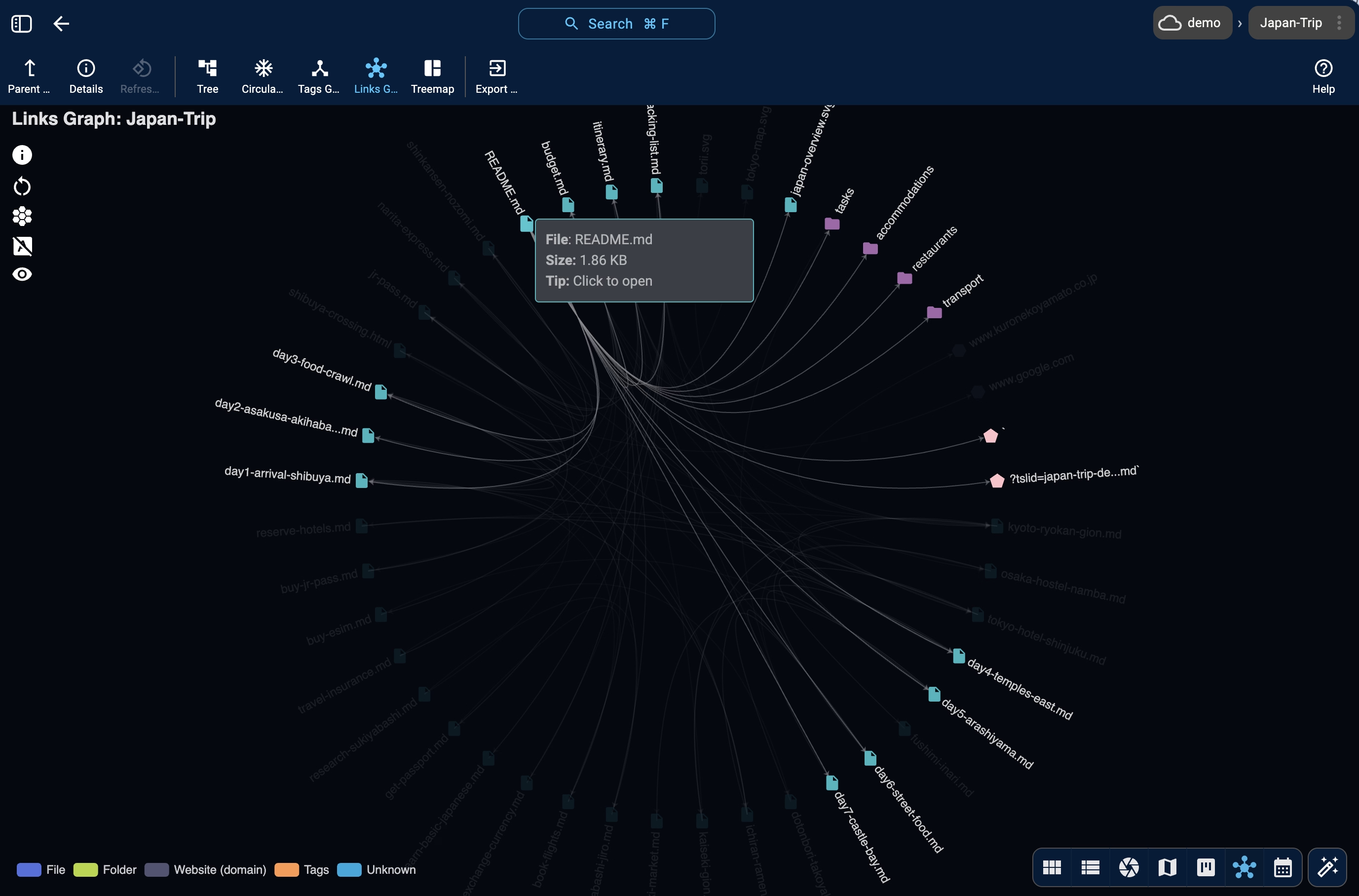
Links Graph in Entry Properties
The FolderViz perspective has had a Link Graph view for a while. In 6.11, we brought a compact version directly into the entry properties panel — so you can see incoming and outgoing links for any individual file without switching views.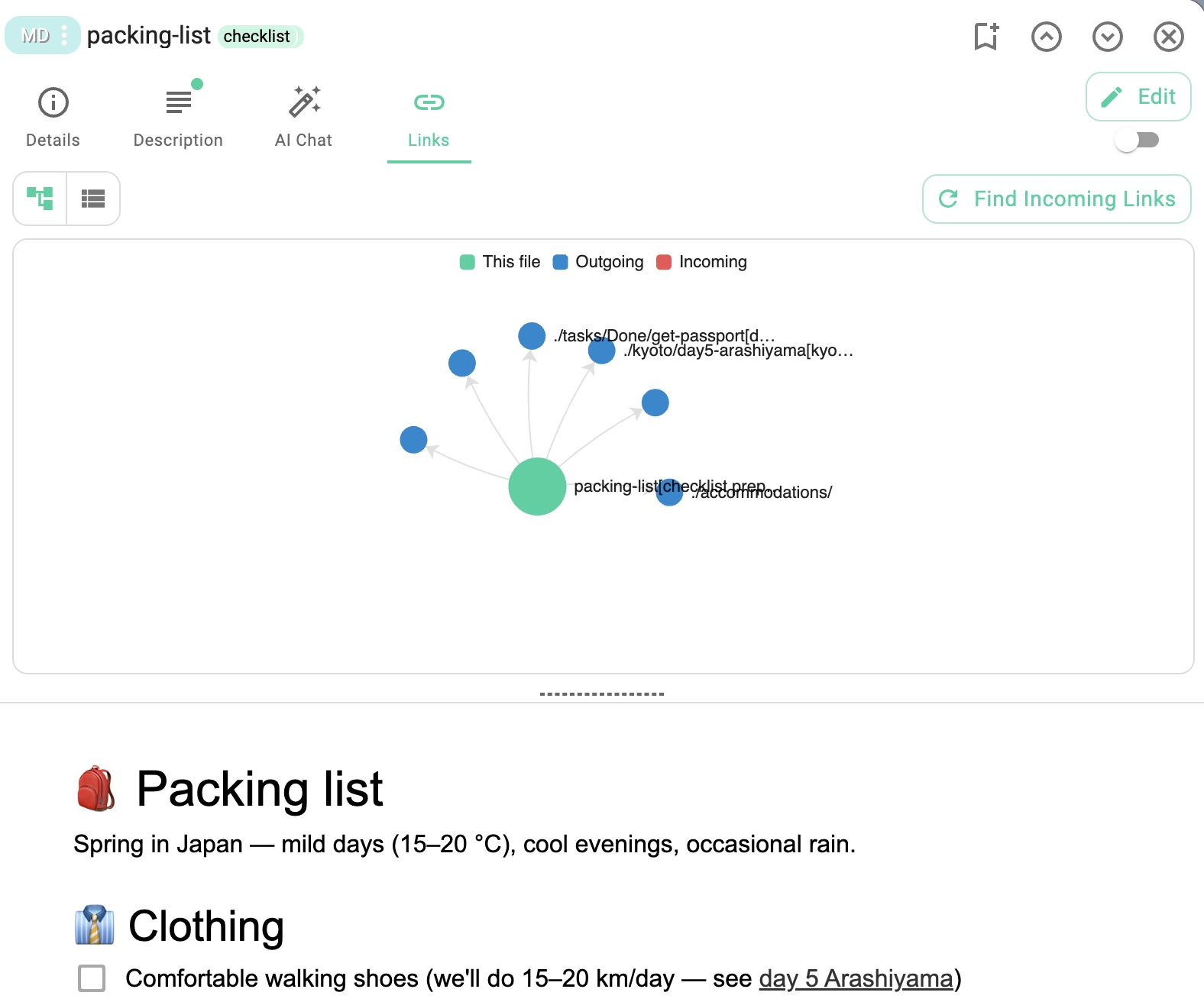
Click on a Markdown note, open the properties panel, and the Links Graph shows every document that links to it and every document it links to. It is especially useful for navigating Zettelkasten-style note collections or tracking references between research documents.
tscmd: Indexing and Search for AI Agents
This is the section for developers and AI workflow enthusiasts.
One of the biggest under-the-hood changes in 6.11 is that the search and indexing functionality has been extracted from the desktop app into a standalone package. This package now powers both the desktop app and the tscmd command-line tool.
What this means in practice: AI agents can now build, query, and maintain full-text search indexes on any folder, from the terminal, without running the desktop app.
Here is what the new tscmd search capabilities enable:
Build an index from the command line
tscmd indexer ~/second-brain/
This creates a full-text search index as .ts/tsi.json in the folder. The index is a plain JSON file — portable, inspectable, and readable by any tool that understands the format.
Search from the terminal
tscmd search ~/second-brain/ -q "authentication architecture"
Agents can now run searches and pipe the results into their next step — whether that is summarizing the top hits with an LLM, cross-referencing tags, or extracting citations for a report.
Why this matters for AI-agentic workflows
1. Context scoping. Large language models have a limited context window. Loading an entire folder tree into an LLM prompt is expensive and often impossible. With tscmd's indexed search, an agent can do this instead:
- User asks a question
- Agent runs
tscmd searchto find the 5 most relevant files in a specific folder - Agent loads only those files into its context
- Agent answers the question with focused context
This is the classic retrieval-augmented generation (RAG) pattern, but implemented with plain files and a lightweight CLI — no vector database, no embedding service, no cloud dependency.
2. Folder-level context isolation. Different folders represent different contexts. A project folder, a research folder, a personal journal. By indexing each folder separately, an agent can scope its searches and reasoning to a specific context — the same folder that the user is working in right now.
An AI agent processing a user query can check the current working directory, search only within that context, and avoid pulling irrelevant information from unrelated folders. Each folder effectively becomes its own RAG corpus.
3. Incremental, local, private. Unlike cloud-based RAG systems, everything runs locally. The indexes live as .ts/tsi.json files inside each folder. When files change, the agent re-indexes only the affected folder. There is no central database, no sync service, no API quota, no data leaving your machine.
4. Composable with other tools. Since tscmd is a regular CLI, it composes naturally with shell pipelines:
# Find notes about "migration", then summarize with a local LLM
tscmd search ~/docs/ -q "migration" --limit 3 \
  | xargs -I {} cat {} \
  | ollama run llama3 "Summarize these notes"
Or plug it into Claude Code, LangChain, an MCP tool server, or a simple bash script on a cron. The search package is MIT-licensed and available via npm install -g @tagspaces/shell.
The bigger picture
TagSpaces 6.11 is the first release where the same search engine powers the desktop app, the web app, and the CLI. An AI agent can now maintain the same index that you browse interactively in TagSpaces. When you search for a file in the desktop app, you are using the same engine your agent uses from the terminal.
This is the foundation we have been working toward: a file-based knowledge system where humans and agents share the same underlying infrastructure, each using the interface that suits them best.
Platform Improvements
The 6.11 release also modernizes the desktop app's foundation:
- Migration from sharp to wasm-vips for image processing — smaller footprint, fewer native dependencies, better cross-platform consistency
- Linux ARM64 builds are now available — TagSpaces runs natively on Raspberry Pi 4/5, NVIDIA Jetson, and ARM-based Linux laptops
- Windows ARM64 packaging is now supported — for Snapdragon-based Surface devices and other Windows-on-ARM hardware
- Electron fuses enabled for enhanced runtime security
- New packaging scripts that significantly reduce build times
Performance & UX Polish
A collection of smaller improvements that add up:
- Concurrent thumbnail loading with a configurable pool (up to 6 parallel threads) — visible when opening folders with hundreds of images
- Cancelable thumbnail generation — navigating away from a folder now stops pending thumbnail work instead of letting it finish in the background
- Improved back/forward navigation for files opened in the app
- Better tag collection — date parts of complex tags bound with a dash (
-) are now skipped correctly when building tag lists - New switch to disable Pro teasers in the Lite version — for users who want the free edition without upgrade reminders
Fixes
- Fixed tag groups incorrectly associated with workspaces
- Fixed bugs with index updates on certain file operations
- Fixed opening files from the command line with automatic tagging
- Fixed the navigation-to-parent-folder button (#2434)
- Fixed drag-and-drop of tags onto folders in an edge case
How to Update
The new version is available on the downloads page. Pro users should follow the instructions in the update documentation to update their existing installation without losing data.
To try the new tscmd indexing and search features, install the CLI globally:
npm install -g @tagspaces/shell
Then run tscmd indexer ~/your-folder/ to build an index and tscmd search ~/your-folder/ -q "your query" to search it.
As always, if you run into anything unexpected, please open an issue on GitHub or reach out via the community forum. Your reports directly shape what gets fixed next.